
Using keyboard shortcuts
SPbinder keyboard shortcuts
You can use keyboard shortcuts for various features and commands.
To show the keyboard shortcuts, press
ALT
. The keyboard shortcut letters will be underlined.For example, try pressing
ALT
, and then press on the menu keys - B
(Binder), E
(Edit), V
(View), or H
(Help).
Menu items within the menu will also show shortcut keys underlined. If you press
ALT
+
B
, the Binder menu opens. Once it's open, press P
(Print), and the print window will open.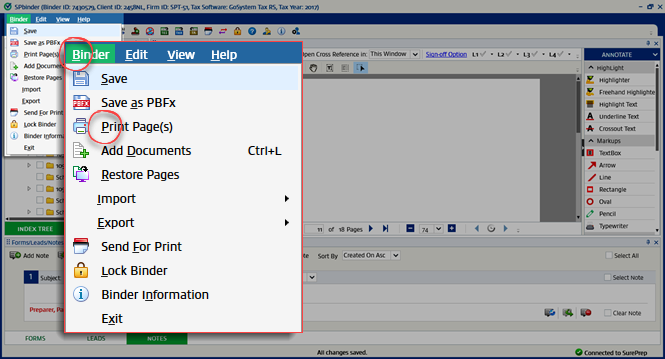
note
Keyboard shortcuts will only work when SPbinder is active and in focus.
You can also use the following shortcuts:
Ctrl
+ L
to Add Documents.Ctrl
+ F
to search for text in the PDF.
