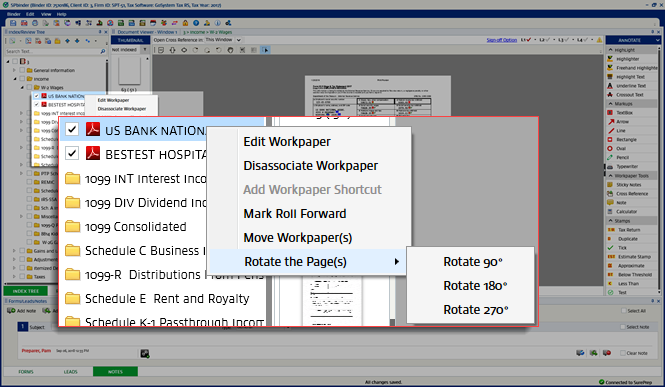
Rotating pages from the Index Tree
You can rotate pages from the Index Tree, Review Tree, or thumbnails.
note
Note
: This feature is not applicable to Excel or Word documents.To rotate one or more pages, select the page or pages you want to rotate, right-click, point to
Rotate the Page(s)
, and select either Rotate 90°
, Rotate 180°
, or Rotate 270°
.note
Tip
: You can rotate pages even if the binder is in read-only mode.From the
Index Tree
, it will look like the following:From the
Review Tree
, it will look like this:
From the
Thumbnail section
, it will look like this:
If any Excel or Word documents were selected and you've set your preferences to prompt you, you'll see the following prompt. Pages other than Excel or Word documents will rotate.

Rotate Multiple Workpapers
To rotate multiple workpapers, select the checkbox for the workpapers you want to rotate. Right-click on any selected workpaper, point to
Rotate Workpaper
, then select the rotate option from the extended shortcut menu.