
Leadsheets variance - 1040 & 1040-SR
Form 1040
Form 1040: Pg 1 Line 1 - Wages, salaries, tips.
Variance: All data appears to be properly entered and exported to the tax software but it doesn’t transfer into the leads section of the tax software.
- For example,W-2Form is properly referenced in SPbinder and exported in the tax software; however, the W-2 amounts don’t transfer properly into the leads section. This causes a variance in Tax Return Reconciliation.
Variance Resolution:
Follow these steps, so that the wages amount transfers into the
leads
section:- Select theW-2Form in theFormstab, for which the numbers don’t transfer to the leads section.
- Re-selectTorSradio button.
- Now Recalculate the Leadsheet or with Leadsheet open, select theSaveicon on the SPbinder toolbar.
note
For
2018 binders
, this line will be located on Line 1 of Form 1040 page 2
. For binders created before 2018, this line will be located on Line 7 of Form 1040 page 1
. Form 1040: Pg 1 Line 4a, 4b, 4c & 4d - IRA, pensions, and annuities
All data appears to be properly entered and exported to the tax software but not flowing to the lead.
Form 1099-R is properly referenced in SPbinder and ported in the tax software; However, the distribution amounts don’t transfer in the leads. This causes a variance in Tax Return Reconciliation.
Follow these steps to transfer the distribution amount in the leads:
- Select the Form 1099-R in theFormstab for which the numbers don’t transfer in the leads.
- Re-selectTorSfrom the ownership code dropdown.
- With theLeadstab open select theSaveicon on the SPbinder toolbar.
Resolution:
To eliminate the variance, enter the Gross distribution amount in the IRA Variance Analysis section in the "IRA" leadsheet.
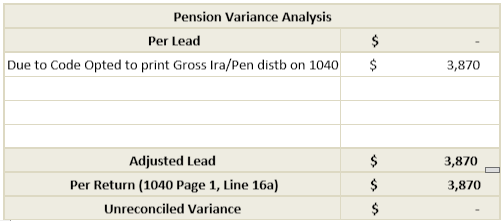
Tax Software specific: GoSystem Tax RS -Variance on line 4b
From 8606 calculations reduce the taxable amount of retirement :
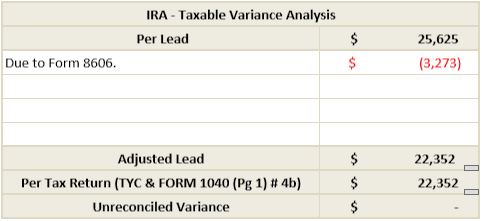
When distributions from an IRA account, current year contributions to the IRA account (with code "I - Use Entries, classify excess IRA non-deductible) and the value of the IRA account as on the last day of the tax year are entered in the tax software, GoSystem Tax RS reduces the taxable number of distributions as per Form 8606 calculation. From 8606 calculations are not captured in the work papers. This will cause a variance in the Tax Return Reconciliation.
Resolution:
To eliminate the variance, explain to it and enter the variance amount in the IRA Variance Analysis section in the "IRA" leadsheet.
note
For
2018 binders
, this line will be located on Line 4a, 4b of Form 1040 page 2
For binders created before 2018, this line will be located on Line 15a, 15b, 16a and 16b of Form 1040 page 1
.Form 1040: Pg 1 Line 6 - Capital gain or (loss)
Installment Sales
Current Year Installment Sale
References for
Installment Sales
are captured only for porting and are not used in leadsheet calculation. Hence current year Installment Sales will cause a variance in the Tax Return Reconciliation.note
If any property is sold in installment in the current tax year, then the gain resulting from this transaction will be used in explaining the variance. The gain amount can be taken from
Form 6252 - Installment Sale
Income then Page 1 - Installment Sale Income
. Resolution:
To eliminate the variance, explain to it and enter the Installment Sale Income amount in the Schedule D Summary Variance Analysis section in the
Schedule-D Summary - Line 6
leadsheet.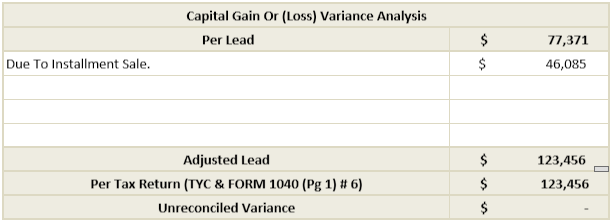
Prior Year Installment Sale
Prior year Installment Sales is not captured in SPbinder. So the principal amount received for the current year will cause a variance in Tax Return Reconciliation.
note
If any property is sold in installment in the prior year, then the gain resulting from this transaction in the current year will be used in explaining the variance. The gain amount can be taken from
Form-6252 - Installment Sale
, Income
, then Page 2 - Installment Sale Income
. Resolution:
To eliminate the variance, explain to it and enter the Installment Sale Income amount in the Schedule D Summary Variance Analysis section in
Schedule-D Summary - Line 6
leadsheet. Disallowed personal loss (Code 4)
If a capital transaction is coded for
Personal Loss
, even then leadsheets include the loss in calculations for line 6. This is so because the code 4 - Personal Loss
is captured only for porting and is not used in the leadsheet calculation. Hence the personal loss is not excluded from line 4 as in tax software. This will cause a variance in the Tax Return Reconciliation. Resolution:
To eliminate the variance, explain to it and enter the disallowed personal loss amount in the Schedule D Summary Variance Analysis section in the
Schedule-D Summary - Line 6
leadsheet.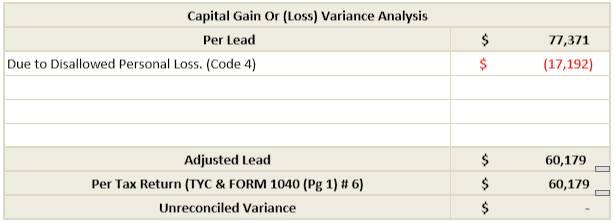
note
For
2018 binders
, this line will be located on Line 13 of Schedule 1
. For binders created before 2018, this line will be located on Line 13 of Form 1040 page 1
Schedule 1
Sch 1 Line 1
- Taxable refunds, credits, or offsets of state and local income taxes No override Tax Deduction Sheet
If the
No Override
Tax Deduction Sheet is used, the 1099-G refund amount is not overridden in the tax software using the Worksheet. The adjustments are not made in SPbinder Leadsheets on account of the following amounts:- Alternative Minimum Tax in Prior
- No benefit received due to itemized deductions
A variance will arise on
line 1
of Schedule 1
for the following reasons: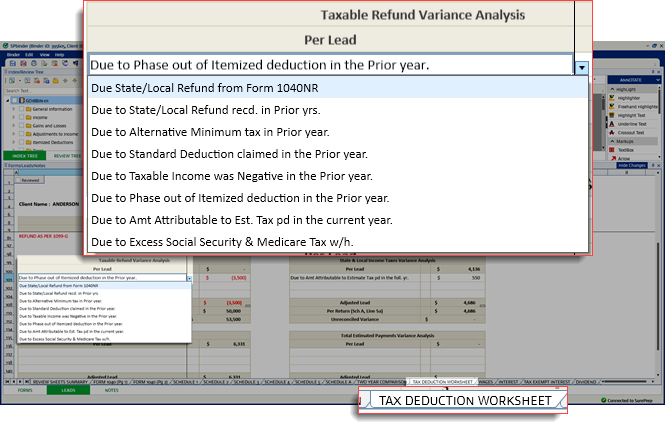
note
For
2018 binders
, this line will be located on Line 10 of Schedule 1
. For binders created before 2018, this line will be located on Line 10 of Form 1040 page 1
. Variance: Alternative minimum tax in the prior year
Leadsheet doesn’t use the prior year AMT amount to calculate the taxable amount of the refund. This will cause a variance in the Tax Return Reconciliation.
Resolution:
To eliminate the variance, explain to it and enter the prior year AMT amount in the Taxable Refund Analysis section in the
Tax Deduction Sheet
sheet.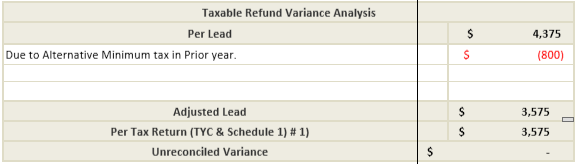
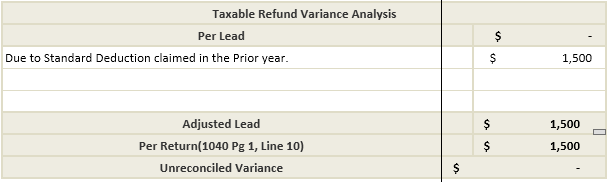
Variance: Standard Deduction Claimed in the prior year
Leadsheet doesn’t use the amount of refund that is not taxable due to Standard Deduction claimed in the previous year to calculate the taxable amount of refund. This will cause a variance in the Tax Return Reconciliation.
Resolution:
To eliminate the variance, explain to it and enter the amount of refund that is not taxable due to Standard Deduction in the
Taxable Refund Variance Analysis
section in Tax Deduction Worksheet
:
Variance: Taxable income was negative in the prior year
Leadsheet doesn’t use the amount of refund that is not taxable due to taxable income being negative in the prior year to calculate the taxable amount of refund. This will cause a variance in the Tax Return Reconciliation.
Resolution:
To eliminate the variance, explain to it and enter the amount of refund that is not taxable due to negative in the prior year in the
Taxable Refund Variance Analysis
section in Tax Deduction Worksheet:
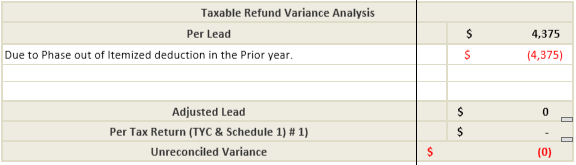
Variance: Phase out of itemized deduction in the prior year
Leadsheet doesn’t use the amount of refund that is not taxable due to the phase out of itemized deduction in the prior year to calculate the taxable amount of refund. This will cause a variance in the Tax Return Reconciliation.
Resolution:
To eliminate the variance, explain to it and enter the amount of refund that is not taxable due to phase out of itemized deduction in the prior year in the
Taxable Refund Variance Analysis
section in Tax Deduction Worksheet
:
Variance: Amount attributable to estimate tax paid in the following year
If an amount is proforma in SPbinder for the field
Amount attributable to estimate tax paid in following year
for state Input Form
under 1099-G: STATE REFUND
, it will proforma in positive. Resolution:
To eliminate the variance, reduce the refund amount with amount attributable to estimate Tax paid in the following year, place a reference for the field and enter the amount in negative.
Override Tax Deduction Sheet
If the
Override
Tax Deduction Sheet is used, the 1099-G refund amount is overridden in the tax software using the Worksheet. The adjustments are made in SPbinder leadsheets on account of the following amounts:- Alternative Minimum Tax in Prior Year
- No benefit received due to itemized deductions
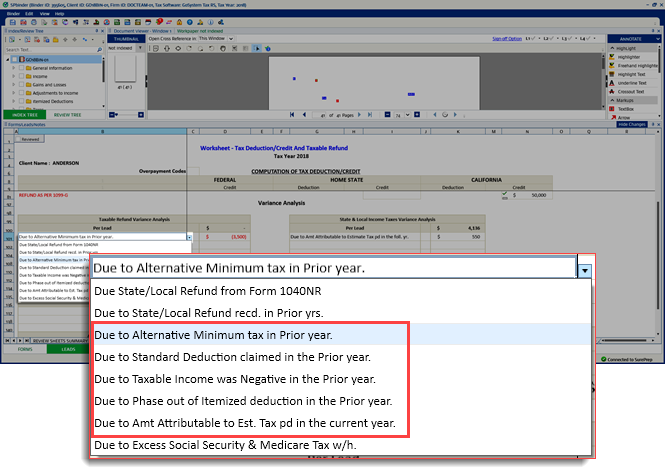
If variance arises on
line 1
of Schedule 1
on account of any of the following reasons, then an adjustment for the amounts can be made in SPbinder. Variance: Alternative minimum tax in the prior year
Prior year AMT causes a variance in Tax Return Reconciliation.
Resolution:
This amount can be adjusted in the leads by referencing it to AMT in 2018 (Insert Prior Year) for State
Input Form
under 1099 G: STATE REFUND
. This reduces the state tax refund by the amount entered for AMT in Prior Year. Variance: Standard Deduction Claimed in the prior year
Variance caused by standard deduction claimed in the previous year.
Resolution:
This amount can be adjusted in the leads by referencing it to
No benefit due to Itemized Deductions
for State Input Form
under 1099-G: STATE REFUND
. This reduces the state tax refund by the amount of no benefit received due to itemized deductions. Variance: Taxable income was negative in the prior year
Variance caused by negative taxable income in the previous year.
Resolution:
This amount can be adjusted in the leads by referencing it to
No benefit due to Itemized Deductions
for State Input Form
under 1099 G: STATE REFUND
. This reduces the state tax refund by the amount of no benefit received due to itemized deductions. Variance: Phase out of itemized deduction in the prior year
Variance caused by phasing out of itemized deduction in the prior year.
Resolution:
This amount can be adjusted in the leads by referencing it to
No benefit due to Itemized Deductions
for State Input Form
under 1099-G: STATE REFUND
. This reduces the state tax refund by the amount of no benefit received due to itemized deductions. Variance: Amount attributable to estimate tax paid in the following year
Variance caused when an amount is proforma for
Amount attributable to estimate tax paid in following year
for state Input Form
under 1099-G: STATE REFUND
. Resolution:
Delete the proforma in SPbinder to correctly reduce the refund amount with prior year estimates paid in the current year, or prior year balance due paid in the current year.
You can also reduce the refund amounts referenced for the State Input Form under
Tax Deduction Worksheet/State
. Sch 1 Line 3 - Business income or (loss)
Form 8829 under Form 2106
Form 8829 can't be linked to Form 2106 in the SPbinder. This will cause a variance in Tax Return Reconciliation.
Resolution:
To eliminate the variance, explain to it and enter the business use of home expenses amount in the
Schedule C Variance Analysis
section in 'Schedule C' leadsheet.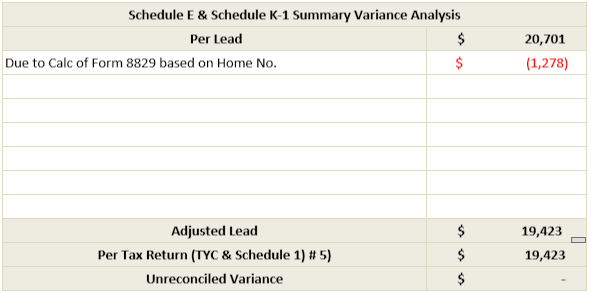
note
For
2018 binders
, this line will be located on Line 12 of Schedule 1
. For binders created before 2018, this line will be located on Line 12 of Form 1040 page 1
. Sch 1 Line 5 - Rental real estate, royalties, partnerships, S corporations, trusts.
Disallowed Investment Interest Expense
- Passive Activity Loss Limitations
Prior year loss carryovers to the current year
Prior year loss carryovers due to Passive Activity Loss Limitations are neither imported from the tax software into SPbinder nor referenced in SPbinder. This will cause a variance in Tax Return Reconciliation.
Resolution:
To eliminate the variance, simply enter the number of prior year losses against its description in the Schedule E Variance Analysis section in
Schedule-E Summary
leadsheet.K-1 entities with a variance will appear highlighted in the
Schedule K-1 Reconciliation
sheet.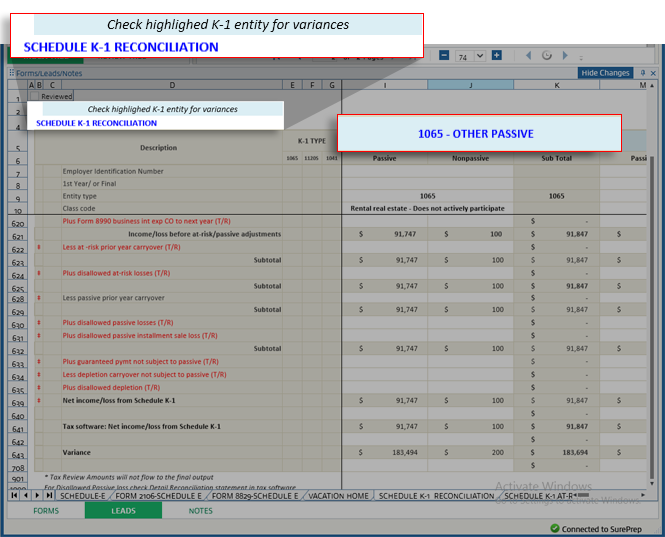
Current year losses carry over to next year
Form 8582 – Passive Activity Loss Limitation is not included in leadsheets. Hence current year losses that are carried over to next year due to Passive Activity Loss Limitations will cause a variance in Tax Return Reconciliation.
Resolution:
To eliminate the variance, explain and enter the amount of losses carried over to next year due to Passive Activity loss limitation in the Schedule E Variance Analysis section in "Schedule-E Summary" leadsheet.
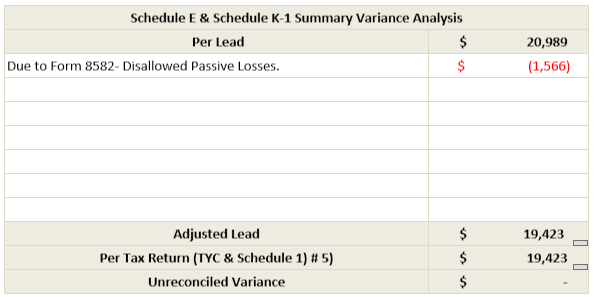
Disallowed Section 179 Expenses for Schedule K-1
The income limitation calculations for Section 179 expenses reported on Form K-1 are not included in leadsheets. This will cause a variance in Tax Return Reconciliation.
Resolution:
To eliminate the variance, explain and enter the disallowed Section 179 expense amount in the Schedule E Variance Analysis section in
Schedule-E Summary
leadsheet.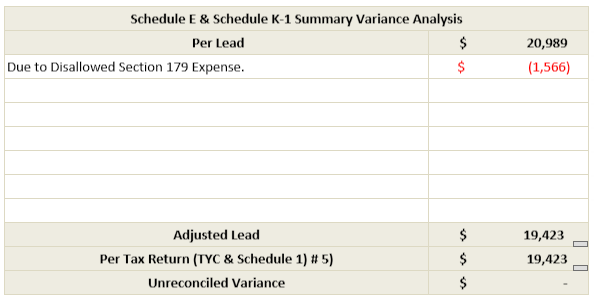
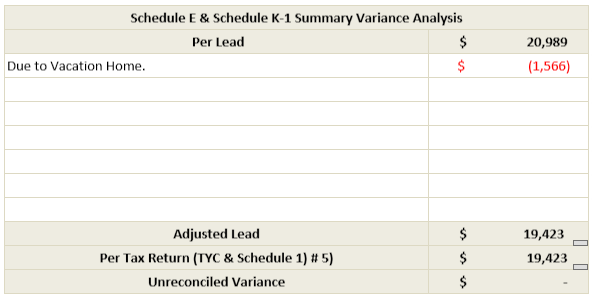
Vacation Home
Amounts relating to the Vacation Home are not captured in SPbinder. This will cause a variance in Tax Return Reconciliation.
Resolution:
To eliminate the variance, explain to it and enter the variance amount in the Schedule E Variance Analysis section in "Schedule-E Summary" leadsheet.
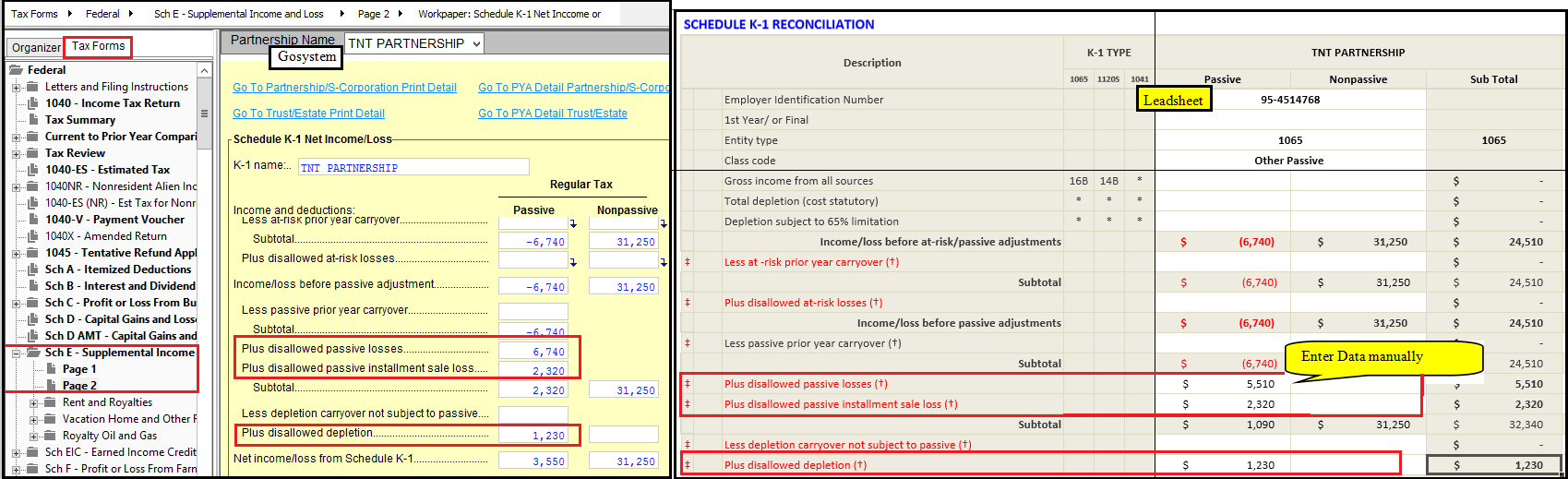
Tax Software specific: GoSystem Tax RS
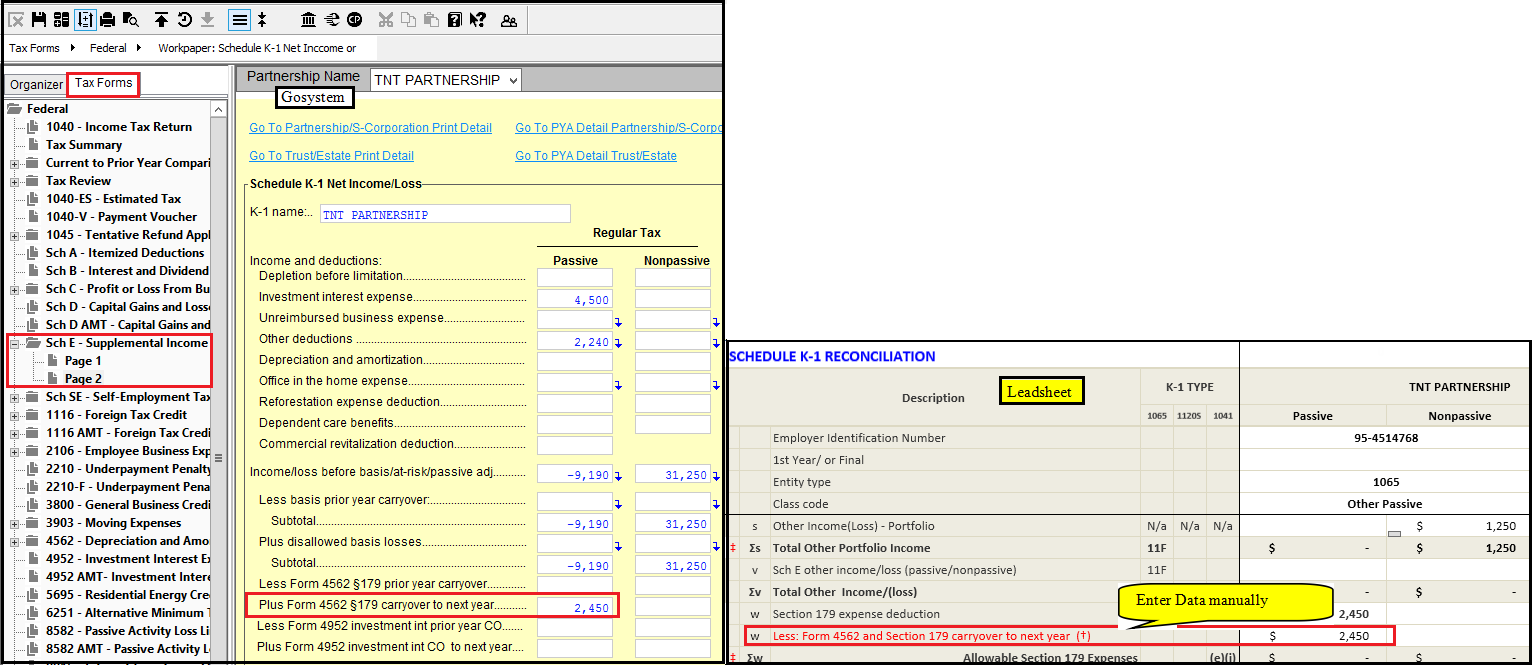
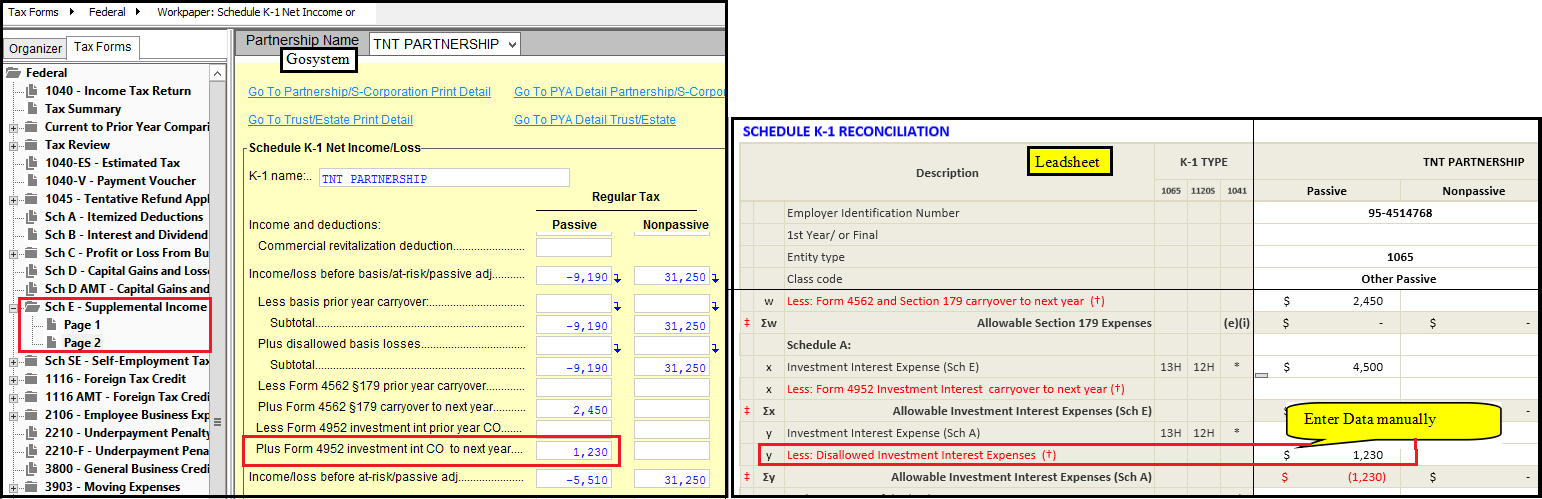
Amounts related to Schedule K-1 fields - Disallowed Section 179 Expenses, Disallowed Investment Interest Expense, Depletion Before Limitation, Disallowed loss Form 8582, Disallowed loss Form 8582 (Installment Sale) and Disallowed Depletion are not populated in the Leadsheets. This causes variance.
Resolution:
To eliminate the variance, drill down the amounts in the GoSystem locator and enter them in their respective fields in the Leadsheets manually.
Disallowed Section 179 Expenses for Schedule K-1
Disallowed Investment Interest Expense.
Disallowed loss Form 8582, Disallowed loss Form 8582 (Installment Sale) and Disallowed depletion.
note
For
2018 binders
, this line will be located on Line 17 of Schedule 1
. For binders created before 2018, this line will be located on Line 17 of Form 1040 page 1
. Sch 1 Line 8
- Other income NOL Carryover
Prior year loss carryovers to current year
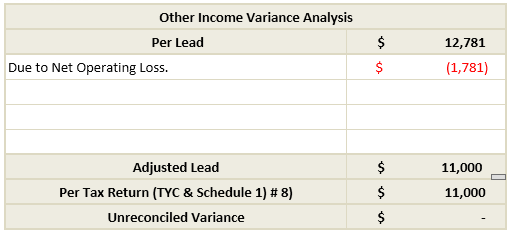
NOL prior year loss carryover are neither imported from the tax software into SPbinder nor referenced in SPbinder. This will cause a variance in Tax Return Reconciliation.
Resolution:
To eliminate the variance, explain and enter the number of prior year losses in the Other Income Variance Analysis section in "Other Income" leadsheet.
note
For GoSystem and CCH Axcess Tax, the NOL carryover amount will import to the leadsheet through
Import TR
. HSA Distribution
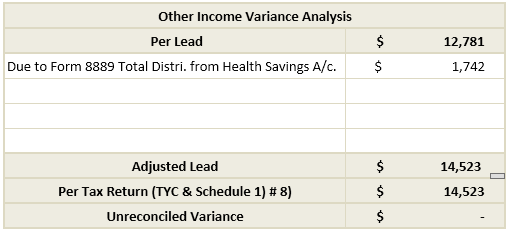
References for "HSA Distribution" are captured only for porting and are not used in leadsheet calculation. This will cause a variance in Tax Return Reconciliation.
Resolution:
To eliminate the variance, explain to it and enter the distribution amount in the Other Income Variance Analysis section in "Other Income" leadsheet.
MSA / LTC Distribution
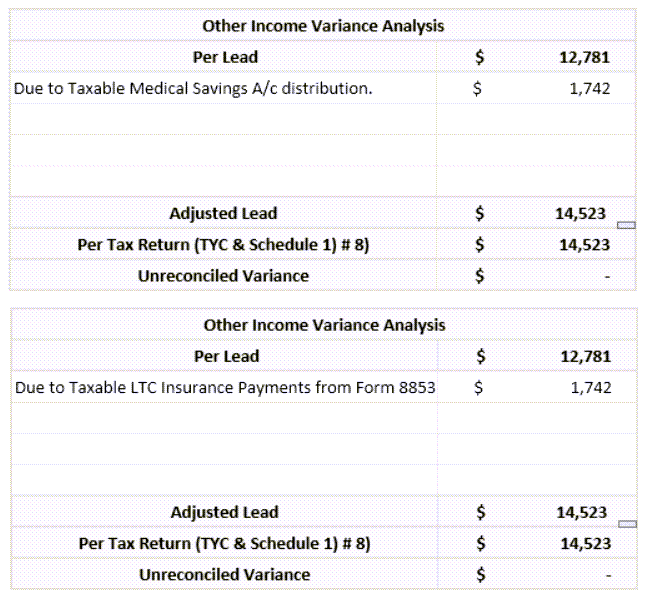
References for MSA and LTC distribution are not captured in SPbinder. This will cause a variance in Tax Return Reconciliation.
Resolution:
To eliminate the variance, explain to it and enter the distribution amount in the Other Income Variance Analysis section in "Other Income" leadsheet.
Coverdell ESA / QTP (Qualified tuition program)
There are no references for Coverdell ESA / QTP distribution in SPbinder. This will cause a variance in Tax Return Reconciliation
Resolution:
To eliminate the variance, explain to it and enter the distribution amount in the Other Income Variance Analysis section in
Other Income
leadsheet.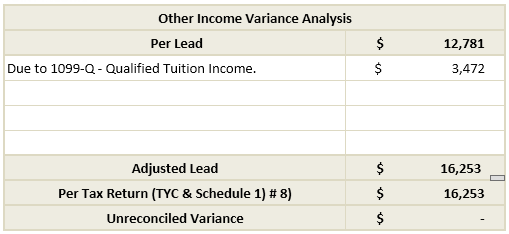
note
For GoSystem and CCH Axcess Tax, Qualified Tuition Income amount will import to the leadsheet through
Import TR
. note
For
2018 binders
, this line will be located on Line 21 of Schedule 1
. For binders created before 2018, this line will be located on Line 21 of Form 1040 page 1
. Sch 1 Line 13
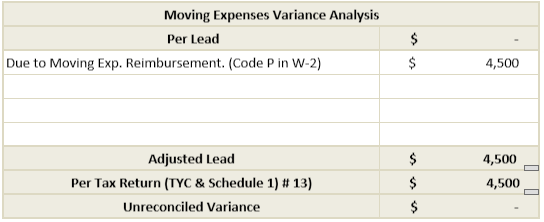
- Moving Expenses for members of the Armed Forces. Tax Software specific: Lacerte - Variance due to
Code P
inBox 12
on Form W-2 - Code P(Excludable moving expense reimbursement) inbox 12on Input Form W-2 is captured only for porting purpose and is not used in leadsheet calculation. This will cause a variance in Tax Return Reconciliation.
- To eliminate the variance, after exporting SPbinder to the tax software:
- Go to Input Form for Moving Expenses in SPbinder.
- Referencebox 12Code P amount to the field "RW: Reimbursements not included in wages on W-2".
- Save and recalculate the leads.
- The reimbursed amount reduces Moving Expenses eliminating the variance.
note
When the Code P amount is referenced on the reimbursement field for Moving Expenses on the Input Form in SPbinder before it is exported to the tax software, then it will be exported to the respective place in the Interview Forms in the tax software (which are override fields).
note
For
2018 binders
, this line will be located on Line 26 of Schedule 1
. For binders created before 2018, this line will be located on Line 26 of Form 1040 page 1
. Sch 1 Line 15
- Self Employed SEP, SIMPLE, and Qualified Plans Pension and IRA Keogh / SEP contribution in K-1
References for
Pension and IRA - Keogh / SEP
contribution" in k-1 are captured only for porting and are not used in leadsheet calculation. This will cause a variance in Tax Return Reconciliation. Resolution:
To eliminate the variance, explain to it and enter the contribution amount in the Self Employed, Simple & SEP Variance Analysis section in
Self Employed Simple SEP
leadsheet.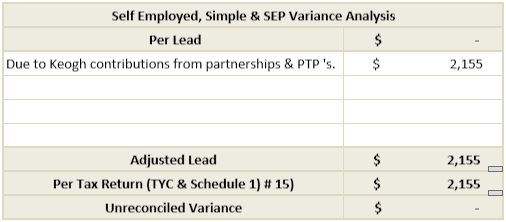
Schedule 2
Sch 2 Line 7a - Household Employment taxes
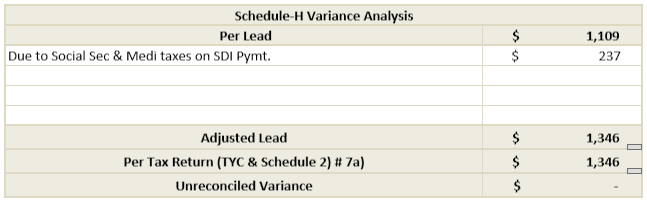
State Disability Plan Payments
State Disability Plan payments are captured only for porting and are not used in leadsheet calculation. This will cause a variance in Tax Return Reconciliation.
Resolution:
To eliminate the variance, explain to it and enter the amount of Social Security and Medicare taxes on State Disability Payments amount in the Schedule H Variance Analysis section in 'Schedule-H' leadsheet.
note
For
2018 binders
, this line will be located on Line 60 of Schedule 4
. For binders created before 2018, this line will be located on Line 60 of Form 1040 page 2
. Schedule 3
Sch 3 Line 1
- Foreign Tax Credit Foreign Tax Credit carryovers prior year Foreign Tax credit carryovers to current year
Prior year Foreign Tax Credit carryovers are not imported from the tax software into SPbinder or referenced in SPbinder. This will cause a variance in Tax Return Reconciliation.
Resolution:
To eliminate the variance, enter the prior year tax credit amount in the Foreign Tax Credit Variance Analysis section in "Form 1116-Foreign Tax Credit" leadsheet.
Current year Foreign Tax credit carryover to next year
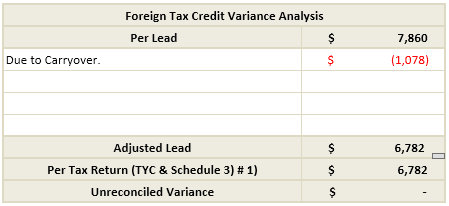
Current year Foreign Tax Credit amount that is carried over to next year due to Foreign Income Limitations will cause a variance in Tax Return Reconciliation.
Resolution:
To eliminate the variance, explain and enter the Foreign Tax Credit amount carried over to next year in the Foreign Tax Credit Variance Analysis section in "Form 1116-Foreign Tax Credit" leadsheet.
note
For GoSystem and CCH Axcess Tax Foreign tax amount will import to leadsheet through
Import TR
. note
For
2018 binders
, this line will be located on Line 48 of Schedule 3
. For binders created before 2018, this line will be located on Line 48 of Form 1040 page 2
. Sch 3 Line 3 - Education Credits
Optimize code between Hope Credit/ Life Time Learning Credit and deduction
Education codes for Optimization are captured only for porting and are not used in leadsheet calculation. This will cause a variance in Tax Return Reconciliation.
The amount imported from tax software for
Education Credit
on Schedule 3
, line 3
in the Per Tax Return
column in the leadsheet. This will cause a variance in SurePrep Tax Return Reconciliation.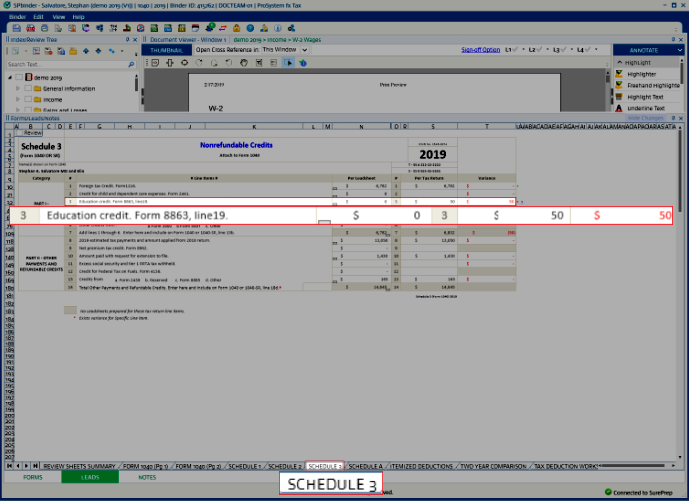
Resolution:
To eliminate the variance, explain to it and enter the amount of credit in the
Education Credit Variance Analysis
section in Form 8863-Education Credit
leadsheet.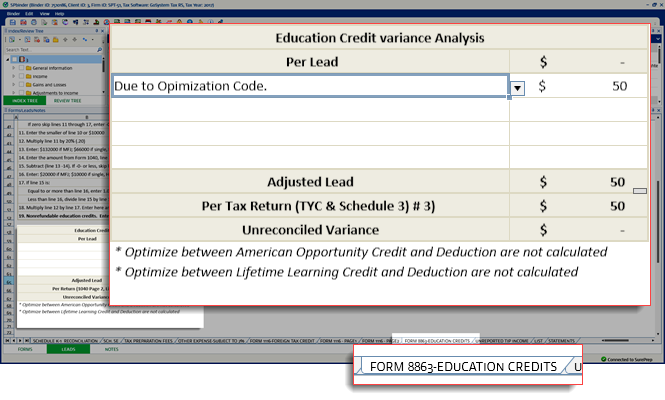
Keeping the leads open, save and recalculate the leads to generate
Education Credit
leadsheet. Select a Form 8863-Education Credit
sheet.note
For
2018 binders
, this line will be located on Line 50 of Schedule 3
. For binders created before 2018, this line will be located on Line 50 of Form 1040 page 2
. 
