Leadsheets variance - 1041
Line 5 Rents, royalties, partnerships, other estates, and trusts.
Line 6 Farm Income or (Loss)
Line 10 Investment Interest Expenses
Line 15a Other Deduction Not Subject to 2 Floor
Line 15b Allowable Miscellaneous Deduction Subject to 2 Floor
Line 19 Estate Tax Deduction
Schedule G Line 2a Foreign Tax Credit
1041 Page 1
Line 3 Business Income or (Loss)
Passive Activity Loss Limitation
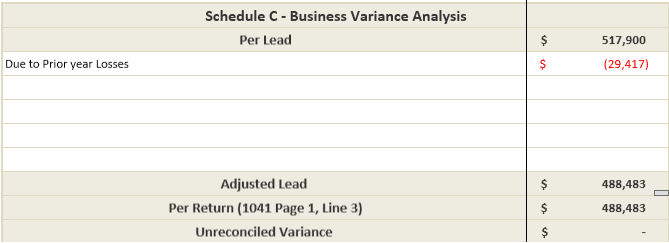
- Prior year loss carryovers to current year
- Prior year loss carryover is imported from the tax software into SPbinder & also referenced in SPbinder. However, it is not used in Leadsheet. So this will cause a variance in Tax Return Reconciliation.
- To eliminate the variance, simply enter the number of prior year losses against its description in the Schedule C Variance Analysis section in 'Schedule-C' leadsheet.
- Current year losses carryover to next year
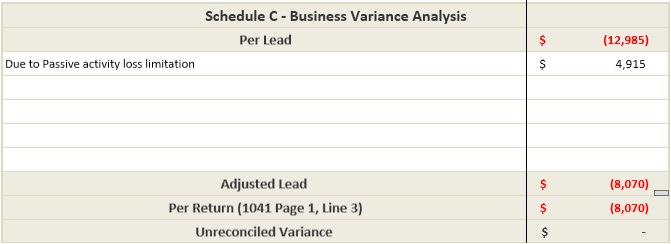
- Form 8582: Passive Activity Loss Limitation is not included in leadsheets. Hence current year losses that are carried over to next year due to Passive Activity Loss Limitations will cause a variance in Tax Return Reconciliation.
- To eliminate the variance, explain and enter the number of losses carried over to next year due to Passive Activity loss limitation in the Schedule C Variance Analysis section in 'Schedule-C' leadsheet.
Line 5 Rents, royalties, partnerships, other estates, and trusts.
- Passive Activity Loss Limitation:
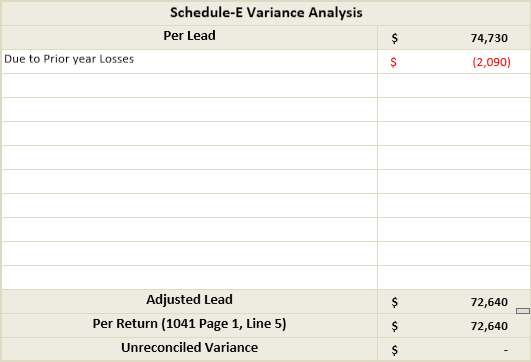
- Prior year loss carryovers to current year
- Prior year loss carryover is imported from the tax software into SPbinder & also referenced in SPbinder. However, it is not used in Leadsheet. So this will cause a variance in Tax Return Reconciliation.
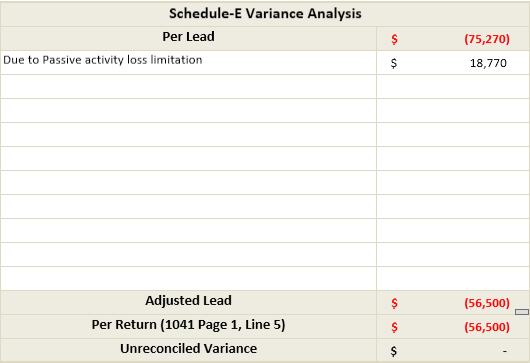
- To eliminate the variance, simply enter the number of prior year losses against its description in the Schedule E Variance Analysis section in theSchedule-E Summaryleadsheet.
- Current year losses carryover to next year
- Form 8582 – Passive Activity Loss Limitation is not included in leadsheets. Hence current year losses that are carried over to next year due to Passive Activity Loss Limitations will cause a variance in Tax Return Reconciliation.
- To eliminate the variance, explain and enter the number of losses carried over to next year due to Passive Activity loss limitation in the Schedule E Variance Analysis section in theSchedule-E Summaryleadsheet.
- Cost Depletion for Schedule K-1
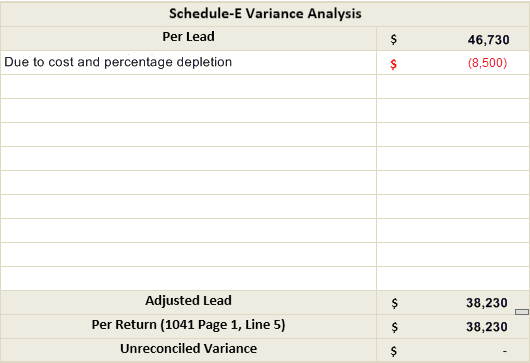
- Cost depletion and percentage depletion fields reported on K-1 are captured only for porting in Input Form K-1 in SPbinder and is not used in Leadsheet calculation. This will cause a variance in Tax Return Reconciliation.
- To eliminate the variance, explain to it and enter the Cost and/or Percentage Depletion amount in the Schedule E Variance Analysis section in theSchedule-E Summaryleadsheet.
Line 6 Farm Income or (Loss)
- Passive Activity Loss Limitation
- Prior year loss carryovers to current year
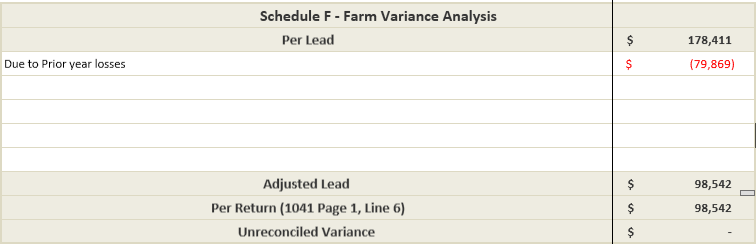
- Prior year loss carryover is imported from the tax software into SPbinder & also referenced in SPbinder. However, it is not used in Leadsheet. So this will cause a variance in Tax Return Reconciliation.
- To eliminate the variance, simply enter the number of prior year losses against its description in the Schedule F Variance Analysis section in 'Schedule-F' leadsheet.
- Current year losses carryover to next year
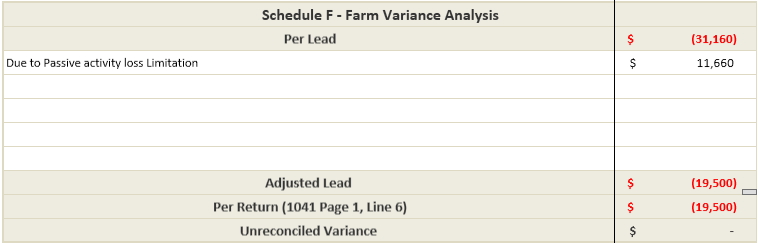
- Form 8582 – Passive Activity Loss Limitation is not included in leadsheets. Hence current year losses that are carried over to next year due to Passive Activity Loss Limitations will cause a variance in Tax Return Reconciliation.
- To eliminate the variance, explain and enter the number of losses carried over to next year due to Passive Activity loss limitation in the Schedule F Variance Analysis section in 'Schedule-F' leadsheet.
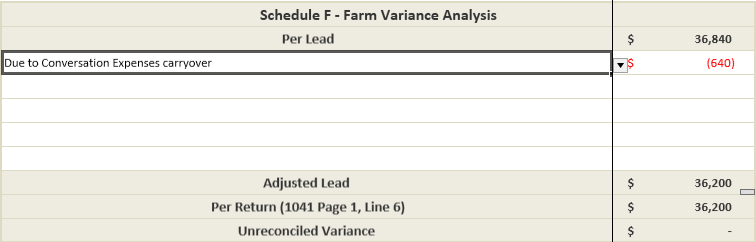
- Conservation Expenses carryover
- Conservation expenses of current year and prior year carryover expenses are restricted to 25% of gross farm income to claim the expenses in current year, balance expenses are carried forward to next year; hence variance may be incurred due to 'conservation expenses carried over from prior year"' and "conservation expenses carried over to next year".
- To eliminate the variance, explain to it and enter the number of expense carryovers in the Schedule F Variance Analysis section in 'Schedule F' leadsheet.
Line 10 Investment Interest Expenses
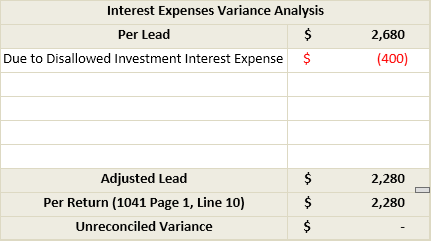
- Investment Interest Expense Disallowed in current year
- If Investment interest expense exceeds net investment income, the excess will be carried over to the next year. This Form 4952 calculation is not captured in leadsheets. And hence it will cause a variance in Tax Return Reconciliation.
- To eliminate the variance, explain to it and enter the Disallowed investment interest expense in Investment Interest Expenses Variance Analysis section in 'Interest Expense - Summary' leadsheet.
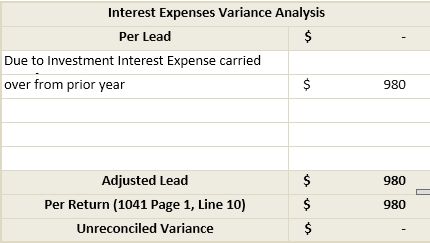
- Investment Interest Expense carried over from the prior year
- If Investment interest expense was carryover from the prior year, the amount to the extent of current year Investment Income will be allowed as deduction in the current year. This Form 4952 calculation is not captured in the leadsheet. And hence it will cause a variance in Tax Return Reconciliation.
- To eliminate the variance, explain to it and enter the disallowed investment interest expense in Investment Interest Expenses Variance Analysis section in 'Interest Expense - Summary' leadsheet.
Line 15a Other Deduction Not Subject to 2% Floor
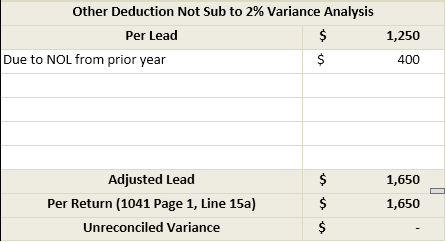
- Net Operation Losses (NOL) from prior year
- If there is any Net Operating Loss (NOL) from prior year, then the amount of NOL will added in Other Deduction Not Subject to 2%. And hence it will cause a variance in Tax Return Reconciliation.
- To eliminate the variance, explain NOL in the Variance Analysis section in 'Other Ded Not Sub To 2%' leadsheet.
Line 15b Allowable Miscellaneous Deduction Subject to 2% Floor
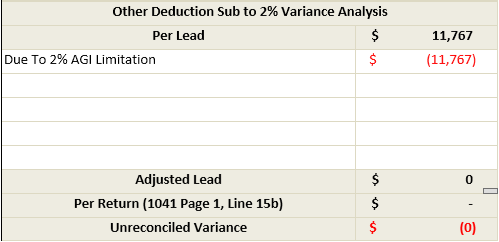
- AGI Limitation
- If the amount of Other Deduction Subject to 2% is more than the 2% of AGI, it will cause a variance in Tax Return Reconciliation.
- To eliminate the variance, explain to it and enter the same in the Variance Analysis section in 'Other Ded. Sub To 2%' leadsheet:
Line 19 Estate Tax Deduction
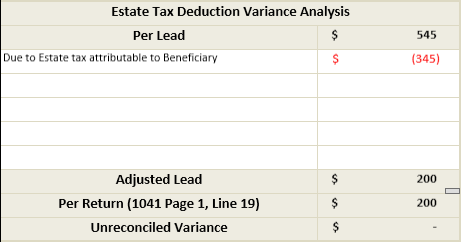
- Estate tax attributable to Beneficiary (Sch.-K1 Line 10):
- Trust deed or will may require to attribute the estate tax to the beneficiary/ beneficiaries, in that case the whole or part of estate tax (as the case may be) will be allocated to the beneficiary/ beneficiaries at line 10 of schedule K1 of 1041, and deduction will be availed by the beneficiary/ beneficiaries while preparing his/their individual return of 1040. Hence to avoid double deduction the amount shown on K1 won’t be deducted on line 19 of Form 1041. This will cause a variance in Tax Return Reconciliation.
- To eliminate the variance, explain to it and enter the variance amount in the Estate tax deduction Variance Analysis section in 'Estate tax deduction' leadsheet.
1041 Page 2
Schedule G Line 2a Foreign Tax Credit
- Foreign Tax Credit carryovers
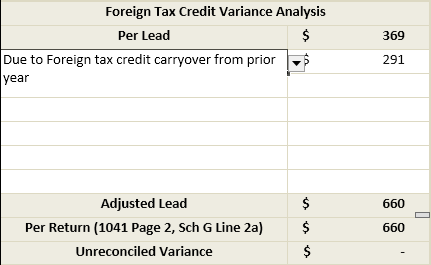
- Prior year Foreign Tax credit carryovers to current year
- Prior year Foreign Tax credit carryovers are not imported from the tax software into SPbinder or referenced in SPbinder. This will cause a variance in Tax Return Reconciliation.
- To eliminate the variance, enter the prior year tax credit amount in the Foreign Tax Credit Variance Analysis section in 'Form 1116-Foreign Tax Credit' leadsheet.
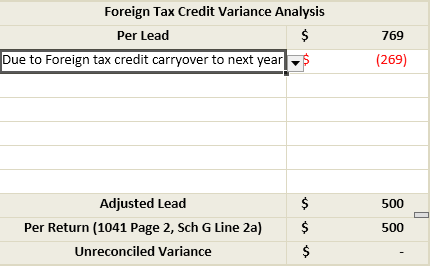
- Current year Foreign Tax credit carryover to next year
- Current year Foreign Tax Credit amount that is carried over to next year due to Foreign Income Limitations will cause a variance in Tax Return Reconciliation.
- To eliminate the variance, explain and enter the Foreign Tax Credit amount carried over to next year in the Foreign Tax Credit Variance Analysis section in 'Form 1116-Foreign Tax Credit' leadsheet.
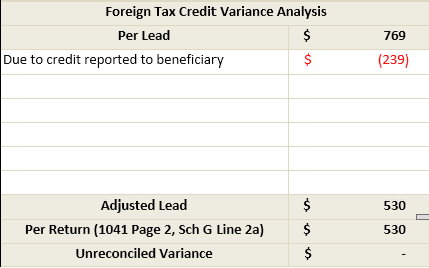
- Credit Reported to Beneficiary
- Trust deed or will may require to allocate the foreign tax to the beneficiary/ beneficiaries, in that case the whole or part of foreign tax (as the case may be) will be allocated to the beneficiary/ beneficiaries on line 14b of schedule 1041 K1, and deduction/credit will be availed by the beneficiary/ beneficiaries while preparing his/their individual return of 1040. Hence to avoid double deduction/crediting the amount shown on K1 won’t be transfer on Form 1041 Page 2, Line 2a. This will cause a variance in Tax Return Reconciliation.
- To eliminate the variance, explain to it in the Foreign Tax Credit Variance Analysis section in 'Form 1116-Foreign Tax Credit' leadsheet.