Leadsheets variance - Schedule A
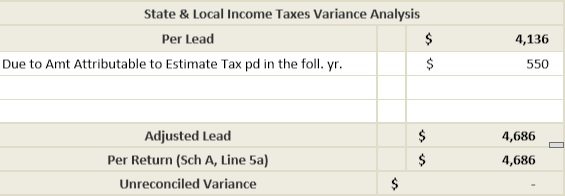
Line 5a State and local (Income Taxes or General Sales taxes)
Amount attributable to estimate tax paid in the following year for No Override tax Deduction Sheet
- The reference for the amount attributable to estimate tax paid in the following year for Input Form 1099 G: State Tax Refund won’t reduce state tax calculation for Schedule A, line 5a. This will cause a variance in the Tax Return Reconciliation.
- To eliminate the variance, explain to it and enter the state tax withheld amount in theState & Local Income Taxes Variance Analysissection in theTax Deduction Worksheetleadsheet.
 noteLine 5aonSchedule Awill be located onLine 5for binders created before 2018.
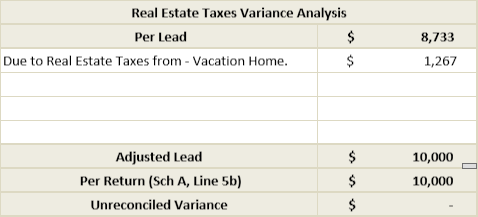
Line 5b State and local real estate taxes
Vacation Home
- Amounts relating to the Vacation Home are not captured in SPbinder. This will cause a variance in Tax Return Reconciliation.
- To eliminate the variance, explain to it and enter the variance amount in the Real Estate Taxes Variance Analysis section in theReal Estate Taxesleadsheet.
note
Line 5b
on Schedule A
will be located on Line 6
for binders created before 2018. Line 8a Home mortgage interest and points are reported to you on Form 1098
Vacation Home
- Amounts relating to the Vacation Home are not captured in SPbinder. This will cause a variance in Tax Return Reconciliation.
- To eliminate the variance, explain it and enter the Mortgage interest expense amount in the Mortgage Interest (Form 1098) Variance Analysis section in theMortgage INT-1098 Receivedleadsheet
The
Calculation of Mortgage
interest credit in Form 8396 isn't captured in workpaper. - Form 8396 calculation for Mortgage interest credit is not captured in SPbinder. This will cause a variance in Tax Return Reconciliation.
- To eliminate the variance, explain it and enter the variance amount in the Mortgage Interest (Form 1098) Variance Analysis section in 'Mortgage INT-1098 Received' leadsheet.
note
Line 8a
on Schedule A
will be located on Line 10
for binders created before 2018. Line 9 Investment Interest Expenses
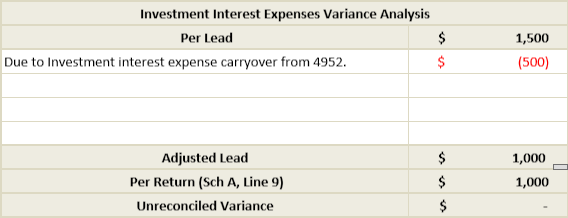
Investment Interest Expense carried over to next year
- If Investment interest expense exceeds net investment income, the excess will be carried over to the next year. This Form 4952 calculation is not captured in leadsheets. And hence it will cause a variance in Tax Return Reconciliation.
- To eliminate the variance, explain it and enter the disallowed investment interest expense in the Investment Interest Expenses Variance Analysis section in 'Investment Interest Expense' leadsheet.
note
Line 9
on Schedule A
will be located on Line 14
for binders created before 2018.Line 16 Other Itemized Deductions
Leased vehicle information
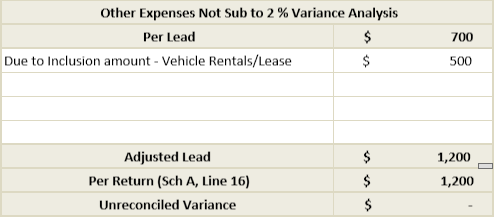
- References for Fair market value of leased vehicle and Vehicle leases on Input Form 2106 related to Schedule A are captured only for porting purpose and are not used in leadsheet calculation. This will cause a variance in Tax Return Reconciliation.
- To eliminate the variance, explain it and enter the amount of variance in the Job Expenses & Union dues Variance Analysis section in theJob Expenses & Union Duesleadsheet.
Tax Software Specific: Lacerte
Expenses for second vehicle onward
- References for Second vehicle onward in Employee Business Expenses are captured only for porting and are not used in leadsheet calculation. This will cause a variance in Tax Return Reconciliation
- To eliminate the variance, explain it and enter the amount in the Job Expenses & Union dues Variance Analysis section in theJob Expenses & Union Duesleadsheet.noteUnreimbursed Employee Expenseswill transfer online 21for the binders created before 2018.These variances will appear only for the binders created before 2018
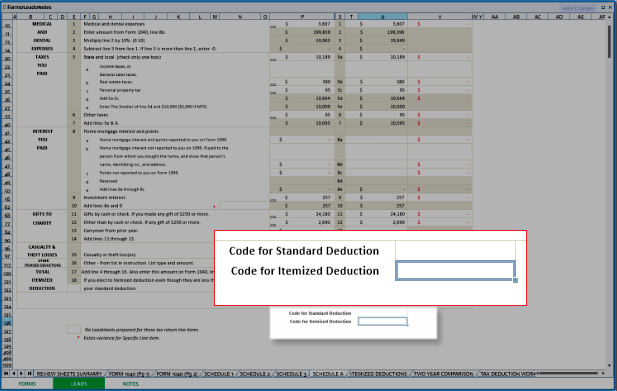
Code for Itemized Deduction
Go to
FORM 1040 (Pg 1)
, on Line 9 Standard Deduction or Itemized Deductions (Schedule A)
will show SD
to the left of the Per Leadsheet
column.By default,
Schedule A
will be automatically marked as SD
for Standard Deduction.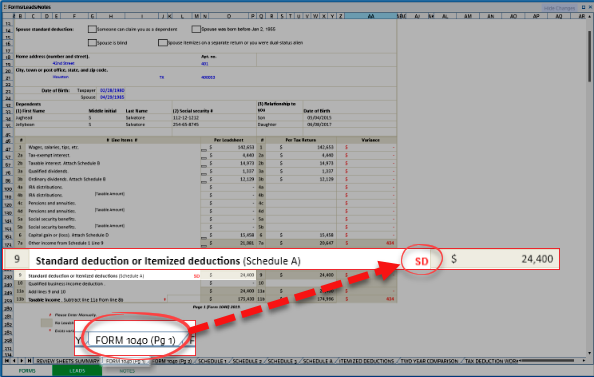
To change
Standard Deduction
to Itemized Deductions
, select the Schedule A
sheet tab, then enter x
in the Code for Itemized Deduction
field.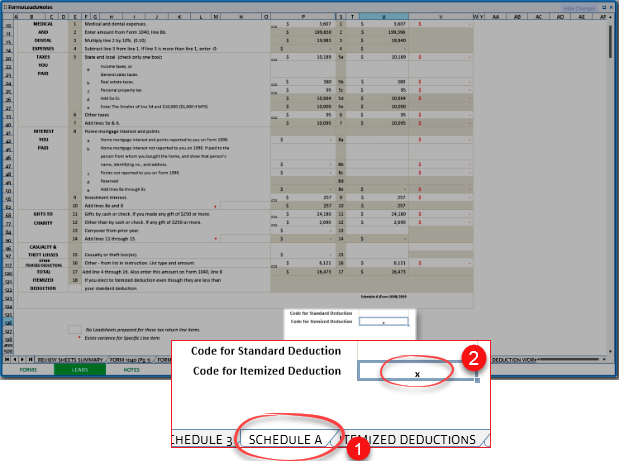
Go to
FORM 1040 (Pg 1)
, on Line 9 Standard Deduction or Itemized Deductions (Schedule A)
will now show ID
for Itemized deduction and the amount for Per Leadsheet
will also be updated.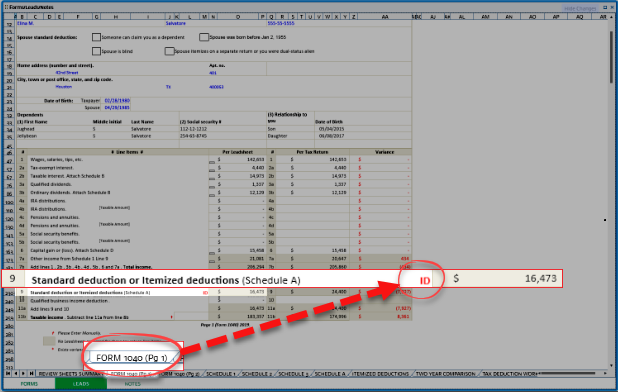
To revert changes back to
Standard Deduction
, change Code for Itemized Deduction
to an empty field.