
Live Sync Compare TR & Auto-populate Leadsheet
If Live Sync is active, you can also use the new
Compare Tax Return
(that is, Compare TR
) feature to check if the leadsheets are up to date or if an import is required from the tax software. Live Sync will also automatically check for tax return updates (in the tax software) when you reopen a binder and Live Sync status is Live Sync Active .Additionally, to help you keep leadsheets up to date, Live Sync streamlines the import process by automatically fetching information from the tax software.
Get a detailed overview of Live Sync.
Leadsheet comparison
Tax software amounts populate into the leadsheets, but how will you know if the leadsheets amounts are up to date? Leadsheet comparison checks for new up-to-date values in the tax software and then lets you know if the values in the leadsheets are up to date.
Automatic comparison
When you open a binder, if the Live Sync status is Ready/Active, Live Sync will automatically begin comparing leadsheet amounts with the tax software. If Live Sync detects discrepancies between the amounts, it will automatically remind you to import the tax return (that is, Import TR).
Compare TR button
In addition to automatic leadsheet/tax software comparison, Live Sync also introduces a new  (that is, Compare Tax Return) button in SPbinder. You can use
Compare TR
(that is, Compare Tax Return) button in SPbinder. You can use Compare TR
to manually trigger a comparison between leadsheets and the tax software. This is useful if you are unsure whether the leadsheet amounts match the tax software or if Import TR is needed to import updated information.The
Compare TR
button appears next to the Export to Tax button in SPbinder’s Quick Access toolbar.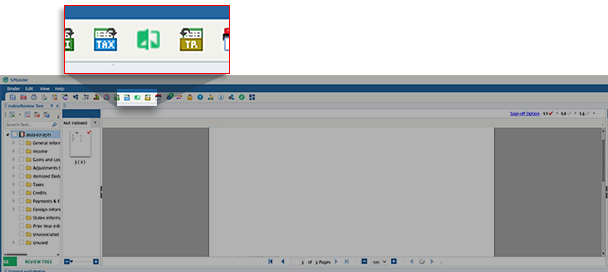
Compare Tax Return
button is enabled after you successfully complete the initial export (Applicable for first as well as subsequent document submissions).note
This button is disabled if
Export To Tax
isn't completed, in error, or in queue. Compare TR result | Description |
|---|---|
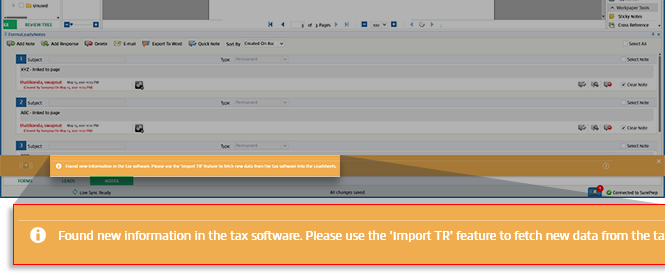
Difference found | If a difference is identified between the tax software and the Leadsheets Per Tax Return column values, a Compare TR window will appear:Found new information in the tax software. Please use the 'Import TR' feature to fetch new data from the tax software into the Leadsheets.  |
No difference found | The following message will appear: Tax software data is in sync with leadsheets. No action is required.  |
Unable to fetch and compare the difference | Unable to fetch and compare the information due to any reason (for example, Locator is busy, service not available, etc.) The following message will appear: New information may be available in the tax software. Please use the Import TR feature to fetch new information from the tax software. |
Auto-populate Leadsheet
When the Live Sync status updates to
Live Sync Active
, new information from the tax software will auto-populate into the leadsheets Per Tax Return
column when:- You open theLEADStab for the first time after opening the binder.
- You update input forms/fields in SPbinder (for example, Add/Edit/Delete) and then use Recalculate or Force Calculate in theLEADStab.

Leadsheet type | Information Auto-populated |
|---|---|
Classic Leadsheet |
|
Simplified Leadsheet |
|
Only the variances data (1040 Page 1, 1040 Page 2, Schedule 1, Schedule 2, Schedule 3, Schedule A) is populated in the Leadsheets when you select on Leadsheets for the first time/Recalculate/Force. Calculate. Users must perform traditional Import TR to get all of their data into the individual Leadsheets.
Related Content
-
Live Sync Overview
Format: Article,
9 min read
Article,
9 min read

