
Download DreamWorkpapers (leadsheet binders only)
You can download DreamWorkpapers once you have printed/generated DreamWorkpapers.
Follow these steps to download DreamWorkpapers:
- Find the binder with the DreamWorkpapers you want to download.
- In theOPTIONScolumn, select thePicklisticon
 for the binder.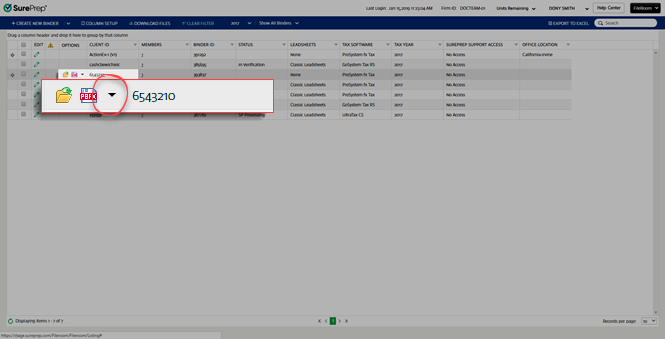
- SelectDownload DreamWorkpapersfrom the dropdown menu.noteTo download DreamWorkpapers, you first need to generate DreamWorkpapers. SelectPrint DreamWorkpapersfrom theOPTIONSmenu. You can also generate DreamWorkpapers from SPbinder. .
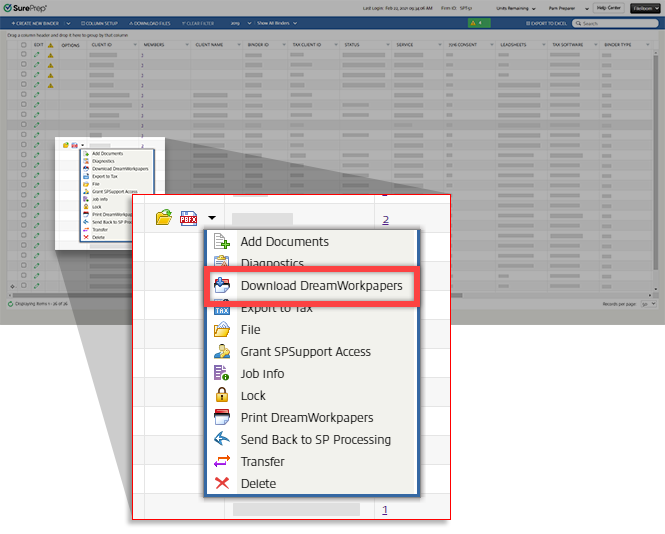
- When you selectDownload DreamWorkpapers, your browser will begin downloading the DreamWorkpapers PDF file. Some browsers may ask for your permission to download the DreamWorkpapers.When printing DreamWorkpapers, if you select both
 Bookmark with markupsandBookmarks onlyoptions, then both files will download and save in the selected path. You will receive 2 pop-up notifications to download each file (for example, Bookmark Only, Bookmark with markup, and Excel as the 3rd file).
 - Alternatively, you can selectFile. In theFilewindow, select2000 Tax Workpapers. Select the PDF link to download the DreamWorkpapers PDF file.
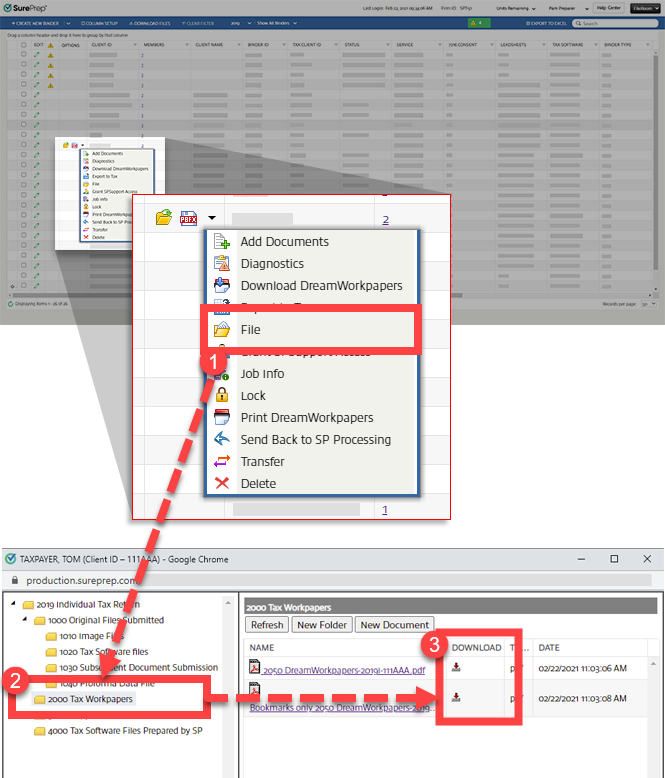 You can also use this option to download files if your browser blocks multiple simultaneous downloads when using theDownload DreamWorkpapersmethod.
note
If you printed a binder, then added additional documents, the printed PDF becomes outdated and you can't download it from the
Download SPbinder PDF/DreamWorkpapers
option on the binder menu. However, you can download the previously printed copy from the File
window. Alternatively, you can enable the download option by printing the SPbinder PDF/DreamWorkpaper again.note
Firms can customize file names for printed binders (that is, DreamWorkpapers, SPbinder PDF).
View DreamWorkpapers
The Bookmarks tab in the PDF file will include the following categories:
- Engagement Notes: Consists of Notes included in the binder.
- Source Document Index: Contains hyperlinked indexes of all the source documents.
- Workpaper Index: Contains hyperlinked indexes of Leadsheets from SPbinder.
- Review Status Summary: Review the workpapers and source document sheets in the PDF file rather than in SPbinder and keep track of the review.

If the DreamWorkpapers PDF file needs to be regenerated as a result of changes, any pages or fields you have reviewed in the DreamWorkpapers will no longer appear as reviewed.
You can also print DreamWorkpapers without any references or stamps.

DreamWorkpaper Excel file contains leadsheets in an Excel workbook. Each Leadsheet has a separate worksheet within the Excel workbook. You can edit the file in Excel, but like the DreamWorkpapers PDF file, if you make a change in SPbinder, the Excel leadsheets update when you regenerate the DWP print files. Making changes in Excel will only update the Excel file and not the PDF file or SPbinder.
Only assigned members and owners of the binder can download and access DreamWorkpapers from FileRoom. The Firm System Administrator can print and access DreamWorkpapers for all binders.
Related Content
-
Generate DreamWorkpapers (Leadsheet binders only)
Format: Article,
7 min read
Article,
7 min read

