
Review Tree - Blank fields
This review feature checks for blank references in the binder. The binder automatically checks for blank fields on the source document(
FORMS
tab) and compiles the list in the Blank Field(s)
section in REVIEW TREE
. Blank fields/references will prevent you from printing and exporting a binder to the tax application. If you have blank fields, then enter data for all references placed on source documents before printing the binder to PDF.
The number in the parenthesis shows the total number of fields that are blank in the Binder.
Select the  icon to expand the category Blank Fields/Form Heads.
Expand
icon to expand the category Blank Fields/Form Heads.
Select the icon to expand the Input Form.
Expand
icon to expand the Input Form.
Select the field for which the amount needs to be entered.

Continue until amounts are entered for all blank fields.
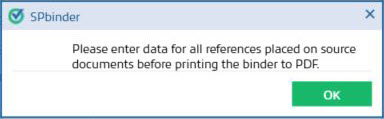
You will get the following messages when printing or exporting a binder with blank references or blank fields:
Please enter data for all references placed on source documents before printing the binder to PDF.
Please fill all the blank references before export.
Solution: Find the references or fields that are blank under
REVIEW TREE
, then Blank Field(s)
, select the blank field, then select enter the information from the source document or delete the field if it was erroneously added.
