
Emails notification types sent based on settings
TaxCaddy offers different email notifications to keep you up to date on your client's account activity without having to manually log in. Email notifications can be categorized based on
Tax Documents
, Questionnaires
, Tax Returns
, etc.You may want to customize your email settings to only receive notifications for topics you're interested in. Tailor your notifications to your needs by reviewing which email notification settings belong to a category.
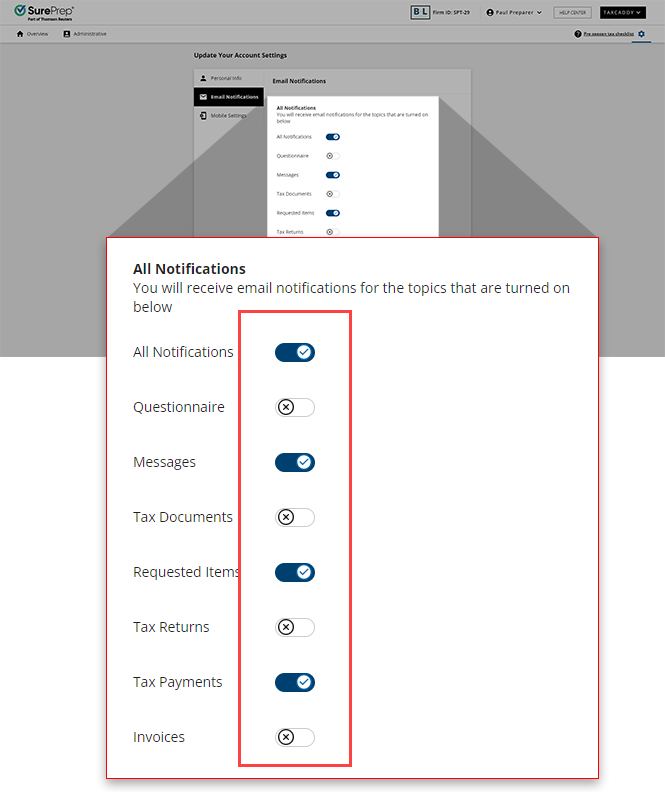
The emails found below belong to their associated categories that can be enabled/disabled within your
Email Notifications
settings to customize your notification preferences.Email Title | Description | Associated email category |
|---|---|---|
Taxpayer has completed their Questionnaire | Your client has completed their questionnaire for the current tax year. | Questionnaire |
Client sent message | Your client has sent you a message in TaxCaddy. | Messages |
Client uploaded document | Your client has uploaded a document to the Uploaded Documents section of their account. | Tax Documents |
Client requested item doesn't apply/already provided | Your client has indicated that a requested item does not apply to them, or has already been provided. | Requested Items |
Client signed letter | Your client has fulfilled a pending Sign request. | Requested Items |
Client reviewed letter | Your client has fulfilled a pending Review request. | Requested Items |
Requested Item's fillable form submitted for [Your Client] | Your client has completed filling out a requested fillable form. | Requested Items |
Payment Voucher marked paid | Your client has marked a pending tax payment voucher as Paid . | Tax Payments |
Tax return uploaded for [Your Client] | Another firm user has uploaded a Tax Return to your client's account. | Tax Returns |
Invoice has been paid | Your client has paid a pending invoice. | Invoices |
Emails sent with settings disabled
Some emails from TaxCaddy contain important or time-sensitive information that demands a user's attention. When this information must be relayed, TaxCaddy will send the associated user an email to inform them, regardless of their email settings.
These emails include the following:
Email Title | Description | Received by Owner | Received by Followers/Assigned Members |
|---|---|---|---|
Disconnection Notice | You have disconnected from this client. | Yes | Yes |
Confirm [Your Client]'s account | Your client has created their TaxCaddy account but requires confirmation before you can share information. | Yes | Yes |
TaxCaddy Account Deletion After 72 Hours | Your client has initiated the account deletion process and their account will be officially deleted after a 72-hour window. | Yes | Yes |
TaxCaddy Account Deletion Canceled | Your client has canceled their account deletion by signing into their TaxCaddy account within the 72-hour period. | Yes | Yes |
Tax Payment Voucher Mailed | Your client has fulfilled a tax payment using the Pay By Check feature. | Yes | Yes |
Uploads Completed | Your client has indicated that they are done uploading documents for the selected tax year using the Done Uploading feature. | Yes | Yes |
Client accepted connection | Your client has accepted your connection request. | Yes | No |
[Your Client] changed their name | Your client has updated their name in their account settings. | Yes | No |
[Your Client] changed their email address | Your client has updated their email address in their account settings. | Yes | No |
Related Content
-
Setting up email notification preferences
Format: Article
-
Setting up email notification preferences
Format:
Article

