
2026-07-27 Release (Flag a binder, Review Module Document checklist, SPbinder Notifications, Tax Return PDF Extraction, API)
Release note for July 27, 2026
Hi there! We have the following new updates for you today:
- SPbinder & FileRoom: Flag a Binder for Review and the new Review/Finalization tab
- SPbinder: status & refinements
- Review Module: Documents
- Account Admin: Lacerte SDK access
- 1040SCAN: Tax return (PDF) extraction available for the 2025 tax year
- 1040SCAN: 1099-DA form capture
- 1040SCAN Review Wizard: Skips Finalization Wizard
- 1040SCAN Review Wizard: Review & verification enhancements
- 1040SCAN Review Wizard: Browser permission recovery
- API: Expanded support for 1041 binders
- API: Additive integration
- API: Binder resubmission
- API: document retrieval validation (GetDocument & DownloadDocument)
- API: New TaxCaddy API calls (DRL, document upload, 7216 consent)
- Reminder: Register for a webinar on Review Wizard Web
- Reminder: Version 5 API retirement
SPbinder & FileRoom: Flag a Binder for Review and the new Review/Finalization tab
Marking a binder for review is now a clean, workflow-driven handoff. From SPbinder's
Sign-Off Options
window, select Flag this binder for Review
to mark it ready at sign-off. When reviewers sign in, they can see exactly what's waiting for them in FileRoom.Sign-Off Option window, “Flag this binder for Review.”

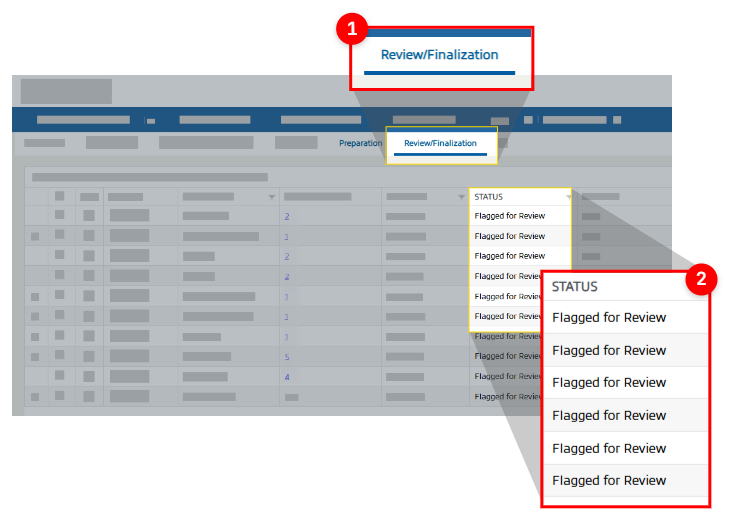
In FileRoom, the binder status will change to
Flagged for Review
, a new standardized status indicating the binder is ready for review and finalization.
All binders flagged for review will appear exclusively in the new
Review / Finalization
tab, giving reviewers quick access to what they need.Review/Finalization tab
note
For firms using custom statuses, this enhancement does not replace your current workflow setup. Flagging a binder for (final) review provides a new standardized workflow where preparers can flag binders for review and reviewers can see a dedicated location to review binders. You can continue to use your firm's current workflows as desired.
SPbinder: Status & refinement
You will now have a better visibility on where your export and import processing stand as you move through the binder.
Export status notification
- When you launch SPbinder, you'll now see a toast notification showing the progress of your binder's data export to the tax software. Applies to Simplified and None Leadsheet binders.
A clear toast confirms a completed export, with dynamic details and a progress indicator.
note
This feature will be rolled out incrementally to firms in the next few days.
Import TR progress bar
- SPbinder now displays a progress bar in the Export window, allowing users to track the export's progress in real time. Applicable for GoSystem Tax RS and CCH Axcess Tax binders. Real-time Import TR progress bar

Additive status notification
- When you submit Scheduled K-1s with Additive, a notification now shows you that your Schedule K-1 pages are processing in Additive, so you can continue with the rest of your tax return preparation without waiting
Review Module: Documents
As a reviewer, you can now review your binders documents directly from FileRoom, without opening the binder or navigating away to Reviewer Dashboard. The
Documents
checklist in Review Module helps you review which documents you have received, which may be missing, which are new, and which you have marked as not applicable.The Documents checklist tabs

Reflects documents still missing in the review workflow; checks every location a document could be expected, including the
INDEX TREE
and (input) FORMS
. note
About the “To Review” count:
It reflects documents still missing in the review workflow. A refined count that checks every location a document could be expected, including the INDEX TREE
and (input) FORMS
. It may differ from the Missing Document count in SPbinder by design; SPbinder remains the place to check the full missing-document list.Account Admin: Lacerte SDK access
FileRoom now links to Lacerte's official Intuit Developer portal for SDK downloads, so you always get the current version (authorized Lacerte login required).

1040SCAN: Tax return (PDF) extraction available for the 2025 tax year
Tax Return PDF Extraction allows you to extract the proforma data from a tax return and populate it into the tax software. With today's release, you can now upload a tax return for the 2025 tax year!

1040SCAN: 1099-DA form capture
SurePrep now captures the 1099-DA form (digital asset proceeds from broker transactions). Supports the IRS standard template only for now.
1040SCAN Review Wizard: Skips Finalization Wizard
For eligible None/Simplified Leadsheet workflows, SurePrep now skips the last Finalization step in certain scenarios (when no post verification steps are pending) and auto-exports the binder data into the tax software. For Simplified Leadsheets, SPbinder launches as soon as Review Wizard steps finish — even if export is still in progress.
If you completed the last verification steps In-house then you will see the informational screen.

1040SCAN Review Wizard: Review & verification enhancements
Changes are made to the Review Wizard's user experience to help verifiers avoid mistakes.
As a verifier, New Form Review (NFR) step will now show you distinct colored icons for Taxpayer, Spouse, and Joint ownership (T/S/J), making it easier to differentiate ownership at a glance, especially when the colors and ownership code mismatch the proforma folder value.
Recolored T/S/J ownership icons in New Form Review.

Additionally, NFR will now prompt a confirmation warning when associating a document whose ownership code does not match the proforma'd document, thereby preventing accidental matching.
SSN change warning
- During step 2 verification, the Verification Wizard warns before an SSN field's ownership is reassigned between the taxpayer and spouse, reducing mismatched-owner errors.
1040SCAN Review Wizard: Browser permission recovery
When Review Wizard on Web loads a binder for the first time, the web browser (like Chrome, Edge) ask users permission to access to Local Network Access, users must select
Allow
. However, users may unknowingly select Block
and prevent the Review Wizard from opening. 
Blocked by accident? Re-enable it.
Now, if user selects Block
, a recovery screen walks users through turning Local Network Access back on in the web browser 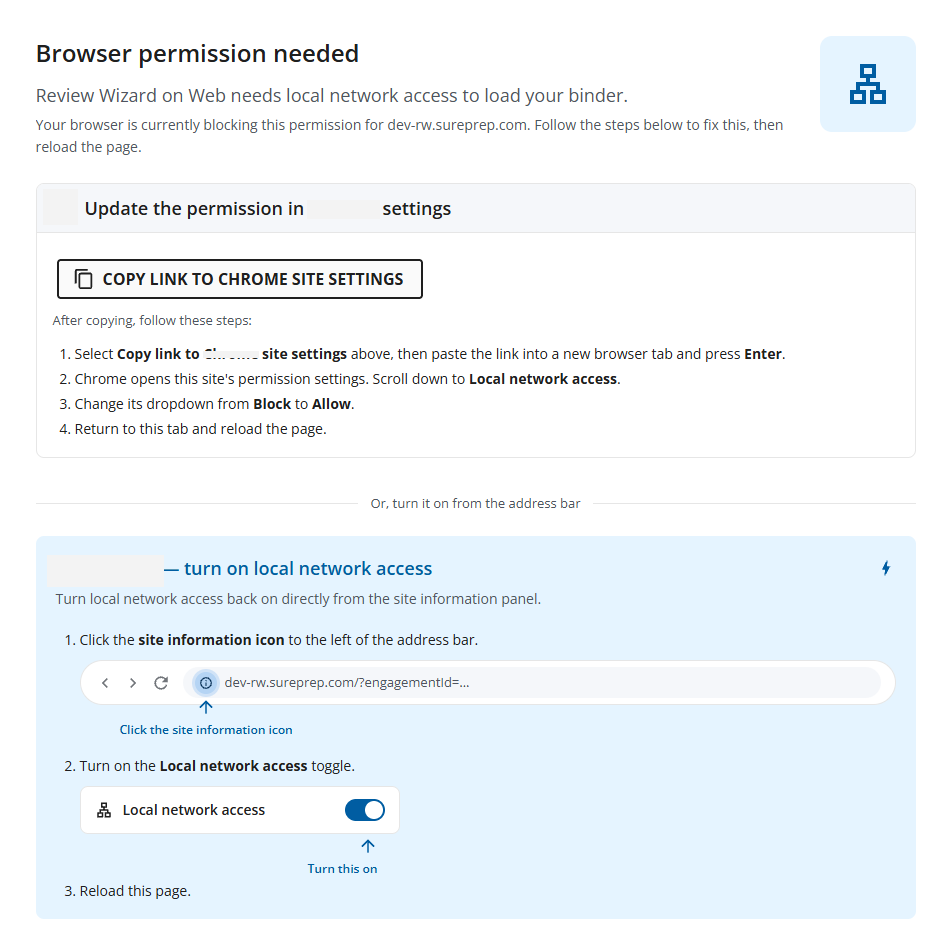
API: Expanded support for 1041 binders
API coverage has expanded for 1041 return binders.
Tax software | Service type | Leadsheet type |
|---|---|---|
GoSystem Tax RS | 1040SCANverify | None, Classic Leadsheet |
API: Additive integration
For firms with Additive integration enabled, all eligible binder's Schedule K-1 will automatically process through Additive by default and use Additive units. To opt an API binder out from using Additive for that particular binder, pass
IsProcessedByAdditive
input parameter as false
on the SubmitBinder
call, opt-out is per binder.Requirements:
- Service: 1040SCAN PRO, 1040SCANverify, and Outsource
- Tax Year: 2025
- Tax software: CCH Axcess Tax
- SurePrep v7 API
API: Binder resubmission
API binders in the send-back (User Action Required) state can now be resubmitted via API and FileRoom, without the previous requirement to first upload an OCR document. This feature already existed for binders created for GoSystem Tax RS and CCH Axcess Tax. This capability is now also available for UltraTax binders created through API.
API: document retrieval validation (GetDocument & DownloadDocument)
The
GetDocuments
and DownloadDocuments
API call now shows clearer, more meaningful errors from the GetDocuments
and DownloadDocuments
APIs.The
GetDocuments
API validates the binder ID and binder print status before returning documents, so you receive clear, meaningful feedback when a document cannot be retrieved. Succeeds only when the binder ID is valid and printing has completed; applies to 1040 and 1041 binders, with or without Leadsheets.Error Code | Message/condition |
|---|---|
1000 | Required field is missing (binder ID not provided) |
1147 | The binder has already been deleted and cannot be fetched |
1320 | Invalid Binder ID |
1329 | No documents available yet — binder printing not complete |
The
DownloadDocuments
API validates the document ID and ensures the latest version is used, so consumers are clearly informed of invalid or outdated IDs. Downloads only when the document ID is valid and is the latest document generated by GetDocuments
.Error Code | Message/condition |
|---|---|
1330 | Invalid document ID |
1331 | Not the latest version — use the most recent document ID |
API: New TaxCaddy API calls (DRL, document upload, 7216 consent)
We are excited to announce some highly requested feature by firms using TaxCaddy API. You can now use the
GetDRLItemsStatus/{TaxYear}
API call to get the full list of DRL items sent to a taxpayer with each item's status (Uploaded, Doesn't Apply, Not Uploaded, and more). Giving you the ability to track open requests and send reminders to taxpayers externally.API name | Description |
|---|---|
DRL (Document Request List) | |
GetDRLItemsStatus/{TaxYear} | Returns the full list of DRL items sent to a taxpayer with each item's status ( Uploaded ,Doesn't Apply ,Not Uploaded , andPrepared by Firm ). Helps you track open requests via API and send reminders to taxpayers externally. |
UpdateDRLItemsStatus | Completes a DRL item with a status of Reply with Amount ,Doesn't Apply ,Already Provided , orFirm Preparing . |
Upload document | |
UploadTaxCaddyDocuments | Adds documents into a taxpayer's TaxCaddy client profile via API. |
7216 consent | |
Get7216ConsentStatus | Gets a client's 7216 consent status |
Update7216Consent | Update a client's 7216 consent status |
Reminder: Register for a webinar on Review Wizard Web
Review Wizard on desktop is scheduled to retire August 31, 2026. To help you transition smoothly to the web application, we're hosting biweekly webinars featuring a live demo of Review Wizard on Web and an open Q&A with our team. Whether you're brand new to the web platform or simply looking to build confidence before the desktop application is retired, these sessions are designed for you.

Visit the
Register for the biweekly Review Wizard on Webinars
article in the Related Content to register for a webinar session!Reminder: Version 5 API retirement
API version 5 will be officially retired on
August 31, 2026
. After this date, API version 5 will no longer be available or supported. We highly recommend all customers currently using API version 5 to upgrade to API version 7 as soon as possible to avoid any service disruptions. All new API enhancements are currently only released on version 7. 
For assistance with the upgrade process, please refer to our migration guide called "
API version 7 changelog
" or contact Thomson Reuters' SurePrep Support team.Related Content
-
Add additional users to a client account
Format: Article

