
Rearranging questions on the questionnaire template
TaxCaddy comes with a questionnaire template ready to use, but you can customize it to your preference. Under each life-changing event category, you can rearrange the order in which the questions should appear to the client. You can also move the questionnaire to another life-changing event category.
note
Clients you already sent the questionnaire template to won’t see any new changes made to the template reflected in their questionnaire. Each client's questionnaire will need to be updated individually.
Follow these steps to rearrange the questions on the questionnaire template:
- Log in to TaxCaddy.
- SelectAdministrativethen selectQuestionnaire.

- Select the applicable tax year for the questionnaire template.

- Select theExpandicon to view questions in that life-changing event category.

- Point to the question you want to move, when the cursor changes to theMove
 icon, select (hold) then drag the question up or down depending on where you want to move it.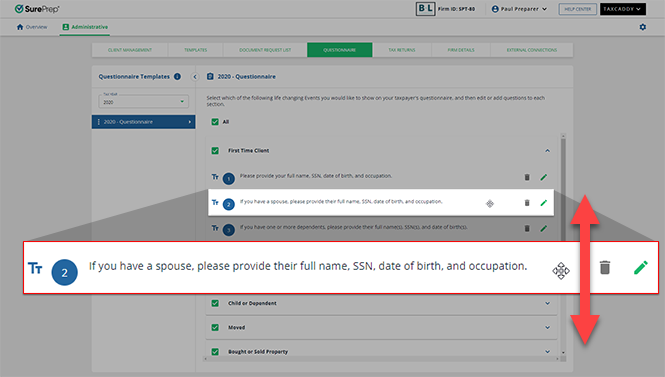
- You can drag and drop the questions to arrange the order that they should appear in. You can also move the question to another life-changing event category and drop it in there.
Related Content
-
Adding questions to the questionnaire template
Format: Article
-
Adding questions to the questionnaire template
Format:
Article
-
Default questions from the questionnaire template
Format:
Article

