
Removing questions from the questionnaire template
TaxCaddy comes with a questionnaire template ready to use, but you can customize it to your preference. You can delete existing questions from the questionnaire template. Questions removed from the template won’t be sent to your clients.
note
If you don't want to send questions for a particular life-changing event then you can turn off the category rather than deleting each question.
note
Clients you already sent the questionnaire template to won’t see any new changes made to the template reflected in their questionnaire.
Follow these steps to delete a question from the questionnaire template.
- Log in to TaxCaddy.
- SelectAdministrativeand then selectQuestionnaire.

- Select the applicable tax year for the questionnaire template.

- Select theExpandicon to view questions in that life-changing event category.

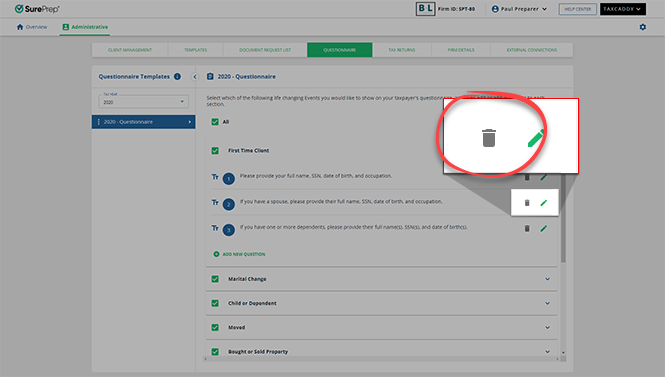
- To delete a question, select theDeleteicon.
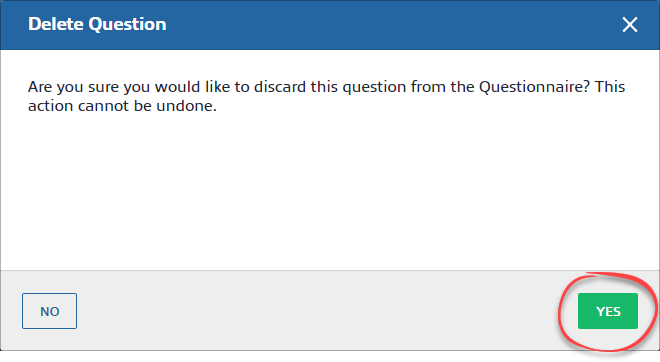
- On theDelete Questionwindow, selectYESto delete the question.
Related Content
-
Adding questions to the questionnaire template
Format: Article
-
Guide to the Questionnaire page
Format:
Article
-
Default questions from the questionnaire template
Format:
Article

