
Deleting the questionnaire template and starting from scratch
Deleting the questionnaire template deletes the entire questionnaire template along with any modifications. This can be useful if you are unable to recall which edits have been made to the questionnaire or would like to start over. Once the questionnaire template is deleted, you can reset everything back to TaxCaddy's default questions.
note
Deleting the questionnaire template will permanently delete any changes or additional questions that were added by you or another member at your firm.
Follow these steps to delete the questionnaire template and start from scratch:
- Log in to TaxCaddy.
- Administrative thenAdministrativeselectQuestionnaire.

- Select the tax year for the questionnaire template.

- To delete a questionnaire template, select theMenu
 icon on the left panel, then select Delete.noteDeleting the questionnaire template will permanently delete any changes or additional questions that were added by you or another member at your firm.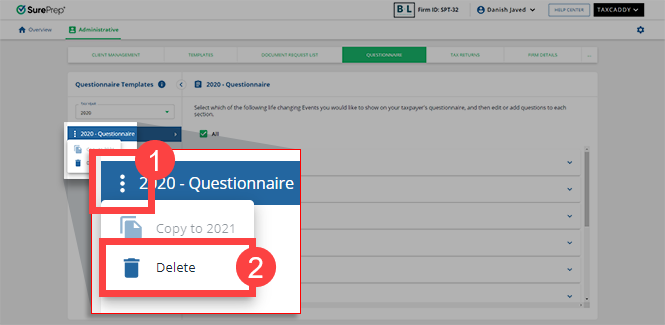
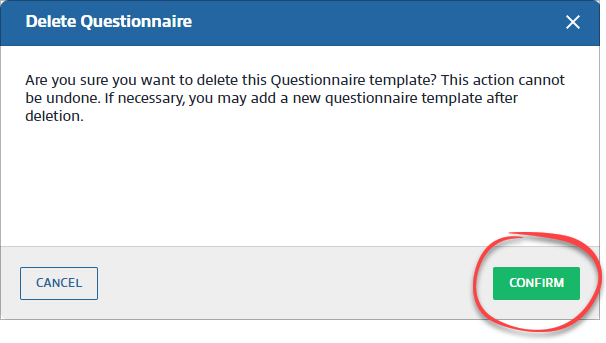
- On theDelete Questionnairewindow, selectCONFIRM.
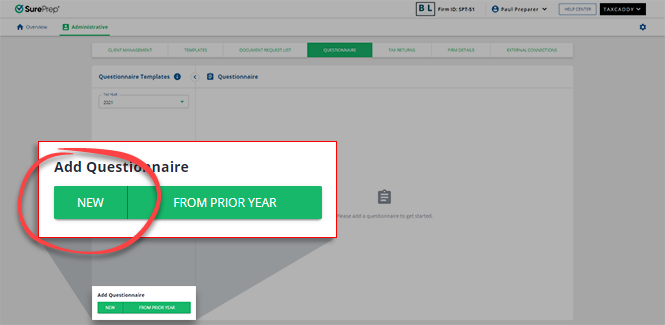
- SelectADD NEWto reset everything and start over from TaxCaddy's default questionnaire template.
note
You can delete questions individually without deleting the template.
Related Content
-
Questionnaire Settings (Generate DRL and Personal Info)
Format: Article
-
Copy(roll forward) Prior Year Questionnaire
Format:
Article

