
Protect your account
Follow these steps to keep your TaxCaddy account secure.
- TaxCaddy uses two-factor authentication to help keep your account secure by prompting you to enter a security code each time you log in. Two-factor authentication is required.When signing into your account, you can selectDon't ask again on this devicefor TaxCaddy to remember this device. Doing so will eliminate the need to provide a code from this device again. When signing in through a different device, you will still need to provide the two-factor authentication codenoteIf you don't seeDon't ask again on this devicewhile logging in with two-factor authentication, your browser may either be in private mode or it may not support session storage. Update your browser and close private mode to correct this issue, or submit and ticket for further assistance. If you select theDon't ask again on this devicecheckbox but you are still prompted for a text verification code, then your browser cookies are not available.
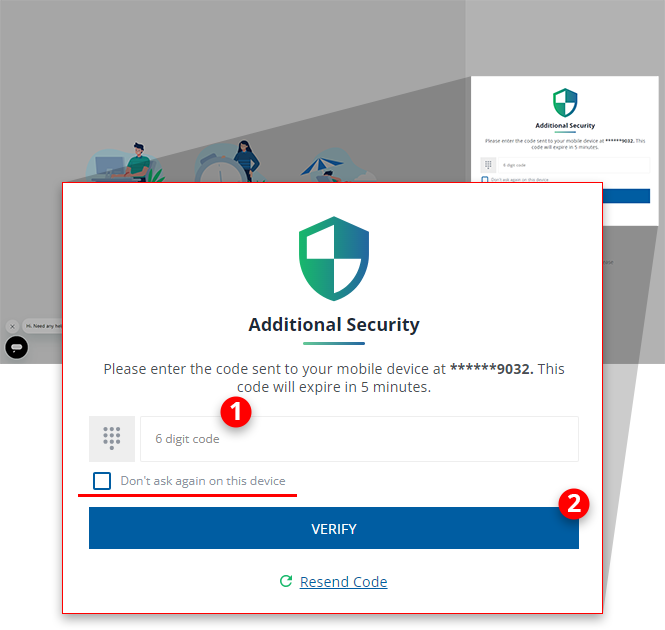 noteDue to local restrictions, some countries may not receive an SMS TaxCaddy verification code on their mobile phone. Contact TaxCaddy Support if you are experiencing difficulty receiving your verification code.
 - Don't use the same password you use for another account. Keep your TaxCaddy password private.
- Be sure to change your password whenever there is a possibility that someone else may have gained access to your password.
- Ensure your security questions and answers are strong and difficult to guess.
- If someone is attempting to gain access to your account, then you might want to change your security questions.
- Emails from TaxCaddy will end in@thomsonreuters.com. If you receive a suspicious email about TaxCaddy or an email that appears to be from TaxCaddy but is from a different email domain, then forward it to taxcaddy.support@thomsonreuters.com. Mention "suspicious email" in the subject.

