
Understand tax notices
Learn about tax notices issued by the IRS or state taxing agencies for errors on tax returns, and find guidance on how to understand a notice and prepare before contacting UltraTax CS Support for help with correcting related data entry.
The IRS or state taxing agency issues notices to taxpayers regarding tax returns it deems are incorrect. They can issue notices for mathematical errors, as well as errors related to improper reporting of income, deductions, or credits.
The notice usually alerts the taxpayer that due to the error, either more tax is owed or an overpayment exists.
For help with understanding your notice, you can do the following:
- Contact the IRS or state taxing agency at the phone number listed on the notice.
- Visit the Understanding Your IRS Notice or Letter page on the IRS website.
UltraTax CS Support can help you with correcting your data entry in the program. Before contacting UltraTax CS Support, you should:
- Understand the notice.
- Decide whether you agree with the notice.
- Know what numbers you want on the tax return.
- Have the relevant form instructions and publications that support the necessary changes to the return.
Internal use only
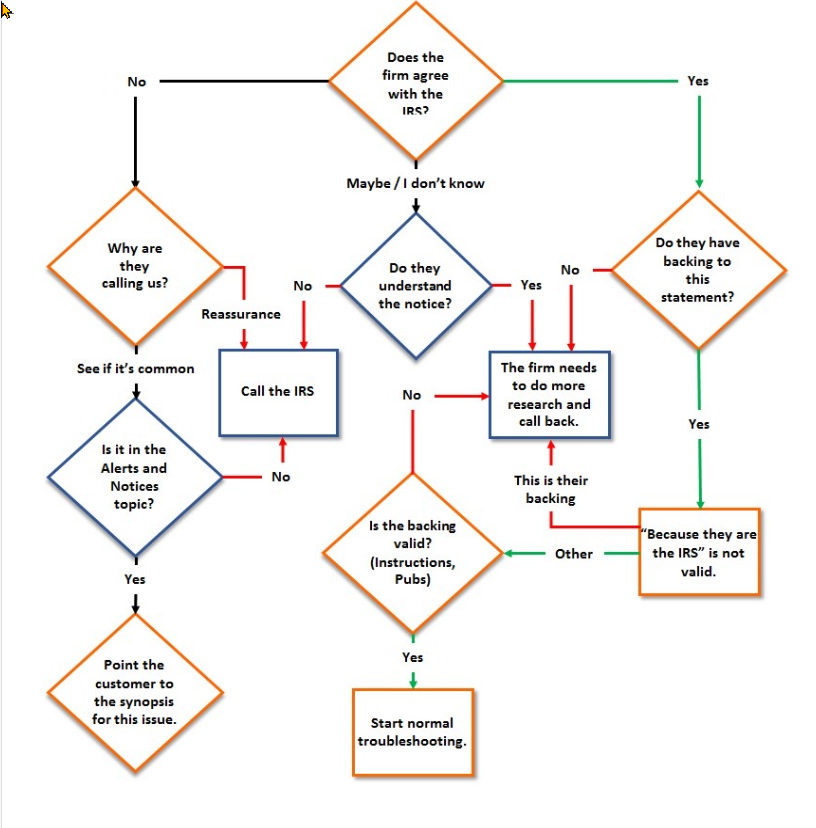
- Does the firm agree with the IRS?
- No: Why are they calling us?
- Reassurance: Call the IRS
- See if it's common: Is it in the Alerts and Notices topic?
- Yes: Point the customer to the synopsis for this issue
- Maybe/don't know
- Do they understand the notice?
- No: Call the IRS
- Yes: The firm needs to do more research and call back
- Yes
- Do they have backing to this statement?
- No: The firm needs to do more research and call back
- Yes
- "Because they are the IRS" is not valid: If this is their backing, the firm needs to do more research and call back
- Is the backing valid (Instructions, Pubs)?
- Yes: Start normal troubleshooting

