
Print the current page and all related pages
You can print a single page of a form or input screen when you have that page open in UltraTax CS, and via the print-related pages feature, the application will include those forms or input screens that relate to the current page or screen.
To print the page with all related pages, complete these steps.
- With a client's return open, select the dropdown arrow onPrint Current Pagein the UltraTax CS toolbar.
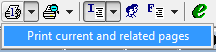
- SelectPrint current and related pagesin the dropdown list.
- UltraTax CS sends the print job to the default printer. To change your default printer, selectFile,Print Returns, selectPrinter, then select the printer from thePrinterdropdown list.

