
Print a folder insert equivalent with vertical or offset slipsheets
The
Folder Insert
slipsheet can't be selected to print with vertical or offset slipsheets within UltraTax CS. However, an equivalent can be printed in its place.When the Slipsheet format is set to
Vertical
, Offset
, or Bulk mail
, the option to Print an additional portrait folder insert
is turned off for both the Organizer cover and Tax return cover. To access this option, select
Setup
, then Office Configuration
, select the Print Options
tab, then select Mailing Slipsheets
. While this option is not available, an equivalent can be printed in its place, for either a return or an organizer.To generate the equivalent, complete the following steps.
- SelectSetup, then1040 Individualfrom the menu.
- Select theFederaltab if you intend to print the folder insert equivalent for returns, or theOrganizertab if you intend to print it for organizers.
- Once on the tab, selectSlipsheets.
- Open theClient Return Slipsheet(or theClient Slipsheetif modifying the organizer documents).
- In the open document, place your cursor after the last text on the page.
- Select and drag your mouse to the very top of the document. Be sure the blank lines at the top of the document are also selected.
- Once all items are selected, selectEdit, thenCopy.
- Next, place your cursor after the last text on the page, and pressonce.Enter
- On this new line, selectInsert, thenPage Break, which will insert a green page break line into the document.
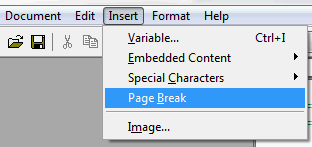
- SelectEdit, thenPaste. Now, when printing a client, 2 copies of the Client Return Slipsheet will generate, one of which can serve as an equivalent to the Folder Insert.


