
HighQ MCP
Seamlessly transform your legal workflows by connecting HighQ Collaborate directly to AI assistants like Claude, ChatGPT, and no-code platforms, completely integrated with your Thomson Reuters HighQ license.
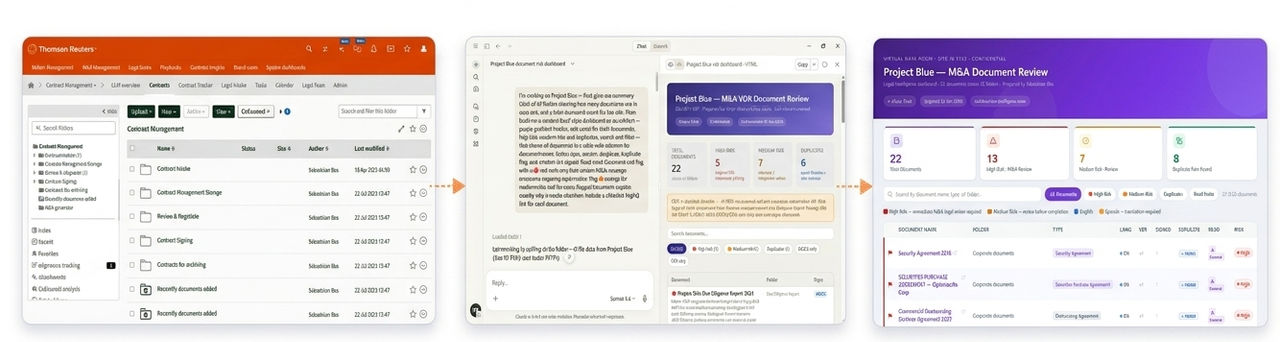
About HighQ MCP
HighQ Model Context Protocol (MCP) is a communication standard that enables AI assistants to interact with your legal collaboration platform in real time. MCP acts as a secure bridge between your HighQ Collaborate platform and MCP-compatible AI tools (e.g., Claude, ChatGPT), allowing these tools to access your actual HighQ sites, documents, iSheets (structured data tables), and more.
Like how you access HighQ through the web interface, MCP provides AI assistants with secure,
read-only
access to your legal workspace. There are no additional charges beyond your existing HighQ Collaborate license.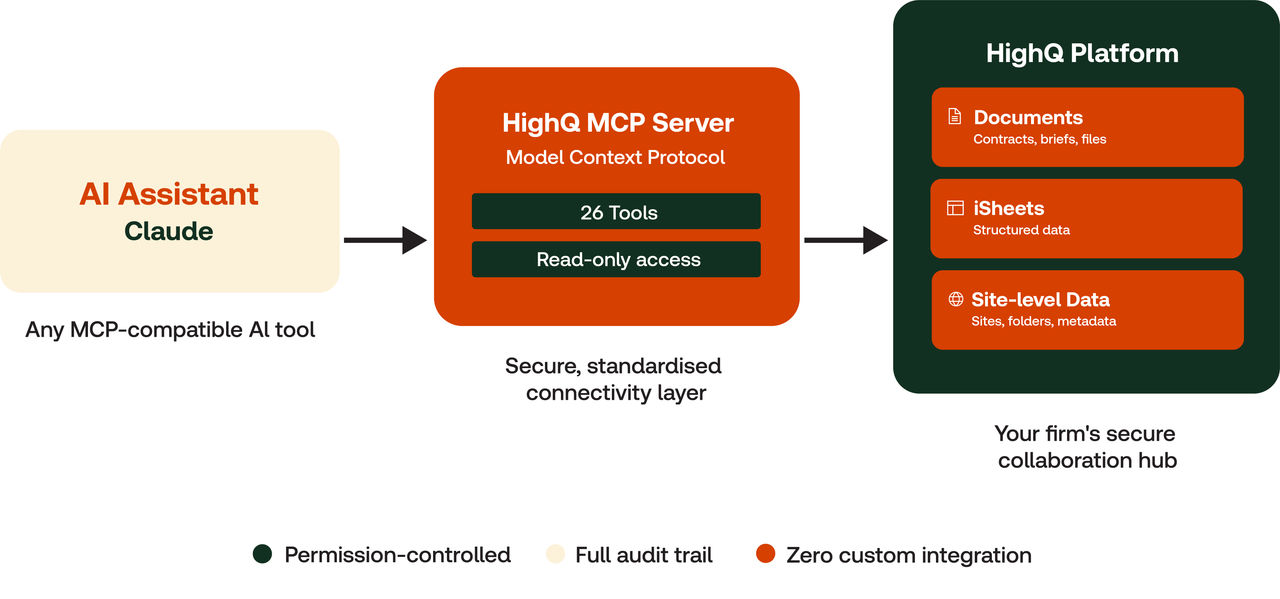
In simple terms, HighQ MCP enables AI assistants to provide:
- Real-time data access: Query your current matter files, not just talk about generic legal concepts.
- Personalised insights: Analyse your specific site structure, not just give general advice.
- Interactive capabilities: Not just answer questions, but also retrieve precise documents and data you need.
- Natural conversation: Ask about complex legal workflows in plain language.
Without MCP, AI assistants are limited to generic legal information and can't respond to specific issues and matters.
How HighQ MCP Delivers Value?
Across legal workflows, we use multiple tools such as HighQ for matter management and collaboration, and AI assistants for drafting, research, and analysis. When these tools operate in isolation, productivity is reduced by frequent context switching and manual data transfers.
With HighQ MCP, you can:
- Work with real matter data: Claude accesses your actual HighQ files and documents, so insights and outputs are grounded in your live matters, not generic legal knowledge.
- Get instant insight from iSheets: Ask questions and analyse matter status, deadlines, risks, and budgets in real time, without exporting or reformatting data.
- Find information faster: Search across HighQ sites to quickly surface relevant precedents, documents, and prior work, right when you need them.
- Stay in flow: Claude understands your HighQ site structure, folders, and matter context, reducing repetitive explanations and manual setup.
Let's look at how MCP simplifies tasks that previously required significant time, reducing them to a single prompt.
iSheet Data Analysis
:What earlier took 30–60 minutes of manual navigation, Excel exports, and analysis is now completed in seconds with a single prompt that analyses iSheet data and flags overdue items by owner.
Manual | AI‑assisted |
|---|---|
Open HighQ, navigate to the required site, open each iSheet individually, manually review rows and columns for relevant data, export the data to Excel for cross‑referencing, build formulas to analyse trends, and copy the results into reports or emails. | Analyse the compliance tracker iSheet in Project Blue and flag any items overdue by more than 14 days, grouped by assigned owner. |
Cross-Module File Search
:Instead of spending 15–30 minutes manually browsing sites and reviewing documents, a single prompt now retrieves all relevant files and key details in seconds.
Manual | AI‑assisted |
|---|---|
Manually browse sites and folders in HighQ, review documents, capture key details, and compile the results separately. | Show me all documents uploaded to the Active Matters folder in the last 7 days in the Project Blue site, with file sizes and who uploaded them. |
Portfolio Reporting
:Previously requiring 45–90 minutes to consolidate data and maintain reports across sites, a single prompt now generates a complete portfolio summary in seconds.
Manual | AI‑assisted |
|---|---|
Manually extract data from multiple HighQ sites, consolidate it in Excel, create reports, and update them whenever data changes. | Create a comprehensive portfolio summary across all my HighQ sites showing total document counts, active tasks, and last activity date for each site. |
By combining HighQ's trusted legal workspace with AI that understands your data and structure, HighQ MCP helps you:
- Reduce manual effort and context switching.
- Make faster, better‑informed decisions.
- Focus more time on high‑value legal work.
This is AI that works with your workflow—not around it.
Getting Started
To set up and use the HighQ MCP server and connector, please follow our step-by-step HighQ MCP Setup Guide.
- For Admins (Primary Owner) - See Primary Owner/Owner Configuration Guide: Adding HighQ MCP as a Custom Connector .
- For End Users - See Get Started with HighQ MCP: Connect and Authorise.
Supported Platforms
HighQ MCP works with any platform that supports the Model Context Protocol. Here is the current compatibility.
Platform | Type | Best For | MCP Support |
|---|---|---|---|
Claude Desktop(Recommended) | Desktop/Website App | Personal workflows, file access | Full Support |
Claude Code | CLI Tool | Multi-step workflows, automation | Full Support |
ChatGPT Enterprise | Web | Team collaboration | Full Support |
Lovable | No-Code Builder | Building legal dashboards & apps | Full Support |
VS Code Copilot | IDE Extension | Developer workflows | Full Support |
Cursor | IDE | Coding with HighQ context | Full Support |
Microsoft Copilot Studio | Copilot Studio Agent | Admin-deployed MCP connectors only; app-level authentication means no per-user permissions | Limited Support |
Claude Mobile Application | Mobile Application | Quick conversations | No MCP Support |
Microsoft Copilot | Copilot In-app in M365 (Word, Teams, Outlook) | End users for personal workflows | No MCP Support |
We recommend using HighQ MCP on the following platforms, based on role, use case, and workflow needs:
- For most users: Claude Desktop offers the best HighQ MCP experience, with stable connections, proper authentication, and higher data limits.
- For developers: VS Code Copilot and Cursor provide full MCP support with the same straightforward setup, simply add your HighQ MCP connector and start coding with HighQ context.
- For building custom apps: Lovable (a no‑code platform) supports HighQ MCP using the same connector approach as Claude, making it easy to build legal dashboards and client portals without writing code.
- For automation: Claude Code offers full MCP support for scheduled tasks and multi‑step workflows.
All these platforms share a common advantage, a simple "
Add Connector
" setup with user‑level authentication that respects individual HighQ permissions, no complex IT deployment required. note
We are actively working with Microsoft and OpenAI to deliver this same streamlined experience on their platforms as their MCP implementations mature.
Security & Privacy
HighQ MCP is designed with security-first principles:
- Authentication: Authentication uses secure OAuth tokens, with credentials never shared and all data transmitted over encrypted HTTPS/TLS.
- Access Control: AI assistants can only read data the authenticated user is permitted to access, respecting all site‑ and folder‑level permissions.
- Data Access: Only user‑visible sites, folders, documents, iSheet data, and visible user details are accessible; all other data is restricted.
- Audit Trail: All AI‑related API activity is logged using HighQ’s standard audit logging framework.
Best Practices
- Add the HighQ MCP connector only from official Thomson Reuters endpoints.
- Review HighQ audit logs periodically to monitor access and usage.
- Revoke connector access when it is no longer required.
- Avoid including unnecessary sensitive or confidential client information in prompts.
- Review AI‑generated responses before sharing them with others.
- Ensure usage complies with applicable client confidentiality and data protection obligations.