
Administrators: Select users to flag for upgrade
Flag individual users or batches of users for migration to the Thomson Reuters Account.
Prefer a video? Watch the Administrator Role in Migration Video Guide.
Before flagging users for upgrade, complete the following prerequisite steps.
- Identify bot or service accounts.On the page, mark theBot Usercheckbox to identify any bot or service accounts as bot users. Marking a user as a bot user ensures they are excluded from the initial migration.importantAs an administrator, you can migrate regular users 1st and plan the transition for bot users and service accounts later. All bot users and service accounts must be migrated to a Thomson Reuters Account by Q1 2027.
- Update the administrator account email.Before flagging an administrator account for upgrade, make sure their email is updated to a valid, individual user email address. The Thomson Reuters Account is created using the email address associated with the user profile. Using a shared, generic, or system email address may prevent proper account access and ownership.Update the administrator account email to the email address of the actual person responsible for managing the system, and make sure the email is active and accessible by that individual.importantWhen the administrator account email is updated and upgraded, the default Support account in the system is also upgraded using the same email address and associated Thomson Reuters Account. No additional action is required for the Support account.
You can flag individual users directly on the page or export a list of users to create a batch for upgrade. We recommend starting with a small group of users to validate the process before performing a larger rollout.
- InAdministration, go toSetupand selectThomson Reuters Account Upgrade.
- Mark the checkbox for each user you want to flag for upgrade.importantAll active and inactive users sharing the same email address are upgraded together. If an inactive user needs to be upgraded, you need to reactivate that user first.
- Go toFlag Users for Upgradeand select an upgrade option.noteThe option you select changes the experience for your users.
- Self-Upgrade— Lets users dismiss the upgrade prompt up to 3 times before the update becomes required.
- Mandate Upgrade— Requires users to upgrade to the Thomson Reuters Account the next time they sign in.
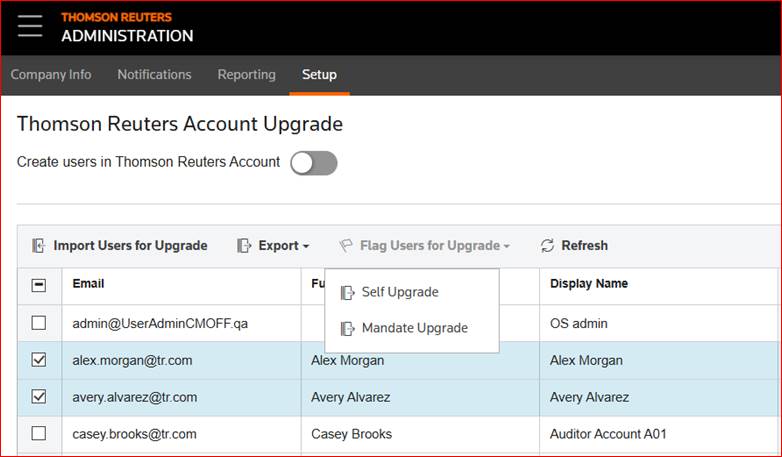
After you select an option, the application flags the marked users. Flagged users will receive the upgrade prompt on their next sign in.
note
Turning on
Create users in Thomson Reuters Account
requires all new users to use the Thomson Reuters Account to sign in and disables the Login Method
option on the User Details
page.Related Content
-
Before you upgrade
Format: Article