
Apply tax law updates
To apply a tax law update, complete the following steps:
- In theCalendar Setupmodule, selectTax Law Update, thenEvent Templates. This opens thePending Event Templatesscreen.
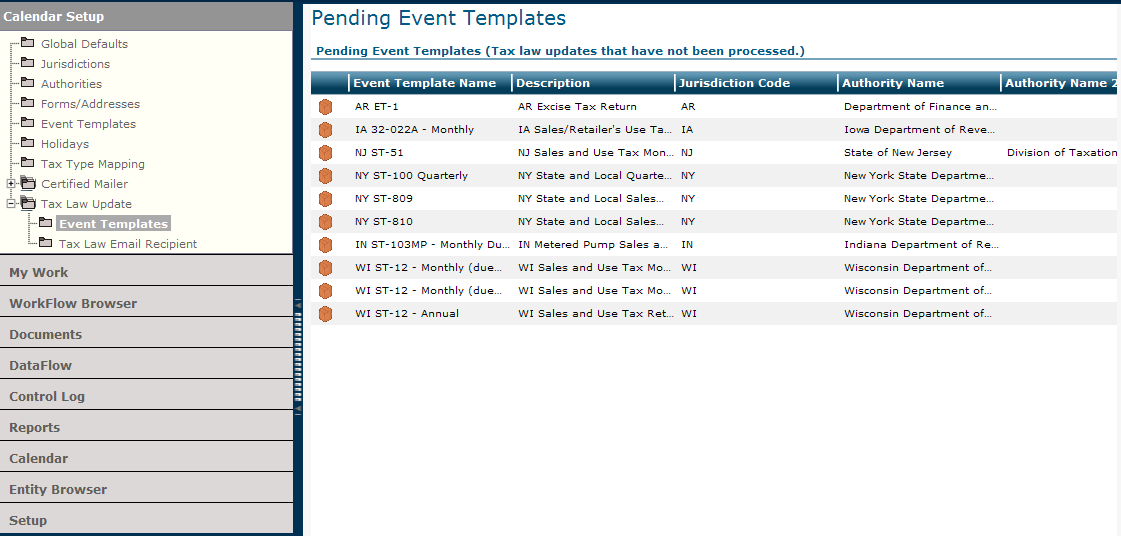
- Select an event template name.
- SelectApply Tax Law Updatefrom theActionsmenu.A message reminds you that this process will update event templates with current law. The system places theNo Roll Forwardicon on the impacted scheduled events, which you can view on the Calendar grid for the current and/or future years.
- SelectOKto continue.The system removes the selected template name from the Pending Event Templates grid.
Related Content
-
2020 files
Format: Article
-
2021 files
Format:
Article
-
2022 files
Format:
Article
-
2023 files
Format:
Article
-
2024 files
Format:
Article
-
September 2024 release information
Format:
Article
-
October 2024 release information
Format:
Article
-
November 2024 release information
Format:
Article
-
December 2024 release information
Format:
Article
-
January 2025 release information
Format:
Article
-
Late January 2025 release information
Format:
Article
-
February 2025 release information
Format:
Article
-
March 2025 release information
Format:
Article