
Advanced AI Feature FAQ
Contract Express v10.0 has introduced advanced AI features for Authors to enhance the efficiency of the template automation process. This article provides answers to common questions about these new capabilities.
How can I get access to advanced AI features?
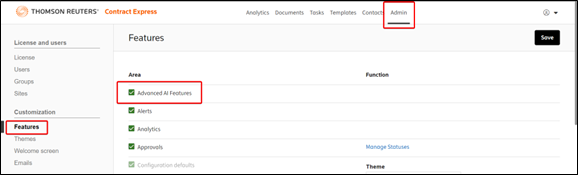
To access these features, an administrator of your license space will need to enable the "Advanced AI Features" setting in the Admin tab of your license under Features. They will be prompted to consent to the use of artificial intelligence (AI) technology for the purpose of analysing and processing your documents.
What is considered an advanced AI feature?
Advanced AI features are those that use AI services to analyse and process the contents of your documents to provide context-specific assistance. Please check the description of each advanced AI feature for information on how the feature works and what content is sent for analysis.
What features does this give me access to?
Enabling this feature will give you access to the following features:
- Markup suggestions feature in the Author add-in released in v10.0. The same feature is also available in Author Online add-in which is available from Office stores from the 17th of March 2025.
- The new Author Online add-in features another advanced AI feature: Auto-set up of the questionnaire. This feature sends to AI service the list of all template variables and their relevance. AI returns the questionnaire structure where variables are grouped in logical groupings with user-friendly names for pages and groups.
- AI Questionnaire Population feature allows answer extraction from an uploaded document in the questionnaire and is released in v10.11.
- AI Expression explainer allows authors to request natural‑language explanations of field and span expressions in the Markup Editor, as well as computable definitions in the Dictionary Editor. It leverages the template’s dictionary data to ensure explanations are accurate, comprehensive, and contextually relevant. This feature is available in Author Desktop starting with version 10.17.
More features may be added to Contract Express in future releases. This article will be updated to reflect any new features.
Do I need to enable this setting to use the Contract Express Chat?
No, Contract Express Chat does not need this setting enabled. Contract Express Chat is not considered an Advanced AI Feature as it does not analyse the content in your document. It only accesses the questions you enter and generates answers using Contract Express help documentation.
What Azure OpenAI services are used by advanced AI features?
All advanced AI features use Microsoft Azure OpenAI's GPT-4o or GPT-4.1 service. The specific model deployed depends on regional availability, determined by the location of your Contract Express instance:
Region | Model | Azure Data Center |
|---|---|---|
European Union (EU) | GPT-4.1 | Sweden Central |
North America (NA) | GPT-4.1 | East US |
Canada (CA) | GPT-4o | Canada East |
Australia (AU) | GPT-4o | Australia East |
Germany (DE) | GPT-4.1 | Germany West Central |
United Arab Emirates (UAE) | GPT-4.1 | Sweden Central |
note
No data is stored as part of this process.
I am hosted on-premises, can I get access to advanced AI features?
AI features are not available through on-premise environments. Customers who want to experiment with AI features can create a trial account on one of our sandbox environments hosted in Azure. Please contact support for details at contractexpress-support@thomsonreuters.com.
Will my data be used for AI model training?
No, documents processed with the advanced AI features are not used for AI model training.
Will OpenAI be able to use my data?
No, Thomson Reuters's use of Generative AI is via dedicated API access through trusted partners such as Microsoft Azure and Amazon Web Services. Thomson Reuters expressly prohibits any vendor from retaining or using customer data to train their Generative AI models.
What information will be collected for product improvement?
The Contract Express product team will collect product usage analytics including the number of fields and variables detected, approved and rejected, and the deduced classification of the document: type of the document (model document or generated document) and category (e.g. Lease, NDA etc.).