
Managing groups
Groups allows assigning permissions for templates and documents in bulk and controlling access to the sites.
Creating groups
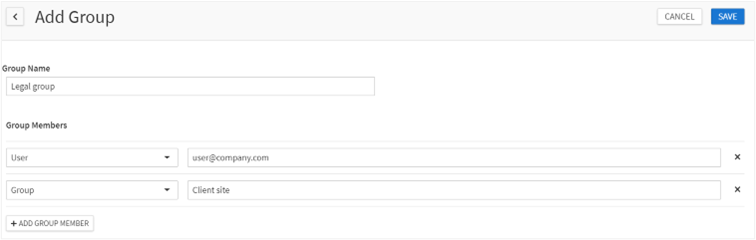
To create a new group:
- Go toAdmin>Groups.
- ClickAdd groupbutton.
- DefineGroup name- it should be unique and should differ from the names of the existing sites.
- AddGroup members- If using form-based authentication you can only add users previously added inAdmin>Userssection (see Adding users to Contract Express), or previously added groups.When adding group members:
- Select, whether you want to add a user or a group.
- Enter user/group name. For Active Directory users in a Windows Authenticated site, typing the first three letters of their username will initiate the search.
- Add multiple group members, if required, usingAdd group memberbutton.
- ClickSave.
Editing groups
Contract Express allows changing the list of group members for an existing group. You cannot change group name.
To edit a group:
- Go toAdmin>Groups.
- Select the group in the list.
- Make the required changes in theGroup memberslist.
- ClickSave.
See Adding users to sites manually about editing site members’ list.
Deleting Groups
To delete a group:
- Go toAdmin>Groups.
- Check the group you want to delete.
- ClickDeletebutton and confirm the deletion.
Using Trusted groups to view writable documents during approvals
For documents created from templates with configured approvals, users that have access to the document but not approvers will see read-only versions of the generated documents.
To allow editing of documents during approvals you can either:
- Edit the profile to allowallusers in the license space to view the writable version of generated documents created using a template with an approval. The setting is located within the “Document” section of the Profile (see Managing profiles).
- If not all the license space users should have this access, the alternative is to use a Trusted users group. This is a regular group where users and groups within will have the ability to view the writable version of the document during an approval. To do this:
- Go toAdmin>Groups.
- Create a new group with the nameTrusted.
- Add applicable users and groups to the group.
- ClickSave.