
Requiring Billed To Entity Information
The Billed to entity fields include information such as the organization name, address, and a tax ID number and are used to identify invoices for VAT purposes. Billed To entity matching enables configuration of the elements that must match between a VAT-compliant LEDES invoice and the matter’s Billed to entity. Billed to entity matching with LEDES 1998BI invoices for the postal code and country is always required. The other Billed to entity elements can also be configured to be required.
Matching is exact character-by-character matching.
- Upper and lower case are separate characters and do not match.
- Punctuation must match.
You require Billed to entity information at the matter type template level. When Billed to entity information is required, for every matter created using a relevant matter type template, the matter creator must select Billed to entity information from a list. The Tracker Coordinator creates this list.
To require the Billed to entity in the matter type template setup options:
- SelectSettingsin the left navigation.
- UnderMatters Setup, selectMatter Type-Template & Matter Setup.
- Select the hyperlinked name of the template you want to edit.
- Scroll to theField Optionssection.
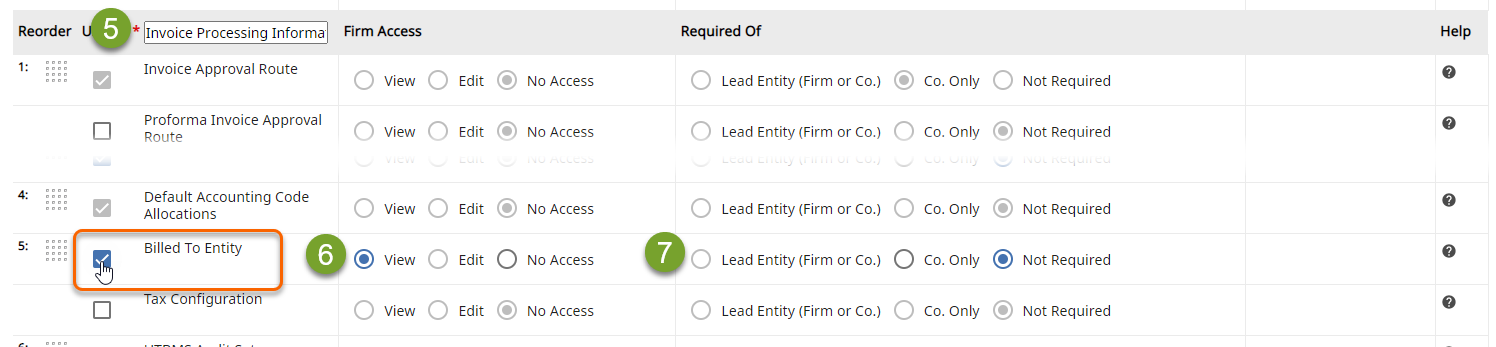
- In theInvoice Processing Informationsection, selectBilled To Entity. TheFirm AccessandRequired ofoptions are activated.
- Select the level of access you want to give firm users.
- UnderRequired Of, selectCo. Onlyto require the matter creator to select the Billed To Entity, orNot Requiredto make the Billed To Entity selection optional.
- On the toolbar, selectSave & close.
Tip | You can use the Bulk Update function to add Billed to entities to matters.
note
If a Billed to entity is included in an invoice and you would like it to appear in the AP batch files sent to your AP department, you must configure the invoice spreadsheet and invoice summary to include the Billed to entity.
Related Content
-
Billed-to entity validation
Format: Article