
Add Record
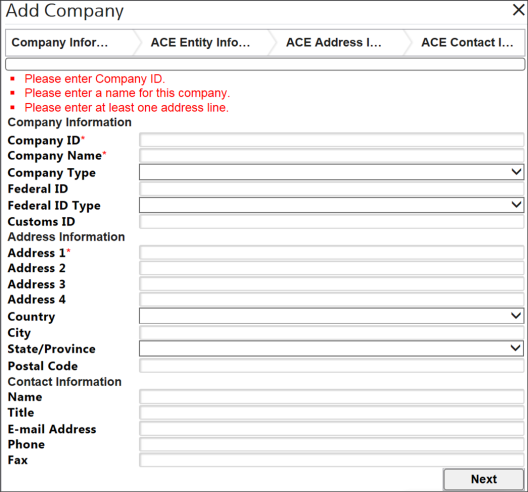
You have the ability to add companies and other entities to the
Company Maintenance
grid.To add a new entity.
- ClickNewto open a pop-up that contains the required data entry fields to manually enter and save a new company or other entity.
 If a field has an asterisk (*) beside it, that field is required and cannot be omitted.
 - Enter any available data.
- ClickNextto proceed to the next section of the pop-up.
- On the last section, clickFinishto save all information and return to theCompany Maintenancescreen. The new entity will appear in the grid below.
At any time, clicking
X
on the top right of the pop-up will close the pop-up without saving any changes.Field | Description |
|---|---|
Company ID* | An alphanumeric code used to reference the entity/company throughout all purchased Integration Point solutions. This is your unique identifier for each entity/company. |
Company Name* | The name of the entity/company as it will appear on legal documentation. |
Company Type | Choose a company type (e.g. Broker, Carrier, Importer, etc.) from the drop-down list. This is the type of business the entity/company conducts. |
Address | The street number and street name of the entity/company’s address of operation. |
Address 2 | Additional address information for the entity/company (Suite, PO Box, etc.). |
Address 3 | Additional address information for the entity/company. |
Address 4 | Additional address information for the entity/company. |
Country | The country where the entity/company is located (selected from the drop-down list). |
City | The city in which the entity/company is located. |
State | The state in which the entity/company is located (selected from the drop-down list). |
Postal Code | The postal code for where the entity/company is located. |
Related Content
-
Company Maintenance
Format: Article