
Viewing Failed Emails (Bounceback Emails)
The
Bounceback Emails
screen can be used to monitor undelivered e-mails so users can act accordingly. This screen can be accessed by selecting Tools
from the user menu and then selecting Bounceback Emails
.
In this screen, ONESOURCE FTA Management you will have access to the
FTA Solicitation Bounceback E-mails
dock. Additional information about the e-mail(s) that bounced back will become visible, including the recipient who failed to receive the e-mail in either the To Addresses
or CC Addresses
columns.
This screen can be filtered to show only e-mails containing certain specific information or that bounced during a specified period of time.
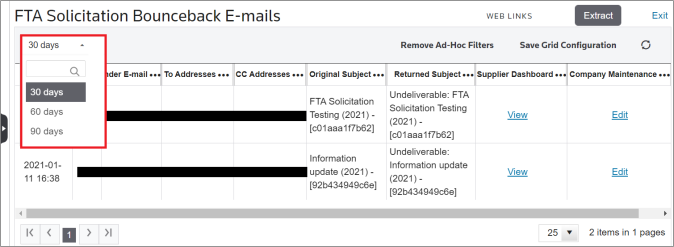

In the
FTA Solicitation Bounceback E-mails
dock, clicking on a View
link will redirect you to the specified Supplier Dashboard or Company Maintenance record that was connected to the undelivered e-mail.


Related Content
-
Email Bounceback Management
Format: Article