
DPS Management: Retrieving Archived Screening Records
In the DPS Management screen, it is possible to:
- Retrieve data you had archived in the past, enabling you to request data when necessary.
- Require additional years to be restored into the application, beyond those already requested.
- Extend the expiration date for data currently restored.
important
Refer to the # guide to learn how to require additional years to be restored into the application or extend the expiration date for data currently restored.
important
The
Current status
column is not available when querying retrieved archived records..Access archived data from a period before the dates shown as available on the
DPS Management
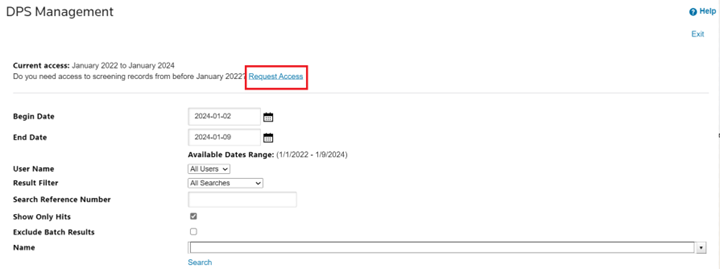
screen by following these steps:1. In the
DPS Management
screen, select Request Access
.
2. Fill out the
Archive Access Request
.• Choose the desired period from the dropdown.
• Provide a brief and relevant reason in the
Reason for request
* field.(Both steps are mandatory.)
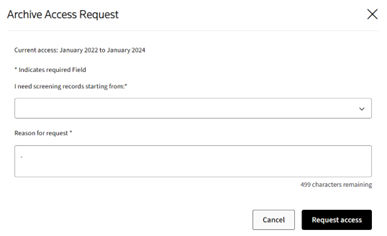
3. Select
Request access
.On the
DPS Management
screen, you will receive a notification of when your request is approved, and you will also be able to view these records in your DPS Management
search results. You will also be able to view these records in
DPS Management
search results.Related Content
-
DPS Archive Settings: Configuring Data Retention and Access
Format: Article