
FTA: Core Materials - BOM Core Parts
The
BOM Core Parts
tab is used for the following processes:- Uploading a list of Core Materials from an external Microsoft Excel spreadsheet
- Adding a new Core Material to theBOM Core Partsgrid
- Modifying (editing) an existing Core Material on theBOM Core Partsgrid
- Removing (deleting) an existing Core Material from theBOM Core Partsgrid
- Extracting a list of Core Materials into a Microsoft Excel spreadsheet
These processes are covered in more detail in the sub-sections below.

Uploading a Spreadsheet
To upload a spreadsheet:
- Click on theChoose Filebutton.
- Select a spreadsheet.
- After a spreadsheet has been selected, click on theUploadbutton. The contents of the spreadsheet will then populate into theBOM Core Partsgrid.
The spreadsheet must be in the exact same format as the spreadsheet that can be extracted in the
Extract Core Material
section of this help.
Adding Core Material
To add a new core material:
- Click on theAdd Core Materialsbutton. A row of read-write fields will then appear at the top of the grid.

- Enter the required information (at least Parts, Component, and HTS are mandatory).
- ClickInsert.

Editing Core Material
To edit an existing core material:
- Choose a core material from theBOM Core Partsgrid.
- Click on its correspondingEditbutton.The fields for the core material’s row will now be in read-write format.

- Make any necessary changes.
- ClickUpdate.

Deleting Core Material
To delete an existing core material:
- Choose a core material from the grid.
- Click on its correspondingDeletebutton.
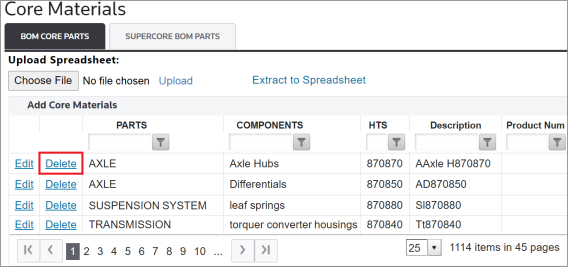
A confirmation pop-up will then appear on the screen. To confirm removal of the core material, click
OK
.
Clicking
OK
will remove the core material from the grid. A system message will also appear on the screen, stating that the core material was successfully removed.
Extract to Spreadsheet
To extract a complete list of all core materials, click on the
Extract to Spreadsheet
button. Clicking this button will trigger the system to generate a Microsoft Excel spreadsheet containing all contents of the grid. This spreadsheet can then be downloaded and worked on outside of the system.If you make changes to that spreadsheet and saves it, it can then be re-loaded into the system. Steps on how to perform this task are listed in the
Uploading a Spreadsheet
section of this chapter.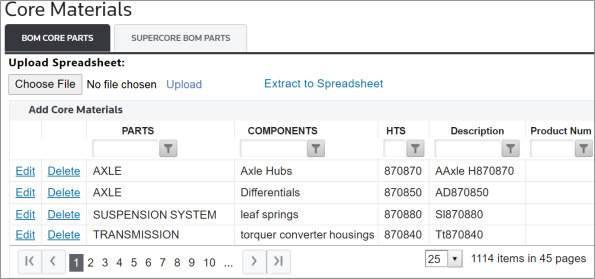
Flex Fields
Flex fields are optional supplemental fields that can be added to the
BOM Core Parts
grid. These fields can be used to identify core parts in order to meet the Light Duty requirements within the USMCA agreement.If your system has not been configured to use flex fields but are interested in adding them, please reach out to your system administrator.

Related Content
-
FTA: Core Materials
Format: Article