
FTZ Management: Preparation - FIFO Processing Correction (Editing Production Data)
The
FIFO Processing Correction
screen retrieves transactions downloaded from the staging table and can be used to review and edit production data. To access the
FIFO Processing Correction
screen:- ChooseFIFO Processing Correctionfrom thePreparationmenu.
- Use theFilter bydrop-down to choose a filter option. The secondFilter bydrop-down can be used to further refine a search.
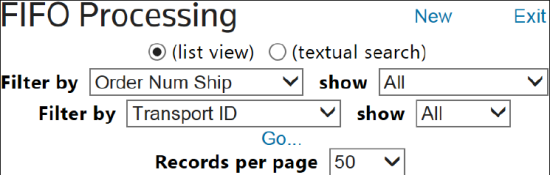
- To update or delete a transaction, clickEdit.

- All FIFO Processing fields will be visible for editing. The fields a user will need to edit will vary depending on the specific Transaction Code being updated. Make any necessary changes.
- ClickSaveto save changes orDeleteto delete the record.
- ClickExitto return to the mainFIFO Processingscreen.

Source Fields and Default Sources
Many of the fields in the FIFO transaction tables (txdFIFOProcessing/HTSValues) have source fields for the data elements that can be utilized to pull the data from various maintenance tables:
SOURCE FIELD | DATA SOURCE |
|---|---|
I | Item Master |
M | Manufacturer ID |
H | HS Codes |
C | Item Master Custom Rules |
P | Pre Receipts |
(Blank) | User Company’s ERP System |
You can edit data in
FIFO Processing
or Transaction Correction
to set ‘Default Sources’ for any of the following source fields. Default Source = I (tmdItemMaster/HTSValues) |
|---|
ProductTypeCodeSource |
ProductDescSource |
NaftaCertifiedSource |
TxnQtyUomSource |
WeightSource |
WeightUomSource |
StatusCodeSource |
CountryOfOriginSource |
ManufacturerIDSource |
HtsIndexSource |
HtsNum2Source |
ValueSource |
Value2Source |
CurrencyCodeSource |
AltValueSource |
AltValue2Source |
AltCurrencyCodeSource |
HtsUomConvFactorSource |
AddlHtsUomConvFactorSource |
ADDutyRateSource |
CVDutyRateSource |
RCO21Source |
RCO22Source |
RCO23Source |
ReceiptSupplementSource |
RPO11Source |
RPO12Source |
RPO13Source |
DEFAULT SOURCE = H (TMDHTS) |
|---|
HtsNumSource |
SpiCode1Source |
SpiCode2Source |
HtsDescSource |
AdValoremRateSource |
SpecificRateSource |
RptQtyUomSource |
AddlRptQtyUomSource |
AddlSpecificRateSource |
Default Source = M (tmfManufacturer) |
|---|
RelationshipFlagSource |
Note that for positive adjustments (i.e., transactions with TxnCode = ‘APPC’ or ‘APIM’), the system will utilize the Default Source (superseding the Source Field value) for data elements that are relevant to the CBP, such as:
- CountryOfOriginSource
- HtsNumSource
- ManufacturerIDSource
- ValueSource
The following fields are "open" fields that can hold additional FIFO transaction date elements. These allow you to work with the Thomson Reuters implementation team to decide which fields will be of greatest use to your business environment.
Open parent record fields (txdFIFOProcessing) | Open child record fields (txdFIFOProcessingHTSValues) |
|---|---|
RPO11 | RCO21 |
RPO12 | RCO22 |
RPO13 | RCO23 |
The following
Additional Data
fields can hold additional FIFO transaction date elements. These data fields are not typically needed, but special processing scenarios may require additional information. ADDITIONAL DATA THAT MAY BE NEEDED (NOT REQUIRED) |
|---|
HTSNum |
HTSIndex |
FifoGuid |
CAProvince |
CAProvinceSource |
GrossWeight |
GrossWeightSource |
NetWeight |
NetWeightSource |
OtherHTSUomConvFactor |
OtherHTSUomConvFactorSource |
OtherRptQtyUom |
OtherRptQtyUomSource |
SupplierID |
SupplierIDSource |
CountryOfOriginExportDate |
CountryOfOriginExportDateSource |
EndUse |
EndUseSource |
Quality |
QualitySource |
Size |
SizeSource |
Gender |
GenderSource |
Style |
StyleSource |
MultiHTSSequence |
MultiHTSSequenceSource |
License1 |
License1Type |
License2 |
License2Type |
ADUnitValue |
ADQtyConv |
CVUnitValue |
CVQtyConv |
Related Content
-
FTZ Management: Preparation - Loading Integration Files and File Load Manager
Format: Article
-
FTZ Management: e214 - Understading the Process
Format:
Article