
FTZ Management: Preparation - Receipt Data Input - Manually Entering Adjustments and Receipts
The
Receipt Data Input
screen is used for the manual entry of positive adjustments and receipts into FTZ Management. This screen can be accessed by choosing Receipt Data Input
from the Preparation
menu. Several of the options and default values presented on this screen are configurable. Should your company require any further changes, please contact Support.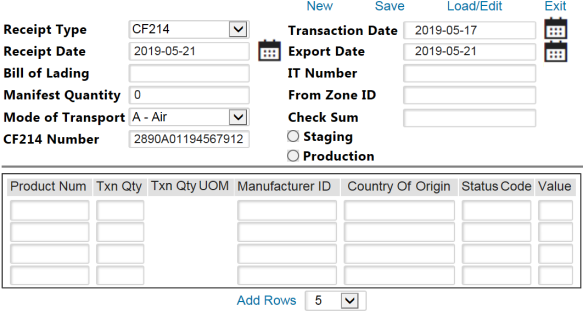
Receipt Data Input Table
Required Fields
Receipt Data Input (Required Fields) | Description |
|---|---|
Receipt Type | Use this drop-down to choose a receipt type: CF214, CF7501-01, Positive Adjustment, Basic Receipt, or Negative Receipt. |
Staging/Production | Staging enters the manual transaction to the staging table to be downloaded via the Staging Data Process .
Poduction enters the manual receipt to the processing table to be processed alongside the current batch of transactions.important
If receipts and adjustments are being added using the Production radio button, the Staging Data Transfer step must be completed first. If this step is skipped, the Staging Data Transfer process will delete any transactions currently within the processing tables. |
Check Sum | This quantity must equal the total TxnQty of the items being entered. |
(Other Fields) | Additional required fields may vary depending on which Receipt Type was selected. |
Actions
Receipt Data Input (Actions) | Description |
|---|---|
Save | Generates a new transaction. |
New | Refreshes the “Receipt Data Input” screen. |
Load/Edit | Retrieves the previously generated transactions after the user enters the header information and clicks this link. |
Add Rows | Adds another entry row. |
Transaction Types
Manual Receipt Transaction Types | Description |
|---|---|
Positive Adjustment | Creates an APPC/APIM transaction that will appear on a CF214 for reporting to CBP if a foreign layer is created. Depending on which status code was given to the transaction for the adjustment logic, some adjustments may be duty-liable. |
Negative Receipt | Creates an RNPC/RNIM transaction, which will back out inventory that match on Country of Origin, Status Code, and Product Number. |
Basic Receipt | Creates an RPPC/RPIM transaction that will be reported on a CF214 if the status code is foreign. This way, the receipt is properly reported to CBP. |
Related Content
-
FTZ Management: Preparation - Loading Integration Files and File Load Manager
Format: Article
-
FTZ Management: Knowledge Based Articles - Positive Adjustment Processing
Format:
Article
-
FTZ Management: e214 - Understading the Process
Format:
Article