
Transmitting AES Records From AES Management
To select multiple AES records for transmission:
- Determine which records are to be transmitted.
- Check their corresponding boxes.

To select all AES records for transmission:
- Check the Select All box in the column header bar.

- After all records to be transmitted have been selected, click theTransmit Selectedbutton.

In order for transmission to take place, at least one shipment must be selected. If no shipments were selected, the below error message will appear:

Clicking
Transmit Selected
will open the Confirm Transmission
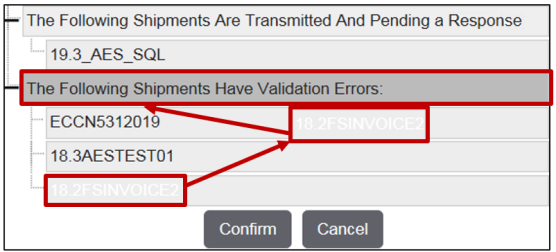
pop-up. This pop-up will display:- Which shipments are to be transmitted
- Which shipments are currently awaiting a reply from U.S. Census
- Which shipments cannot be transmitted due to validation errors
Review the contents of the pop-up. If any further changes need to be made, click
Cancel
and make the necessary changes. If no further changes need to be made, click Confirm
.
The categories within the
Confirm Transmission
pop-up can be collapsed or expanded. Clicking on the border will hide the records within that category. Clicking on the border a second time will re-expand the section.The order of shipment records can also be adjusted.
To perform this task:
- Choose a record to be moved.
- Click on the record and drag to the desired location.
After the selected shipment(s) have been transmitted, the data will be transmitted to AES and you will receive an automated e-mail message similar to the one below:

Related Content
-
Automated Export System (AES)
Format: Article