
1120-PC print suppression options
- In Organizer, selectLoss Reserve Discounting, thenOptions, thenPrint Suppression.
- On theGlobalpage, the Global LRD Print Suppression Options let you suppress the following items by selecting the check box:
- Loss Reserve Discounting Summary
- Short and Long period summaries
- All detail
- Company payment pattern detail
- Reserve detail
- Group A&H, Other A&H detail
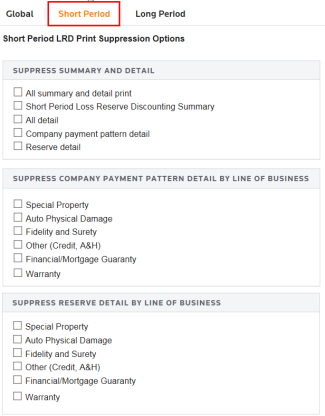
- On theShort Periodpage, the Short Period Suppression Options let you suppress the following:
- Suppress Summary and Detail print items by selecting an item check box.
- Suppress Company Payment Pattern Detail by Line of Business by selecting an item check box.
- Suppress Reserve Detail by Line of Business by selecting an item check box.
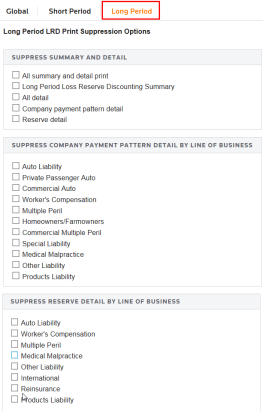
- On theLong Periodpage, the Long Period Suppression Options let you suppress the following:
- Suppress Summary and Detail
- Suppress Company Payment Pattern Detail by Line of Business
- Suppress Reserve Detail by Line of Business
Related Content
-
Loss Reserve Discounting (LRD) for 1120-PC returns
Format: Article
-
Loss Reserve Discounting (LRD) for 1120-PC returns
Format:
Article
-
1120-PC discounting summary
Format:
Article

