
Loss Reserve Discounting (LRD) for 1120-PC returns
Loss Reserve Discounting (LRD) can be performed using 2 methods: company experience or Treasury experience. Our tax software supports both, calculating discount factors up to 14 years past the accident year.
Data requirements for LRD
LRD calculations, including company payment patterns, require data from Schedule P of the Property and Casualty Annual Statement. This information can be imported from NAIC files using either a combined 1120-PC and LRD transfer or a separate LRD transfer. Alternatively, you can manually enter the data into the LRD Annual Statement screens.
Discounting Methods and Defaults
Loss reserves can be discounted using IRS factors or company payment patterns. The system defaults to using IRS factors for LRD. A combination of both IRS factors and company payment patterns is also an option, tailored to the company's line of business.
note
For title insurance companies, IRS discount factors are not calculated for the miscellaneous casualty area.
Challenges with Company Experience Basis
Syncing NAIC files with the LRD schedule in Organizer is not possible when using the company experience basis due to 2 main reasons:
- 2 year data lag:There is a 2-year gap between the NAIC Schedule P data and its use for tax calculations. For instance, 2023 imported Schedule P data is not utilized until the 2025 tax year.
- Historical data requirement:The company experience basis requires a minimum of 5 years of historical payment pattern data, which the current year's NAIC Schedule P doesn't provide.
Example:
To use company experience for discounting loss reserves in the current tax year, a company needs NAIC Schedule P data from the preceding 5 tax years at a minimum. To see how the software performs these calculations, you would need to enter Schedule P data for the 5 years minimum into the Organizer. In practice, our software automatically transfers prior-year Schedule P information for you.LRD lines
The lines of business can be calculated all by 1 method or a combination of 2 methods: the company payment pattern or the IRS payment pattern. The company payment pattern comes from the Annual Statement transfer. The IRS payment pattern is a compilation of the industry averages. You can select the loss reserves by lines; 1 calculated by the payment pattern and the other calculated by the IRS payment pattern.
Compute options
- In Organizer, selectLoss Reserve Discounting, thenOptions, thenCompute Options.
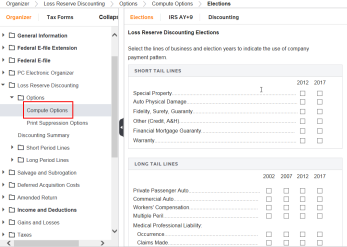
- On theElectionspage, select the lines of business and years to discount using company payment pattern on this page.
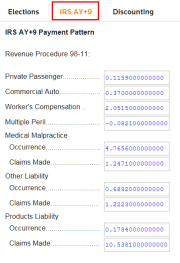
- Select theIRS AY+9page to see the payment pattern the IRS uses in computing discount factors.
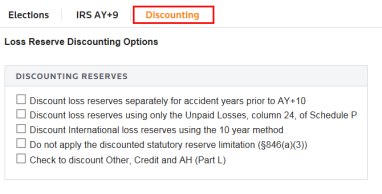
- Select theDiscountingpage for options such as:
- Discount loss reserves separately for accident year's prior to AT +10.
- Discount loss reserves using only the unpaid losses, column 24 of Schedule P.
- Discount International loss reserves using the 10-year method.
- Do not apply the discounted statutory reserve limited (S846).
- Check to discount Other, Credit and AH (Part L).
Related Content
-
1120-PC discounting summary
Format: Article
-
1120-PC print suppression options
Format:
Article
-
1120-PC insurance returns
Format:
Article
-
Salvage and subrogation for 1120-PC returns
Format:
Article
-
1120-PC discounting summary
Format:
Article
-
1120-PC print suppression options
Format:
Article

