
Salvage and subrogation for 1120-PC returns
To calculate the Salvage & Subrogation (S&S) option for the Annual Statement, you need to select Schedule P column 24 for the amounts to flow from the LRD screens to the S&S discount screens.Two methods apply when discounting the S&S area:
- Alternative 1: This method uses the industry pattern.
- Alternative 2: This method uses the same factors used to discount unpaid losses.
S&S options
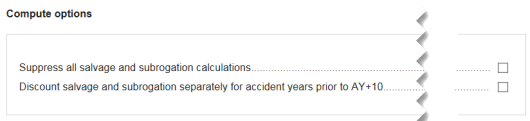
- In Organizer, selectSalvage and Subrogation, thenOptions, thenCompute Options.
- Global Calculation Suppression: 2 options are available to suppress all salvage and subrogation calculations and to discount salvage and subrogation separately for accident years prior to AY+10.
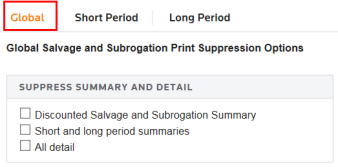
- Print Suppression Options: Select 1 of the first 2 check boxes to suppress various detail summaries or selectAll detail.
- Discounting Summary: This is where you can see the discounting amounts for the short and long period lines. The IRS table is also included here for both short and long period lines. It displays the Salvage Discount factors based on published revenue procedures.
Related Content
-
1120-PC insurance returns
Format: Article
-
Loss Reserve Discounting (LRD) for 1120-PC returns
Format:
Article

