
Return attachments window
The Attachments page shows the list of all returns with attachments. Supporting documentation of any file type can be added to a sheet or cell in a return. There is no restriction on file size or the number of attachments. You can also attach a URL. Sheet-level attachments can be set up to roll forward. This option is specified when the attachment is added to the return.
You can view the attachments added as an additional audit trail, and can also review and edit the attachments. Select a hyperlink in the
Location
column to open the cell that contains the attachment.Select Returns > Attachments to view and manage all attachments in every return.
note
You can also open a return to view the attachments associated with the return.
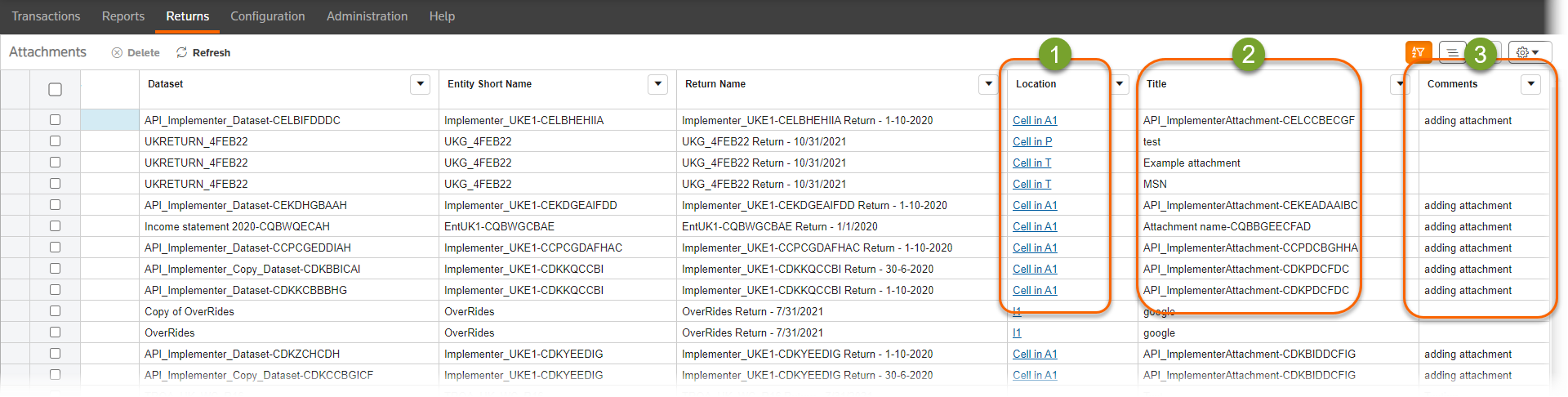
- TheLocationscolumn shows the cell where the attachment is in the return. Select the hyperlink to open the return and sheet to the cell that contains the attachment.
- TheTitlecolumn shows the name of the attachment.
- If a comment was entered when the attachment was created, it is shown in theCommentscolumn.
Related Content
-
Add an attachment to a return
Format: Article,
3 min read
Article,
3 min read