
Sent & received documents
Received
and Sent
views inside Documents-section is where are able to check all the documents that have been successfully sent or received by your company. You can search for a specific document with different identifiers in the search field at the top-left corner such as document number or sender/supplier name. Additionally, you can narrow down your search with different filters.The list of documents offers a selection of columns detailing basic information.
note
Business Status doesn’t tell you whether the invoice was delivered or not, it's a special status that is only used if sending and receiving service provider exchanges business status acknowledgments.
Selecting a document will open a new
Details
window to the left that offers more information. 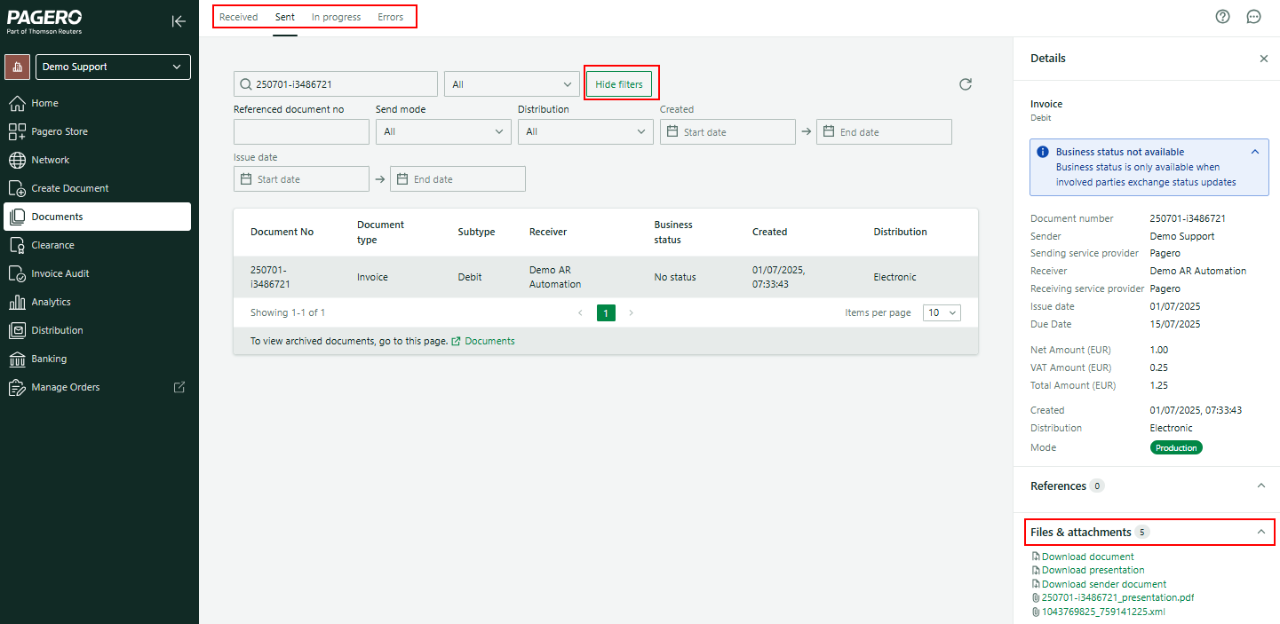
Document number | Document Number |
Sender | Sender name |
Sending service provider | Sender's service provider |
Receiver | Receiver name |
Receiving service provider | Receiver's service provider |
Issue date | When the document issued |
Due Date | When the document is due. |
Net Amount | Net amount |
VAT Amount | Tax amount |
Total Amount | Total amount |
Created | When the document arrived to Pagero's system. |
Distribution | Method of delivery (Electronic, Email, Print) |
Mode | Send type (Production, Test, Certification) |
Additionally, you can find all the related references and attachments in the Details page.
Related Content
-
Documents
Format: Article,
2 min read
Article,
2 min read
-
Documents interface
Format:
Article,
2 min read