
CCH Axcess™ best practices for printing organizers
This article contains information on print settings for CCH Axcess™ organizers that are uploaded to Organizers. Follow these guidelines for an optimal experience. For information on how to prepare batch organizers, refer to Uploading Batch Organizers.
- Engagement letters:Include engagement letters in your CCH Axcess™ organizer so that they transfer into Organizers.
- Print organizers options:
- To use batch processing, organizer file names should be named byName and ID:<YYYY><US><system letter> <Client Name> <Organizer> <Client ID> <V#>Example: (2015USI Smith, John Organizer ABC123 V1)
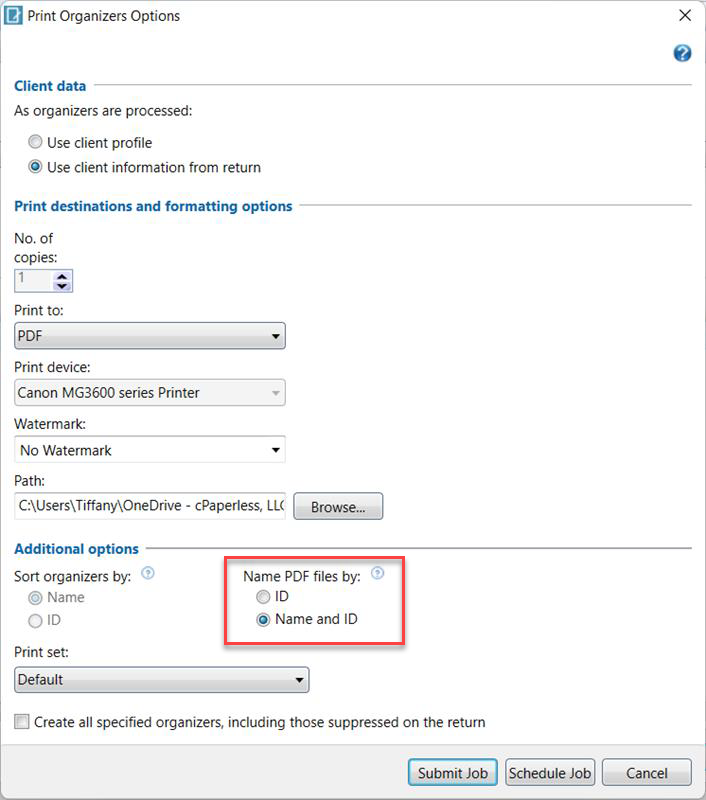
- Don’t customize the questionnaire. Use the default questionnaire in CCH Axcess™.
- Social Security Numbers:We recommend suppressing Social Security numbers when outputting a CCH Axcess™ organizer.
- Checklist Organizer Forms:We recommend using the checklist organizer created by CCH Axcess™. This helps reduce the number of unnecessary pages.
CCH Axcess™ reference documents
The following documents contain additional information about CCH Axcess™ and are hosted in the CCH® Knowledge Base.
note
The content linked is created and maintained by Wolters Kluwer®, makers of CCH Axcess™. If you have trouble with these instructions, or with configuring your product to meet our requirements, please contact Wolters Kluwer® support.