
Maintain an Engagement Disclosure Note Library
One of the common tasks in maintaining a Disclosure checklist in an engagement is creating and maintaining a collection of disclosure notes for the engagement. There are a number of actions you can perform to maintain and update a disclosure note library. Most of these actions are available from a pop-up menu, enabled by right-clicking in the right-hand pane where the disclosure library is displayed. They are also available from the toolbar below the right-hand pane.

Hover your cursor over an icon to see the action.
note
Some actions are contextual and will be grayed out (disabled), depending on the right-hand pane contents and selection.
Add a Note
- While viewing the Disclosure checklist requirements in the main content pane, selectEngagement Libraryfrom the drop-down menu in the right-hand pane to view the disclosure note library for the engagement.
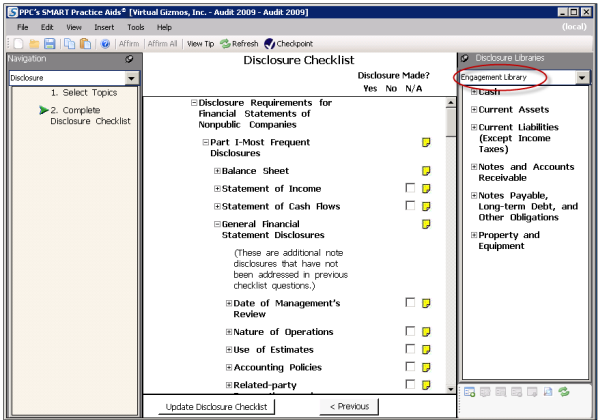
- Right-click in the right-hand pane to open the Disclosure Note action menu.
- SelectAdd New Note to Engagement Library.
- On the Add New Note window, type the title of the Disclosure in theEnter Disclosure Titlefield.noteYou can also add an optional summary of the note by clickingSummary Description. The summary will be visible when the mouse cursor is hovered over the disclosure note title in the library view displayed in the right-hand pane.
- Select the topics you want to assign to the note by clicking in theAssigned Topicsfield. A selection window will open.
- Select the check box next to each topic you want to assign to the disclosure note.
- Enter the text of the disclosure note in the provided field. Use the provided toolbar to format the note text.
- ClickOKto save the note. The new note and assigned topics will display in the right-hand pane with the rest of the disclosure note library content.
Copy a Note from Another Library
- Open the disclosure note library you want to copy from in the right-hand pane by selecting it from the drop-down menu.
- Expand the topic sections to locate the note you want to copy.
- Select and right-click on the note. From the pop-up menu selectCopy to Engagement Library.
- On the Copy to Library pop-up window, select the topics to which the disclosure note most relates by selecting the check boxes next to the topic names.
- Return to the engagement disclosure note library in the right-hand pane to see the copied note under the topics you selected in step 4.
Edit a Note
- Locate the note you want to edit in the right-hand pane.
- Double-click the note title and theEdit Notewindow will display.
- Modify the note text, title, summary description, or assigned topics and clickOKto save the changes.noteThe Edit Note action is also available by right-clicking a disclosure note title in the right-hand pane and selectingEdit Notefrom the pop-up menu.
Delete a Note
- Locate the note you want to delete in the right-hand pane.
- Right-click the note title and selectDelete Note from Engagement Libraryfrom the pop-up menu.
- ClickOKon the confirmation window.
Preview a List of Disclosure Notes
- Locate the disclosure note library you want to review in the right-hand pane by selecting it from the drop-down menu.
- Right-click a note or topic in the right-hand pane.
- SelectView Note(s)from the pop-up menu.
- TheView Notewindow displays the selected note.
- Use thePreviousandNextbuttons to navigate through the disclosure notes.
- ClickClosewhen finished to close the View Note window.
Select Multiple Disclosure Notes
You can select multiple disclosure notes in the right-pane by holding the CTRL key and left clicking the disclosure note titles. You can then access the selected notes by using the
View Note(s)
action (or toolbar icon). Only the selected notes will be visible when you use the Previous and Next buttons on the View Note window. Then you can review a specific set of notes within a larger note library without having to navigate through the entire collection of notes.Disclosure Notes and "Unassigned" Topics
It is possible for a disclosure note's assigned topic to be removed as the result of rolling forward an engagement or updating a checklist to a later version. When this occurs, the disclosure notes assigned to the removed topic are listed under a topic labeled "Unassigned." Resolve this issue by assigning these notes to other related topics or by deleting them from the disclosure note library.