
Edit SMART Docs Properties in Workpapers CS
You can edit the properties of the generated SMART workpapers from within Workpapers CS.
To edit SMART document Properties from Workpaper CS:
- SelectPropertiesfor a SMART doc to open theWorkpapers Propertiesdialog in Workpapers CS.
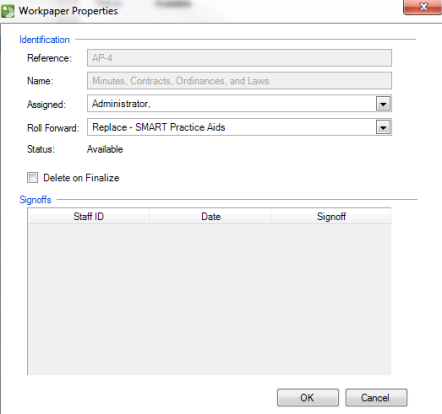
- In the open dialog box, you can edit theAssigned,Roll Forward, andDelete on Finalizeoptions.noteReferenceandNameproperties below Identification will be unavailable for editing. Also, enablingDelete on Finalizecheck box will delete the workpaper from Workpapers CS only. The deleted workpaper will still be available in SMART.
- You can also setRoll Forwardproperties for the SMART workpaper. This will be useful when you roll forward a linked SMART engagement. The following two options are available in theRoll Forwarddrop down for a workpaper:
- Replace - SMART Practice Aids- Selecting this option will create aplaceholderworkpaper in the rolled forward engagement in Workpapers CSEngagement Bindersscreen. Upon completing and saving the rolled forward workpaper in SMART, the placeholder workpaper for the rolled forward engagement in Workpapers CS will be automatically replaced with the updated SMART workpaper.
- Exclude- Selecting this option will exclude the workpaper paper from the rolled forward engagement.
noteRoll Forwardproperties for SMART workpapers can also be defined while Performing a Rollforward in theRoll Forward Wizardof Workpapers CS.