
View the status of a shared element in the download center
Edit a shared source report element and verify that the update propagates to linked copies, with tracking through the Download Center.
Link report elements from the source to target entities to sync changes across all linked copies. Updates apply only when the target financial periods are open. Monitor progress in the Download Center.
- Create a source reporting entity and share a report element.
- Create a target reporting entity and add a linked copy of the shared report element.This connection lets data updates transfer from the source report element to all its linked copies.
- Edit the shared source report element (XML, options, or variables).OSR automatically triggers an Excel link to reflect the status update and creates a transaction.
- OpenAdministration > Download Centerand monitor the transaction.
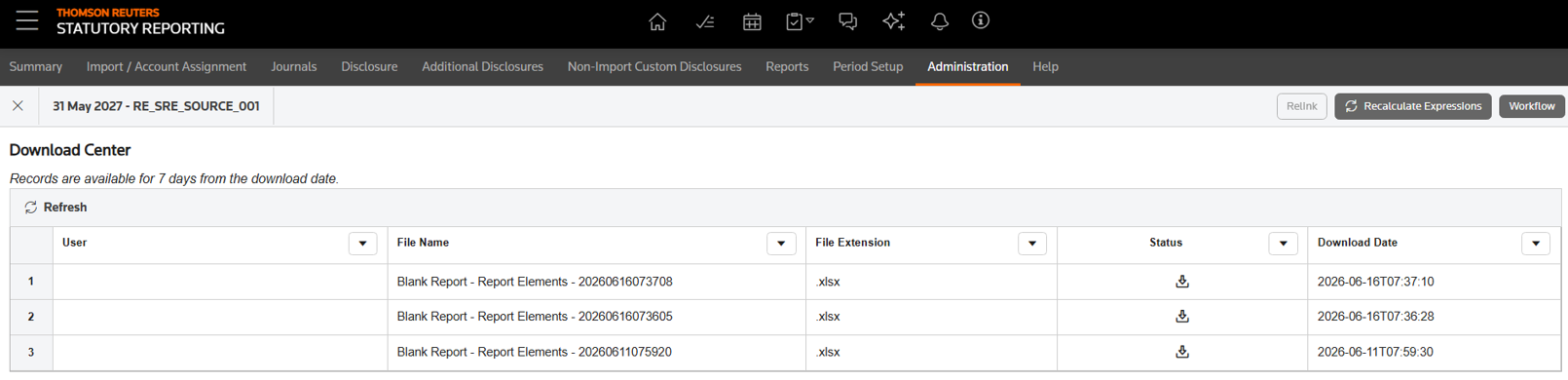 The transaction appears with statusIn Progresswhile processing. Once complete, the status changes toSuccess, and the Excel file becomes available to download.
 - Verify that the target financial period is open.OSR automatically syncs changes to linked copies when the target financial period is open.
- Verify the outcome when the target financial period is closed.No updates are applied to the linked copy in the target, target data remains unchanged, and the Download Center shows the transaction status asFailed.
Related Content
-
Share report element
Format: Article