
Enabling API for your firm
SurePrep's REST API lets you integrate with SurePrep FileRoom to automate and streamline your workflow. This API is organized around REST. We use built-in HTTP features, like HTTP authentication and HTTP verbs, which off-the-shelf HTTP clients can understand. Integrating with SurePrep can help your firm streamline the binder creation process, check binder details, create TaxCaddy clients, create Custom DRL, get billing information, and much more.
Enable API
Follow these steps to enable or turn off SurePrep API for your firm:
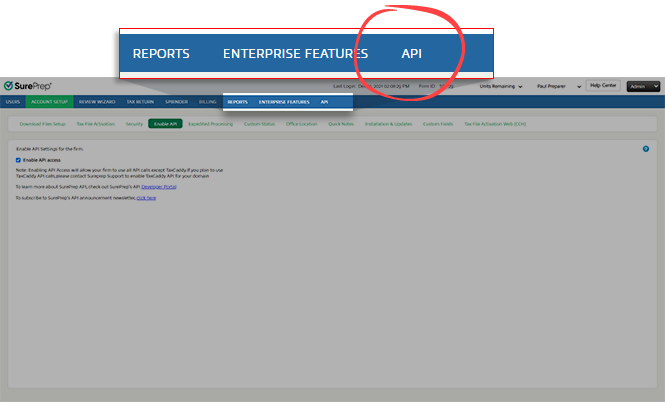
- SelectFileRoom,Admin,Account Setup, thenEnable API.

- Mark theEnable API accesscheckbox to enable API access for your firm.

- API is now enabled. Refresh/reload the page to seeAPIappear in the navigation bar. You can selectAPIto create a new user, and generate a new API Key.
 noteEnabling API access will let your firm use all API calls except TaxCaddy. If you plan to use TaxCaddy API calls, contact SurePrep Support to enable the TaxCaddy API for your domain. TheAPIpage is only visible to the Firm System Administrator.
Once you enable API access, user group permission for the
Firm System Administrator
will show Grant access to API
selected by default. This option is only available for Firm System Administrator
and you can't disable it.
What's next?
- Create a new API user to make API calls.
- To authenticate API calls, generate a new API Key and Token. Use this API token for all subsequent requests during that session (until the token expires).
Related Content
-
Get started with the SurePrep API
Format: Article
-
User Management overview (API)
Format:
Article
-
Set up API Key and Token
Format:
Article
-
Create new API users
Format:
Article

