
Set up API Key and Token
SurePrep API requires you to use the API Key and API user credentials in FileRoom to get an auth token that can authenticate your API request.
Follow these steps to get API Auth token.
Before you begin, enable
API
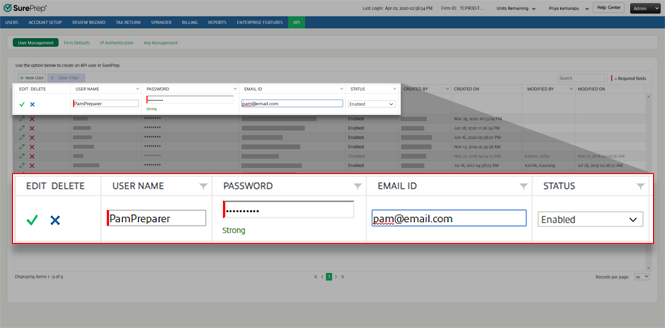
for your firm.- Go toFileRoom > Admin > API > User Managementand create an API user.
- SelectKey Managementthen selectGenerate.

- After generating the API Key, selectCopy Keyto copy the API key to your clipboard. You can pressCtrl+Vto paste the API Key to your code.
 noteTo generate a new API token or API Key, selectRevoketo remove the existing API key, then selectGenerate.
Developer Sample
Next, your firm's developers can use the
GetToken (POST)
API call to get an API Auth Token. You will need to provide API user credentials and API Key from previous steps.// Sample Request with Input Parameters { "userName": "string", "password": "string", "apiKey": "string" } var request = new RestRequest(Method.POST); request.AddHeader("cache-Control", "no-cache"); request.AddHeader("content-Type", "application/json"); request.AddParameter("application/json", "{ userName: 'username', password: 'password', apiKey: 'apikey' }", ParameterType.RequestBody); IRestResponse response = client.Execute(request);
Sample Output:
{ "Token":
       "d2c43eb0-5b43-449b-857b-6f2d5ff96121", "TokenExpiry": "2019-11-06T22:12:16.4109775Z"}
Use this token for all subsequent requests during that session (until the token expires).
RestRequest
       request = new RestRequest(methodName, Method. POST);request.AddHeader("AuthToken",
       authToken);IRestResponse response = client.Execute(request);
Related Content
-
Get started with the SurePrep API
Format: Article
-
Enabling API for your firm
Format:
Article
-
Create new API users
Format:
Article

