
SurePrep API - Binder use cases
SurePrep API Use Cases can help you visualize and plan how to integrate your application with SurePrep. You can walk through the process of identifying methods, creating steps, and running tasks using the SurePrep API.
Create binders (including adding additional documents)
Use this workflow to create binders and add additional documents.
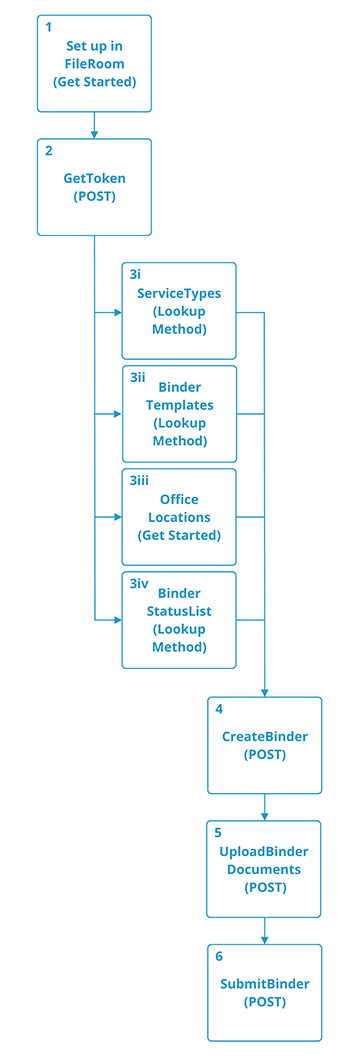
Follow these steps to create a binder:
- Set up
- Get Started with SurePrep API
- Use these methods to get firm-related information you can use in other method calls.
- CreateBinder: You don't need to call this method again when adding additional documents to binders with leadsheets. You can directly callUploadBinderDocuments.
- UploadBinderDocuments: Call this method individually for every document you need to add before calling theSubmitBindermethod.
- SubmitBinder: Call this method only once after you've uploaded all the binder documents.
Create Additive binders
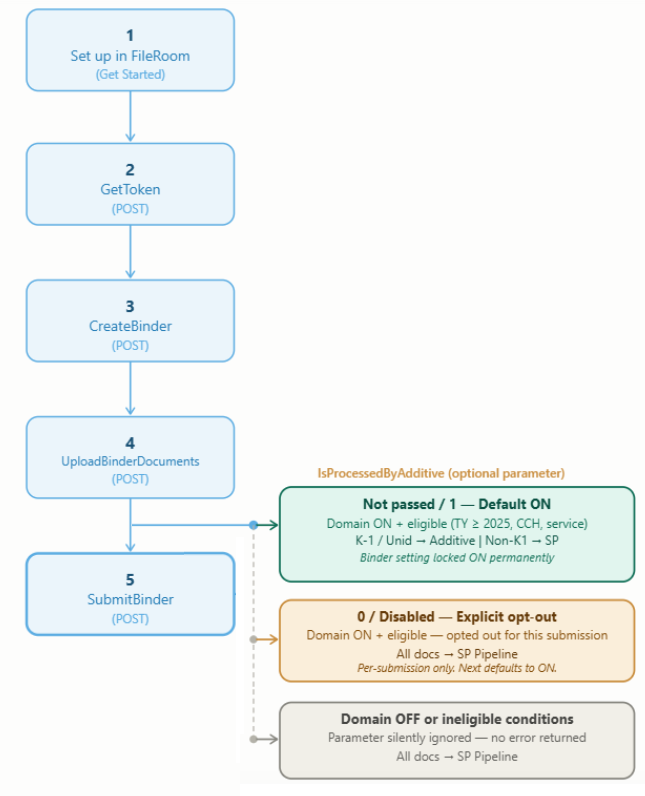
Additive processing must first be enabled at the domain level to allow firms and integration partners to process binders through Additive. Once enabled,
Admin
users can access the Additive Integration
screen under the Review Wizard
tab in Account Admin
.- Get Started with SurePrep API
- SubmitBinder: When submitting a binder for Additive processing, you can configure the input parameter to1.
note
If your domain is configured for Additive processing, however you would not like to avoid Additive processing for this specific binder, configure the
IsProcessedByAdditive
parameter as 0
.
Update binder details
Update binder details.
You can use any of these workflows to update binder details. There are multiple methods available to update different binder details.
Update owner, member, or office location
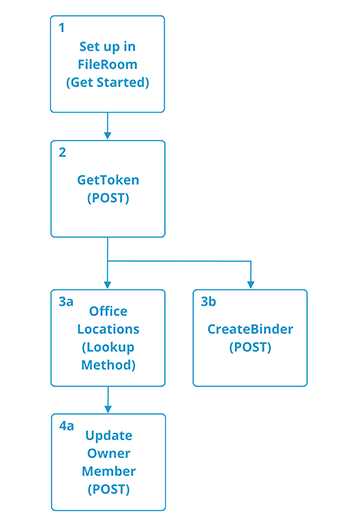
Follow these steps to update an owner, member, or office location:
- Set up:
- Get Started with SurePrep API
- Update owner, member, or office location:
- OfficeLocations (Lookup Method): Use this method to get firm-related information to use in other method calls.
- Update Owner
- CreateBinder: While adding additional documents, you can use this method to update the binder owner.
Update binder status
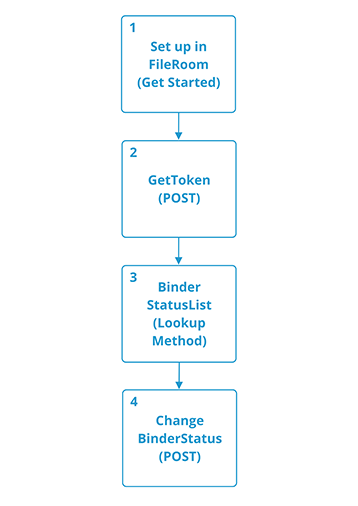
Follow these steps to update binder status:
- Set up:
- Get Started with SurePrep API
- Lookup Method
- BinderStatusList (Lookup Method): Use this method to get firm-related information you can use in other method calls.
- Change Status:
Update Project ID

Follow these steps to update the project ID:
- Set up:
- Get Started with SurePrep API
- Update Project ID
Print and download documents
You can use either of these workflows to print and download documents from the binder. There are multiple ways to initiate the printing of documents for the binder.
Print

Follow these steps to print and download documents:
- Setup:
- Get Started with SurePrep API
- Check Binder Status
- Call the preferred method.
- Receive Print Completed Notification: PushDocumentType (Webhook)
- Download Documents:
- DownloadDocument (Binder)
Print on status change

Follow these steps to print on status change and then download documents:
- Setup:
- Get Started with SurePrep API
- Receive Print Completed Notification:
- PushDocumentType (Webhook): You can trigger print based on binder status change. This lets you begin directly from this webhook method.
- Download Documents
- DownloadDocument (Binder)
Get binder information
Use these workflows to get and/or display general binder details (Status or BinderID, for example).
Get Status, States, and Localities

Follow these steps to get binder Status, States, and Localities:
- Setup
- Get Started with SurePrep API
- Get States, Status, and Localities
- Call the preferred methods.
Get binder details

Follow these steps to get binder information:
- Setup
- Get Started with SurePrep API
- Get Binder Information: GetBinderDetails
Get binder audit log
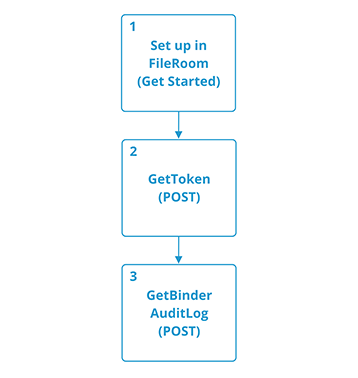
Follow these steps to get a binder's audit log:
- Setup
- Get Started with SurePrep API
- Get binder audit log: GetBinderAuditLog
Get information about pending items
Use any of these workflows to get and/or display pending item details.
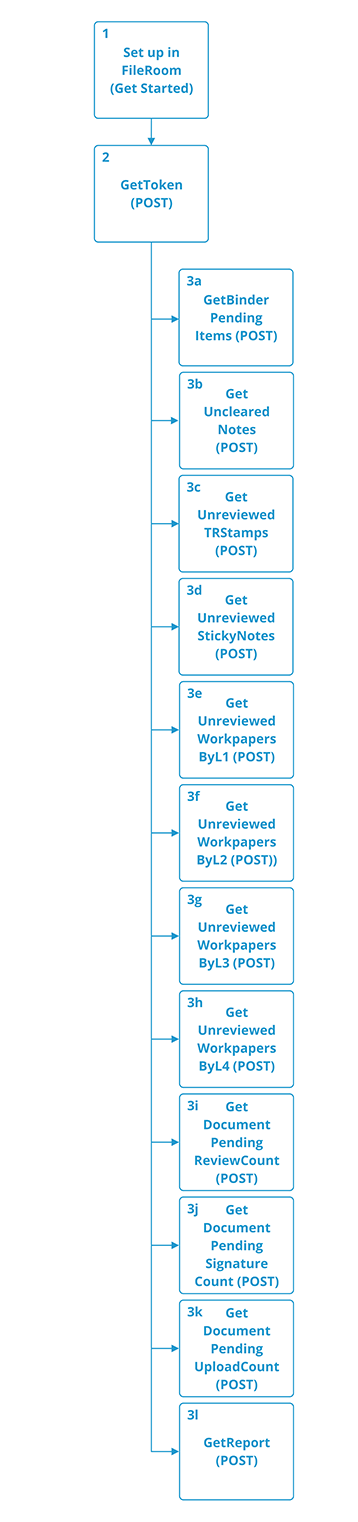
Follow these steps to get pending items:
- Setup
- Get Started with SurePrep API
- Get Pending Items Information
- Call the preferred methods.
- GetBinderPendingItems: Certain output details (Sign, Review, and Upload requests) only apply to clients with TaxCaddy accounts.
- GetDocumentPendingReviewCount - Only applies to clients with TaxCaddy accounts.
- GetDocumentPendingSignatureCount - Only applies to clients with TaxCaddy accounts.
- GetDocumentPendingUploadCount - Only applies to clients with TaxCaddy accounts.
Open binders from your portal
Use this workflow to access binders from your portal.
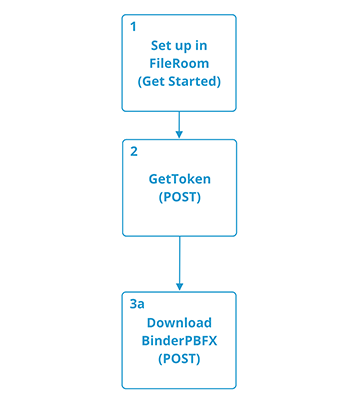
Follow these steps to open the binder from your portal:
- Setup
- Get Started with SurePrep API
Related Content
-
Use API to create binders for GoSystem Tax RS
Format: Article
-
Automatically link new binders with client profiles in TaxCaddy
Format:
Article
-
Use API to create binders for GoSystem Tax RS
Format:
Article
-
Automatically link new binders with client profiles in TaxCaddy
Format:
Article
-
Get started with the SurePrep API
Format:
Article

