
Add a custom status
Adding a custom status can help you track the progress on your clients' binders. You can mark binders with a custom status that can be viewed from FileRoom.
Follow these steps to add a custom status.
- SelectFileRoom, thenAdmin.
- SelectAccount Setup, thenCustom Status.

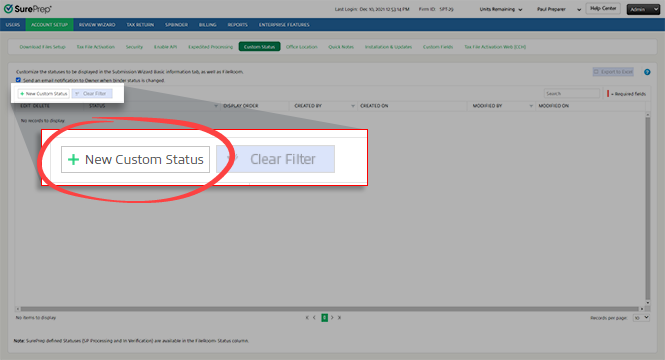
- SelectNew Custom Status.
- When a new row appears, enter a status name in theStatusfield (for example, Verification Complete, In Review, Pending Information, Partner Review, On Extension, Done).noteYou can't add custom statuses with the same name as SurePrep-defined statuses.
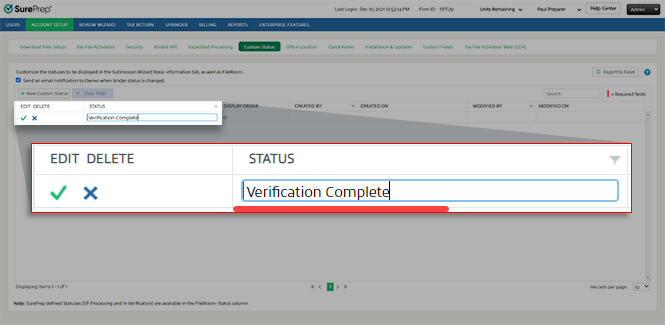
- SelectSave
 to save the new status. Select Cancel
 to close without saving.
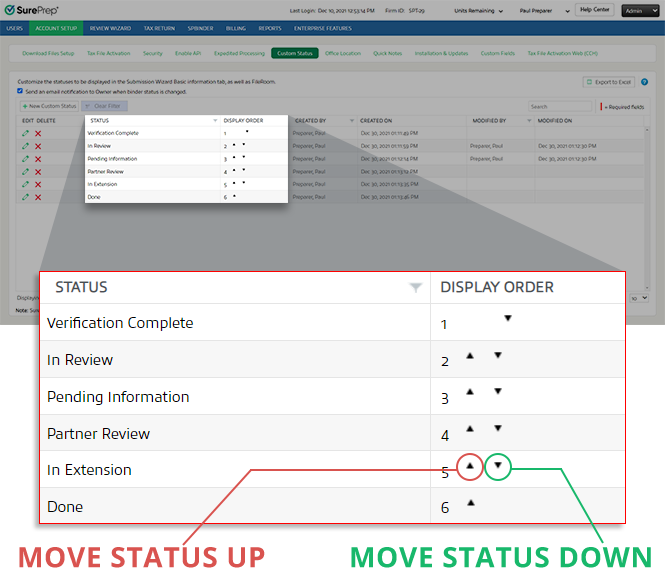
- Once you save your custom status, you can adjust the display order using the arrows in theDisplay Ordercolumn.
Related Content
-
Configure a custom status
Format: Article
-
Edit a custom status
Format:
Article

