
Select tax application files
Submitting binders under most services will require you to upload the client's most recent tax application file details.
The
Select (tax application name) return
panel appears after a template has been chosen under Select Binder Template
because it's specific to the tax application being used.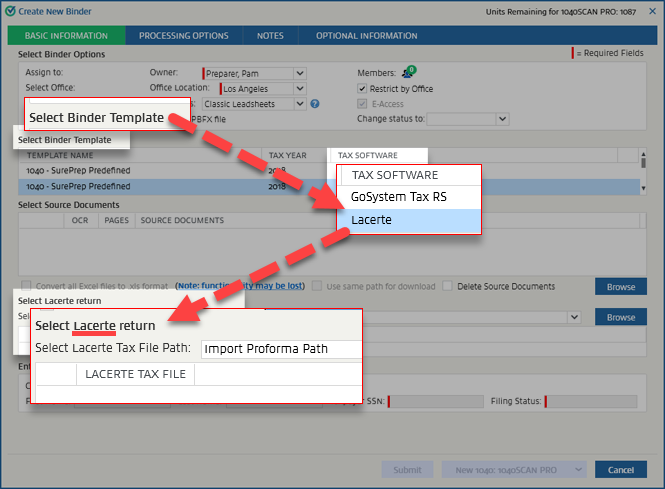
If you've selected a custom binder, you won't need to upload a tax application file, and the
Select (tax application name) return
panel won't appear.You can upload binders as either in-house or outsource services based on the tax application configured by your firm.
The method for uploading the tax application file details differs on your tax application. See the article that corresponds to your tax application.
- GoSystem Tax RS
- Lacerte
- UltraTax CS
- UltraTax CS (Virtual Office CS or SaaS)
- CCH Axcess Tax
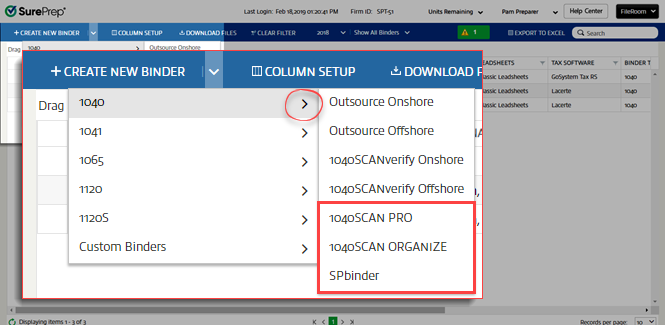
In-house
You can upload binders in the following in-house services:
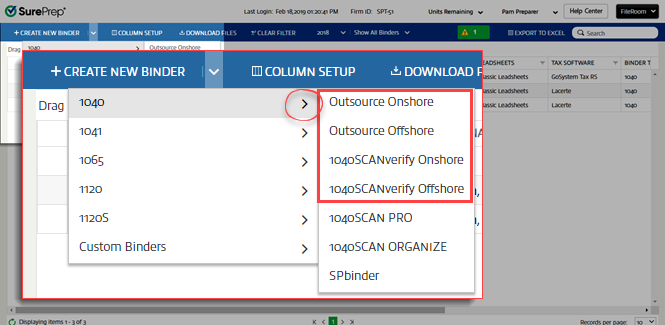
Outsource
You can upload binders in the following outsource services:
Related Content
-
Basic information
Format: Article

