
Distribution information
When creating a binder, you can select if distribution information is available.
Follow these steps to indicate that this is the final year for a trust return:
- Initiate creating a new binder.
- In theCreate New Binderwindow, select theTrust Informationtab.noteTheTrust Informationtab is only available for 1041 Outsource Onshore/Offshore.
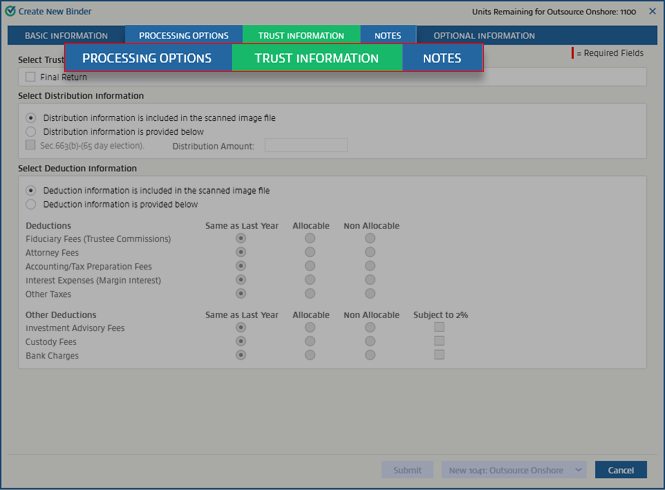
- Go to theSelect Distribution Informationsection.

- If the scanned images provide information regarding distribution, selectDistribution information is included in the scanned image file. This will turn offSec.663(b)-(65 day election)andDistribution Amount.

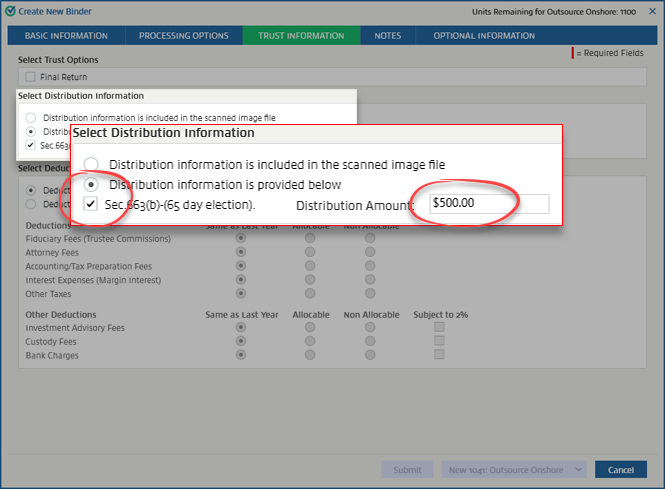
- If the scanned images don't contain distribution information, selectDistribution information is provided below, thenSec.663(b)-(65 day election)if needed, and enter the distribution amount inDistribution Amount.
Related Content
-
Trust information
Format: Article

