
Run SPbinder Diagnostic Tool
If you experience issues with FileRoom or SPbinder, run SPbinder Diagnostic Tool to identify system requirements that you might need to address. Follow these steps to run SPbinder Diagnostic Tool.
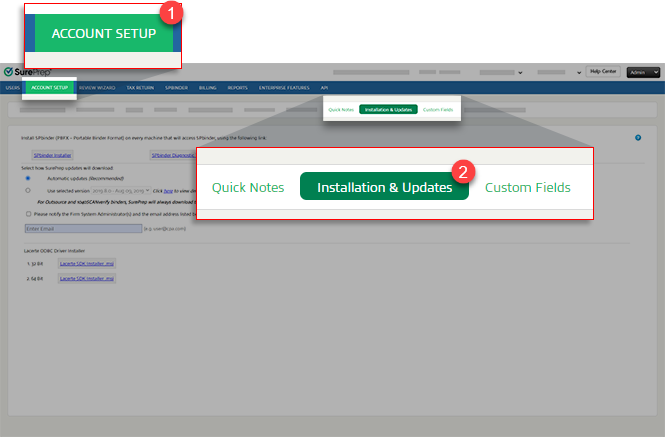
- SelectFileRoom, thenAdmin.
- SelectAccount Setup, thenInstallation & Updates.
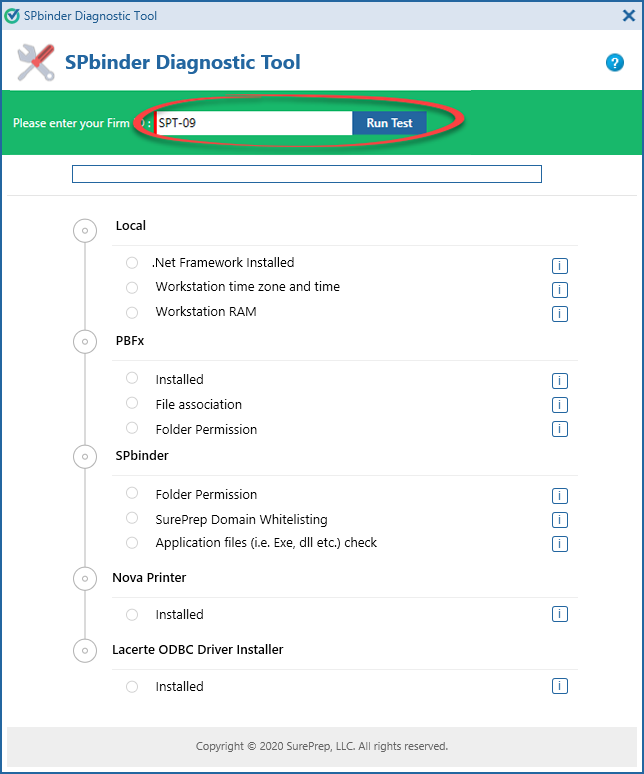
- Enter yourFirm IDthen selectRun Test.
- SPbinder Diagnostic Toolchecks your system. A red cross mark
 indicates an item hasn’t been installed or configured as needed by SurePrep. You should address these items.tipSelect
 for information on minimum requirements.
 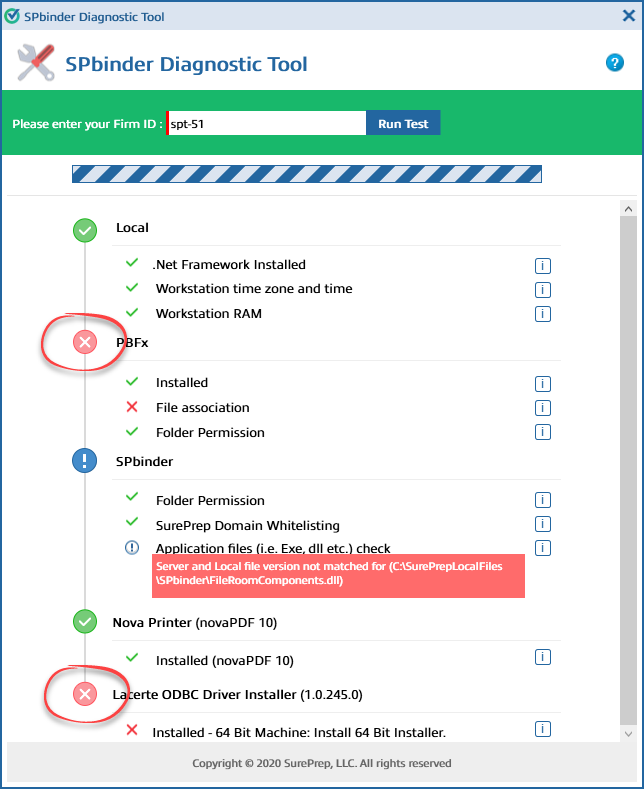 noteYour results may vary based on your domain.
SPbinder Diagnostic Tool results
SPbinder Diagnostic Tool will check for the following results:
Area | Details |
|---|---|
.Net Framework Installed | Checks to see if you have .Net Framework installed on your machine with minimum or later version requirements. |
Workstation time zone and time | Checks if the local time matches the workstation. Resolve : Contact your IT professional to update your workstation to the correct time. |
Workstation RAM | Check if you have the minimum RAM requirement. |
Area | Details |
|---|---|
Installed | Checks if the PBFX application is installed. Resolve : Install SPbinder on your workstation. |
File association | Checks if the PBFX file is correctly associated with the SurePrep application on the workstation environment. Resolve : Set PBFX files to open in SPbinder. |
Folder Permission | Checks if the PBFX folder (C:\Program Files (x86)\SurePrepLLC\PBFX) is set for all users on the workstation. |
Area | Details |
|---|---|
Folder Permission | Checks if the SPbinder folder path (C:\SurePrepLocalFiles) is available for all users on the workstation. Resolve : To check your folder location, go to FileRoom > Account Admin > Account Setup > Download Files Setup . |
SurePrep Domain Whitelisting | Checks if your firm whitelists SurePrep domains and can be accessed by you. Resolve : See what domains and IP addresses need to be whitelisted by your firm. |
Application files (for example, EXE, DLL) check | Check if all the application files are properly installed. Resolve : Uninstall and reinstall SPbinder. |
Area | Details |
|---|---|
Installed (nova PDF 10) | Checks if Nova Printer (print driver) is properly installed and updated on your local machine. You may have issues printing on a local machine if an issue is detected. You will see the current version of Nova Printer in parentheses. Resolve : Update SPbinder to install the current version of SPbinder. If Nova Printer is not updated, then you will need to uninstall and reinstall SPbinder. |
Area | Details |
|---|---|
Lacerte ODBC Driver Installer (1.0.0.298) | (Only for domains using Lacerte tax software) Checks if the Lacerte ODBC driver is installed with the current version. You will need to resolve this option to create binders using Lacerte templates and to create DRL in TaxCaddy. Resolve : Install a Lacerte ODBC driver. |
Related Content
-
Install SPbinder
Format: Article
-
Installation & Updates
Format:
Article

