
2025-11-24 Release (Activate new SurePrep UltraTax CS integration, Updated GoSystem tax file integration, FileRoom enhancements, API Service Expansion)
Release note for November 24, 2025
Hi there! We have exciting updates for you today:
- Activate new SurePrep UltraTax CS integration
- Updated GoSystem tax file integration
- FileRoom enhancements
- Bulk Update
- API Service Expansion
Activate new SurePrep UltraTax CS integration
note
Refer to the
Action Required: Activate New SurePrep-UltraTax CS Integration
article in the Related Content
section for the complete documentation.Starting with tax year 2025, SurePrep has introduced a new, simplified integration process for UltraTax CS customers (local desktop and Virtual Office/SaaS). This
mandatory one-time setup
replaces the previous integration method and significantly reduces the complexity of connecting SurePrep services with UltraTax CS. This is a mandatory, one-time integration that ALL firms using SurePrep and UltraTax CS must complete to create binders and Document Request Lists (DRLs) for the 2025 tax year.
important
New
mandatory
requirements for the upcoming 2025 tax year:- All firms using SurePrep with UltraTax CSmustcomplete this new integration setup oryou will not be able to create binders or Document Request Lists (DRL) for tax year 2025
- Firms using SurePrep Single Sign-On (legacy)mustmigrate to Thomson Reuters SSO as soon as possible. Your firm users will not be able to create binders or DRL for the 2025 tax year until you update your SSO connections. Contact SurePrep Support for more information.
Follow these steps to complete the one-time integration setup:
- OpenUltraTax CS
- Navigate toSetup,System Configuration.
- Select theSurePrep & SafeSend Integrationstab, then theSelect Firm IDbutton.
- Select yourFirm IDfrom the drop-down menu, thenOK.
- SelectEnable SurePrep Integration(if not already selected)
- SelectOKto save all settings.You're now set to create binders for tax year 2025!
- TaxCaddy customers: Firms using UltraTax CS Local Desktop must also assign their UltraTax firm Account Number to clients. In TaxCaddy, use the bulk edit feature to add your firm's UltraTax account number to all the clients.
Key benefits of the new integration:
1. Simplified Setup Process
- Connect UltraTax to SurePrep from one application - No more switching between multiple apps or managing API keys
- Unified process for both Local Desktop and Virtual Office/SaaS
2. Streamlined TaxCaddy Workflow
- For UltraTax local desktop customers, DRLs automatically go directly into the queue without launching a new window
- No more downloading PBFX files
- No more launching separate windows to create DRLs
3. Enhanced Template Selection
- Simplified binder template selection in the Create New Binder window
- One template for all UltraTax CS customers, regardless of Local/Virtual setup
Updated GoSystem tax file integration
Previously, a firm would need to complete SurePrep-GoSystem integration in the
Tax File Activation
window, wait 3 days for account activation, then complete the remaining steps in the Tax File Activation web
screen. We have now improved the integration process by combining all the steps into a single workflow and eliminating the 3-day wait time.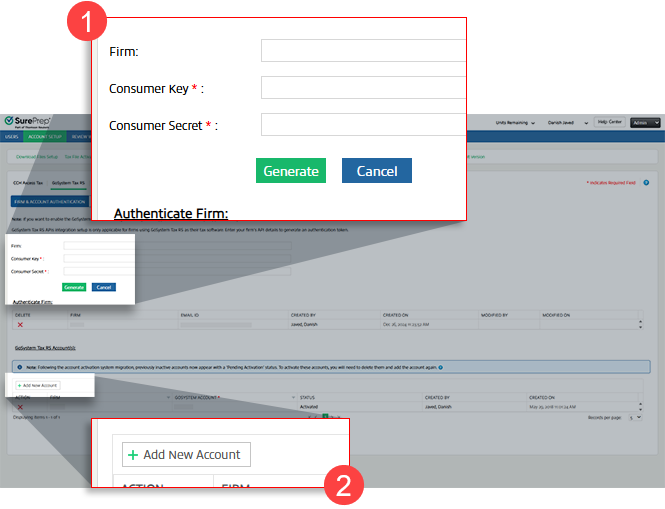
note
Existing GoSystem Accounts have been migrated to
Tax File Activation web
(no further action needed). The integration applies to firms setting up a new connection.FileRoom enhancements
Introducing a new and improved FileRoom interface! This update introduces a tab-based filtering system designed to help you quickly find, review, and resolve issues in your binders. With enhanced navigation, dynamic error displays, and real-time updates, managing your workload becomes easier.
FileRoom Tabs
Each FileRoom tab is there to help you filter your view and focus on reviewing what you need. Select the tab to view the filtered list.
Tabs | Description |
|---|---|
All Binders | Shows all FileRoom binders in one view, irrespective of verification status, errors, or pending actions |
SP Processing | Shows binders that are processing (in SP Processing status) |
User Action Required | Shows binders that require you to take an action. Binder processing can be interrupted for several reasons, like the tax file or locator being open in the tax software or the tax return being password-protected, which would require you to take action. |
SP Action Required | Shows binders with SurePrep system issues; no action is required from your firm. However, if the issue is not addressed in time, contact SurePrep Support for inquiry. |
Verification | Shows binders that are ready to be verified by your firm ( In Verification status) |
Preparation/Review/Finalization | Shows completed and customer status binders. These binders are ready for preparation, review, and finalization by your firm. |
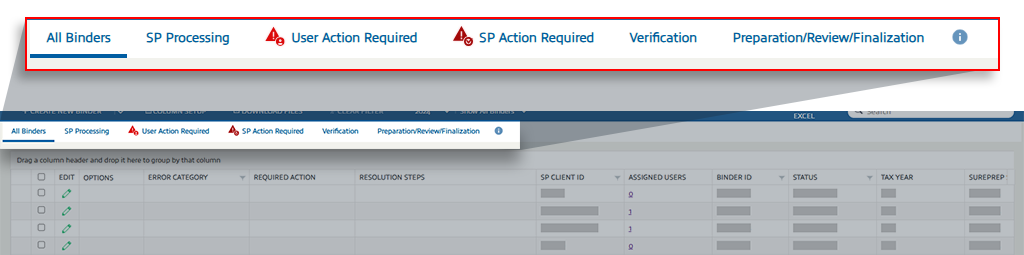
Some binders may require manual intervention to resolve, some need to be resolved by you, and others may need SurePrep to resolve. You will see the following
REQUIRED ACTIONS
:Required Action | When It Occurs | User Action | Appears In |
Resubmit | When a binder is submitted for the first time, and an error occurs during processing before it reaches "In Verification" status | Click the Resubmit button to download a PBFX file, fix the errors in the file, and resubmit the binder. | All binders and User Action Required |
Retry | When an error occurs after the binder has completed the first workflow (e.g., during the export process) | Fix the underlying error and click the Retry button to restart the process that encountered the error. | All binders and User Action Required |
Fix in Progress | When an error occurs that requires technical or support team intervention and cannot be resolved by the user | No action required. Wait for technical support to resolve the issue. | All binders and SP Action Required |
For instance, when you select the
User Action Required
tab, you will see binders that you can resolve based on the description in the RESOLUTION STEPS
column. Take the REQUIRED ACTION
after you've resolved the issue.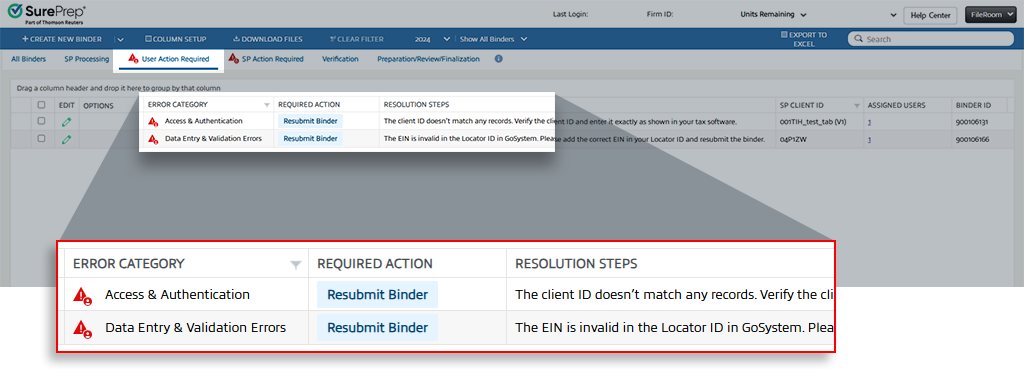
Bulk Update
You can now use the
Bulk Update
feature in Account Admin
to create multiple firm users in bulk. Select the Bulk Update
button to use this feature.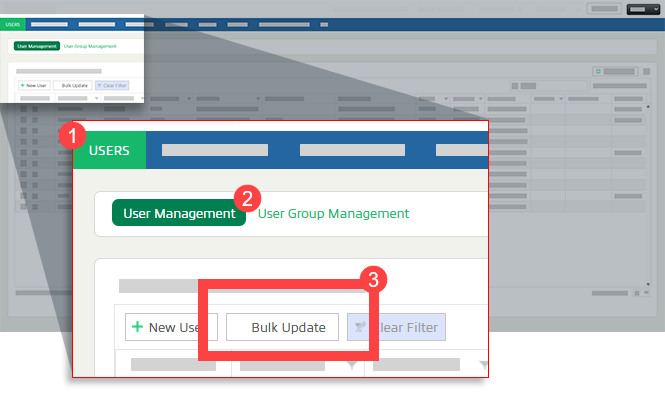
Select the
Download Template
button, add users in the template, select browse on the Bulk Update
modal, and then select Upload
to bulk create users.
note
Currently, you can only bulk create new users. Coming soon in December, you will also have the ability to bulk update users details.
API Service Expansion
UltraTax CS will be supported across all SurePrep APIs, ensuring seamless integration for tax professionals using this tax software. We are also extending support to both 1040SCANPRO and 1040SCANOrganize, further enhancing the range of available solutions with greater flexibility and efficiency.
Along with an expanded availability of supported tax software and services, we're also introducing new API calls that can streamline your firm's tax preparation processes even further:
- SendTaxCaddyInvitation: Allows firms to securely send onboarding invitations to tax clients, granting them access to TaxCaddy for document sharing and collaboration.
- SendTaxCaddyInvitationReminder: Enables firms to automatically send timely reminders to tax clients for pending actions, such as document uploads or task completion.
- GetDRLItems: Enables firms to securely retrieve Document Request Lists (DRLs) created for TaxCaddy clients.
- DeleteDRLItem: Allows firms to efficiently remove specific DRL items from a client’s Document Request List (DRL).
- Drl.status.updated(webhook): Provides real-time notifications whenever a document's status in the DRL is updated or removed
- GetMemberDetails: Retrieves information about members already assigned to one or more taxpayer profiles. Supports querying by single, multiple, or all tax client IDs.
- UpdateMember: Updates the assigned members for one or more tax clients, allowing bulk addition or removal of members.
- GetBinderDetailsByBinderID: Direct binder status checking using Binder ID.
- ServiceUnits(lookup): Comprehensive service unit information retrieval, including the names, service type IDs, and remaining units for each service available to your firm.
note
The documentation is coming soon to Thomson Reuters' Developer Portal. However, you can contact SurePrep Support if you would like to start development now.
Related Content
-
1040SCAN release notes
Format: Article
-
Action Required: Activate New SurePrep-UltraTax CS Integration
Format:
Article
-
Tax File Activation on web for GoSystem Tax RS API
Format:
Article

