
SurePrep enhancements recap for 2025
Review SurePrep's enhancements from 2025
Show all hidden content
We are excited to share all of SurePrep's latest features from the past year. Our team has been dedicated to bolstering our products and workflows to ensure you can enjoy the best possible user experience. Our comprehensive improvements include everything from new integrations to new API calls, all of which are recorded for all audiences looking to get caught up on SurePrep's latest news just in time for tax season.
note
Additional items will be added to the 2025 Recap article!
This article is not an exhaustive list of all the updates that were released this year. Check out the release notes for additional information if necessary.
Select one of the following categories to review its enhancements from 2025:
General
We’ll cover general announcements and enhancements:
Migrate SurePrep SSO to Thomson Reuters Account SSO
We are pleased to announce that you can now migrate your SurePrep SSO (Single Sign-On) accounts to the unified Thomson Reuters (TR) SSO platform. This migration streamlines your experience by enabling a single sign-in session to access both SurePrep and Thomson Reuters Account applications. While it is not currently required, we recommend migrating your SurePrep SSO to TR SSO before December 31, 2025, if possible.
Contact SurePrep Support at SurePrep.Support@thomsonreuters.com to create a ticket for your firm’s TR SSO migration. SurePrep Support team will create a ticket and coordinate with your team to assist with SSO configuration and migration.
When raising your SSO enablement request to our Support team, include the following:
Fields needed | Description |
|---|---|
Company name | Firm/Organization Name |
Contact name | Contact person’s name from your firm who manages the IDP (Identity Provider) application. This can be your Development or IT Person. |
Contact phone number | Contact person’s number from your firm who manages the IDP application. |
Contact email | Contact person’s email from your firm who manages the IDP application. |
Email domain | List of email domains that need to be configured for SSO signin (@example.com) |
Metadata URL | Metadata URL, Example URL format: https://your-idp-domain.com/idp/saml2/metadata |
note
If your organization uses other Thomson Reuters services or applications with the same email domains as FileRoom, all of those TR services or applications will be switched to SSO as well. When TR SSO is enabled, it applies to all services using those email domains; this is an all-or-nothing change. For example, if your firm signs into GoFileRoom with traditional credentials (e.g., Username/Password), then your GoFileRoom will also be switched over to SSO sign-in.
In certain cases, your firm may need to undertake development work. We recommend initiating the process promptly to identify any potential development requirements early.
If you have any questions or need assistance, contact our Support team (sureprep.support@thomsonreuters.com).
Activate new SurePrep UltraTax CS integration
Starting with tax year 2025, SurePrep has introduced a new, simplified integration process for UltraTax CS customers (local desktop and Virtual Office/SaaS). This
mandatory one-time setup
replaces the previous integration method and significantly reduces the complexity of connecting SurePrep services with UltraTax CS. This is a mandatory, one-time integration that ALL firms using SurePrep and UltraTax CS must complete to create binders and Document Request Lists (DRLs) for the 2025 tax year.
important
New
mandatory
requirements for the upcoming 2025 tax year:- All firms using SurePrep with UltraTax CSmustcomplete this new integration setup oryou will not be able to create binders or Document Request Lists (DRL) for tax year 2025
- Firms using SurePrep Single Sign-On (legacy)mustmigrate to Thomson Reuters SSO as soon as possible. Your firm users will not be able to create binders or DRL for the 2025 tax year until you update your SSO connections. Contact SurePrep Support for more information.
Updated GoSystem tax file integration
Previously, a firm would need to complete SurePrep-GoSystem integration in the
Tax File Activation
window, wait 3 days for account activation, then complete the remaining steps in the Tax File Activation web
screen. We have now improved the integration process by combining all the steps into a single workflow and eliminating the 3-day wait time.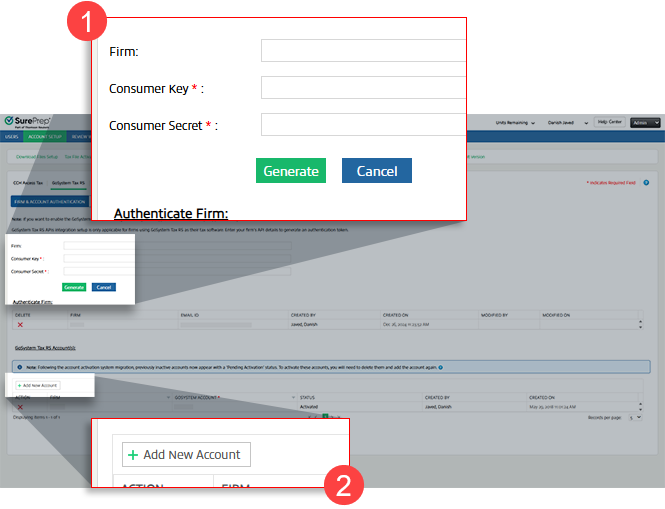
note
Existing GoSystem Accounts have been migrated to
Tax File Activation web
(no further action needed). The integration applies to firms setting up a new connection.Minimum system requirement changes
We are committed to providing you with the best possible experience and ensuring that our software continues to meet modern standards of performance and security. As part of this commitment, we want to update you on an important change to system requirements.
We have updated the following
minimum
system requirements:Component | Specifications |
|---|---|
.NET framework | 4.8.1 |
Operating System | Windows 11 |
Windows Server | Windows Server 2022 |
FileRoom/Account Admin
We’ll cover the following new enhancements in FileRoom/Account Admin:
FileRoom enhancements
Introducing a new and improved FileRoom interface! This update introduces a tab-based filtering system designed to help you quickly find, review, and resolve issues in your binders. With enhanced navigation, dynamic error displays, and real-time updates, managing your workload becomes easier.
FileRoom Tabs
Each FileRoom tab is there to help you filter your view and focus on reviewing what you need. Select the tab to view the filtered list.Tabs | Description |
|---|---|
All Binders | Shows all FileRoom binders in one view, irrespective of verification status, errors, or pending actions |
SP Processing | Shows binders that are processing (in SP Processing status) |
User Action Required | Shows binders that require you to take an action. Binder processing can be interrupted for several reasons, like the tax file or locator being open in the tax software or the tax return being password-protected, which would require you to take action. |
SP Action Required | Shows binders with SurePrep system issues; no action is required from your firm. However, if the issue is not addressed in time, contact SurePrep Support for inquiry. |
Verification | Shows binders that are ready to be verified by your firm ( In Verification status) |
Preparation/Review/Finalization | Shows completed and customer status binders. These binders are ready for preparation, review, and finalization by your firm. |
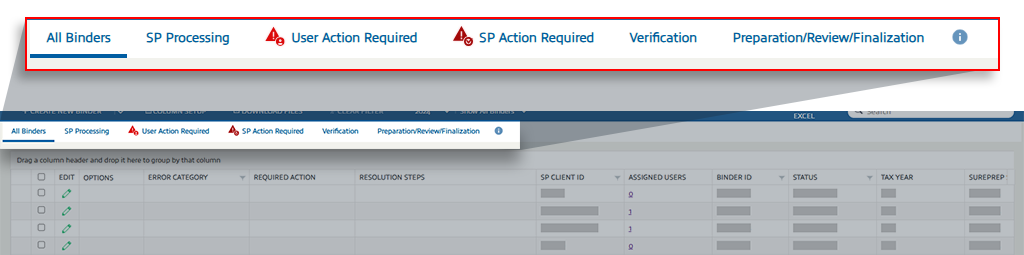
Some binders may require manual intervention to resolve, some need to be resolved by you, and others may need SurePrep to resolve. You will see the following
REQUIRED ACTIONS
:Required Action | When It Occurs | User Action | Appears In |
Resubmit | When a binder is submitted for the first time, and an error occurs during processing before it reaches "In Verification" status. | Select the Resubmit button to download a PBFX file, fix the errors in the file, and resubmit the binder. | All binders and User Action Required |
Retry | When an error occurs after the binder has completed the 1st workflow (for example, during the export process) | Fix the underlying error and select the Retry button to restart the process that encountered the error. | All binders and User Action Required |
Fix in Progress | When an error occurs that requires technical or support team intervention and can't be resolved by the user. | No action is required. Wait for technical support to resolve the issue. | All binders and SP Action Required |
Hide Error Columns
In FileRoom, the ' After you log in, users will now also see a pop-up notification that displays the number of binders in error in your firm's account. You can select the link to switch to the relevant tab in FileRoom directly. The table is broken down into the following two error categories:
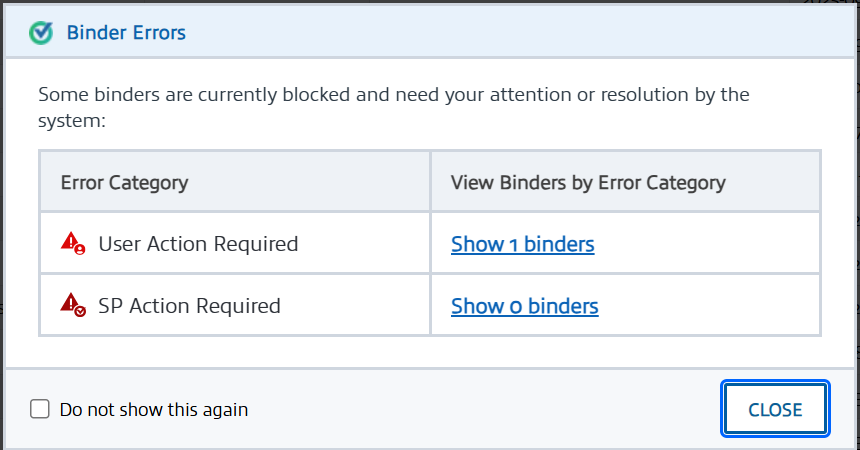
All Binders
' tab shows users three columns that highlight if a binder is in error and what actions are required to resolve the error. However, these three columns may not always be needed (as in ERROR CATEGORY
, REQUIRED ACTION
, RESOLUTION STEPS
). With this new enhancement, users can now select the Hide Error Columns
button to hide the error columns.After you log in, users will now also see a pop-up notification that displays the number of binders in error in your firm's account. You can select the link to switch to the relevant tab in FileRoom directly. The table is broken down into the following two error categories:
- User Action Required: Binders in error that can be resolved by a user at the firm.
- SP Action Required: Binders in error that can be resolved by SurePrep.
note
You can select '
Do not show this again
' to permanently dismiss this notification from appearing in the future. To enable this feature again, please contact Support.Bulk Update
You can now use the
Bulk Update
feature in Account Admin
to create multiple firm users in bulk. Select the Bulk Update
button to use this feature.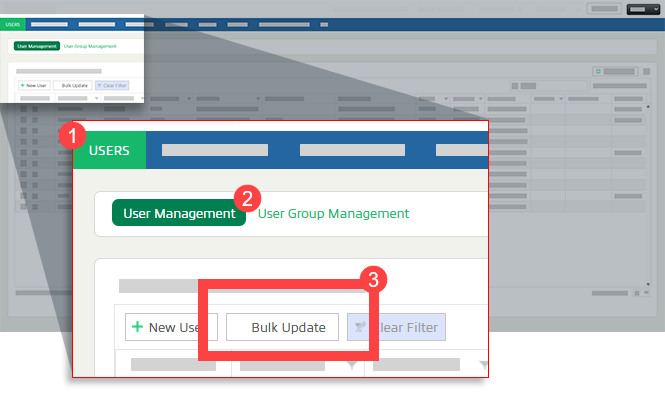
Select the
Download Template
button, add users in the template, select browse on the Bulk Update
modal, and then select Upload
to bulk create users.
Bulk Delete
You can now bulk delete multiple firm users. In
Account Admin
, User Management
page, select the checkboxes for users you want to delete, then select the Delete User
button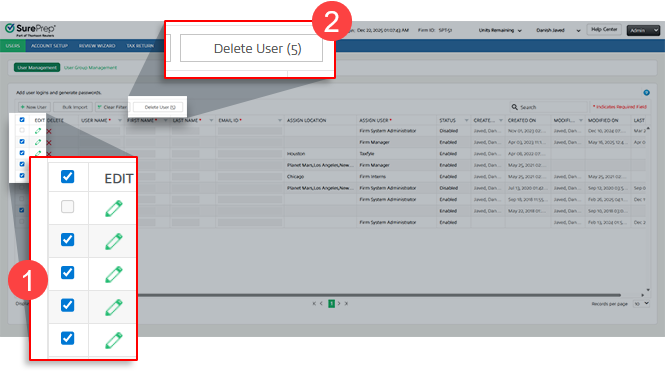
note
You can't bulk-delete users who meet either of these conditions:
- Have theFirm System Administratorrole
- Have aDisabledstatus
Manage TR Account
Firms' users using Thomson Reuters (TR) Account to sign in can now go to their TR profile to change their email address and password. Sign in, select the dropdown with your name, then select
Manage TR Account
.
note
The
Manage TR Account
link does not apply to SSO login.On the new screen, select
Security
. Select Change password
to update your password or select Change email
to update your email address.
New Lacerte Drivers (Firms using Lacerte)
A new version of Lacerte SDK Driver has been released. Firms that have installed or updated Lacerte Software to the latest version need to also install the latest version of Lacerte SDK Driver on their machine/environment to successfully create binders in FileRoom or Create Custom DRL in TaxCaddy.
To install the latest Lacerte Drivers, go to
FileRoom
, Admin
, Account Setup
, then select Installation & Updates
.
note
New drivers may have been released since authoring this article. Check that your Lacerte drivers are up to date to ensure a seamless integration with your firm.
You need to first uninstall the previous version of Lacerte Drivers before installing a new version. Install both the 32-bit and 64-bit installer. Lacerte may update new drivers in between December-February, if you are facing issues and unable to create a binder in FileRoom or TaxCaddy DRL then check if you have the most upto date driver installed
Review Wizard (1040SCAN)
We’ll cover the following new enhancements in Review Wizard (1040SCAN)
Review Wizard on Web
We're excited to announce that Review Wizard for web browsers is now available! Firms using 1040SCAN PRO can now open an
In Verification
status binder from FileRoom to open a new tab within your browser. From here, you can proceed with the verification process on any operating system with no additional software installation needed.
How can I begin using Review Wizard on Web?
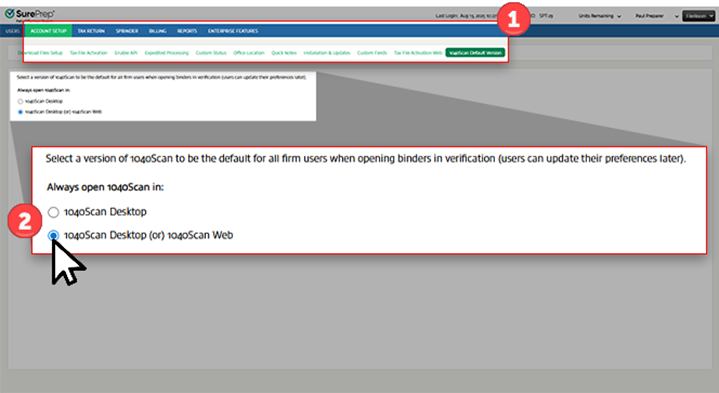
If your firm is interested in using Review Wizard on Web, navigate to
Account Admin
, ACCOUNT SETUP
, 1040Scan Default Version
, then select 1040Scan Desktop (or) 1040Scan Web
.
note
If you select  icon.
icon.
1040Scan Desktop (or) 1040Scan Web
, all firm users will be switched over to 1040SCAN (Review Wizard) Web when they select the Open
icon.SPbinder
We’ll cover the following new enhancements in SPbinder:
Leadsheet loading preference
When opening the
LEADS
tab, SPbinder now detects if your binder contains large volumes of reference information (for example, multiple Schedule K-1s, W-2s, etc.) that could slow down Leadsheet loading. If such a scenario is detected, you will see a new modal window (see screenshot below) that gives you the option to:- Load Quick: Temporarily omit specific, large data sets (such as certain Schedule K-1s, W-2, etc.) from the Leadsheet calculations for this session, resulting in faster loading.
- Load All: Load all reference data into the Leadsheet (may result in longer loading times).
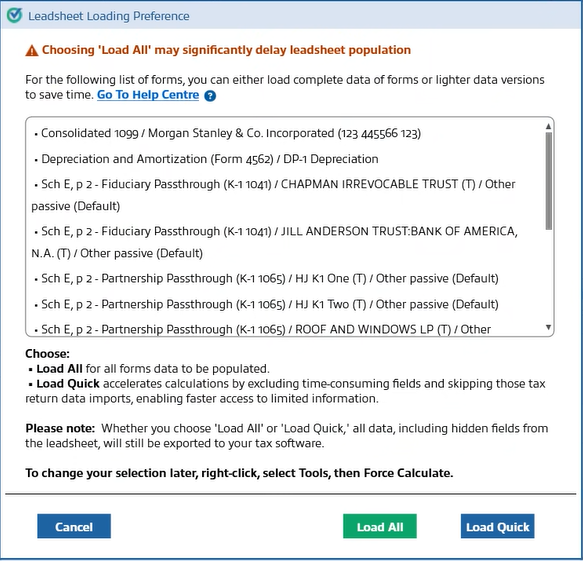
Furthermore, in Leadsheets, you can now select
Load Quick
to view which forms were omitted from calculations.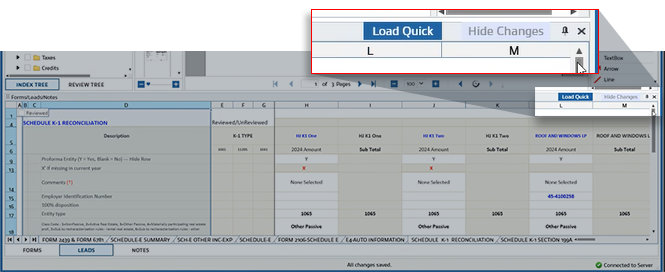
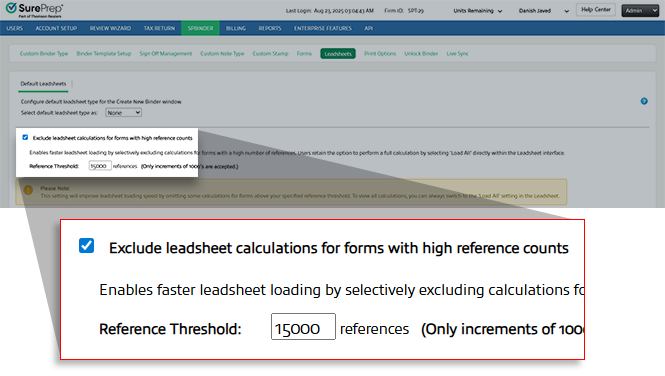
Your firm can set how much information a form needs to have before SPbinder shows a user the options for loading preference.
To modify the threshold, browse to
Admin
, SPbinder
, Leadsheets
, then select Exclude leadsheet calculations for forms with high reference counts
.
SafeSend integration with SPbinder
Tax professionals often face the challenge of manually transferring documents between collection and preparation systems—downloading files from SafeSend Gather AI, then re-uploading them to SPbinder for processing. This multi-step workflow consumes valuable time and creates unnecessary friction in your document management process. We're excited to announce a new integration between SPbinder and SafeSend Gather AI! With this new integration, tax professionals can now create binders directly from SafeSend Gather AI. This integration eliminates manual document transfers and accelerates the transition from document gathering to review and preparation.
How It Works
- SafeSend users with appropriate permissions can select "Send to SPbinder
" from the Delivered Gather dashboard. Documents are then automatically transferred to create a SPbinder, where they're organized and ready for review.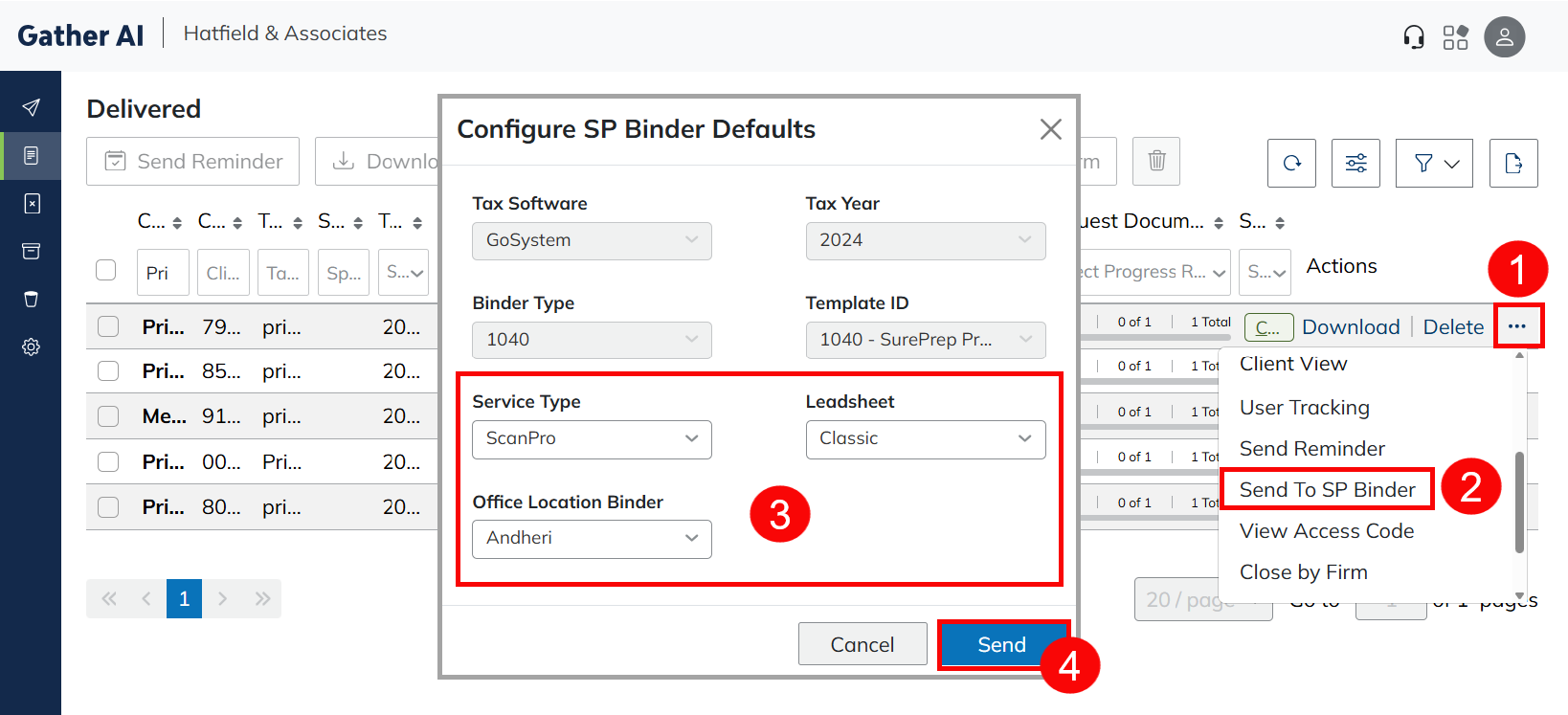
Key Benefits
- Seamless Workflow– Documents collected through SafeSend Gather AI can be sent directly to SPbinder, maintaining your efficient end-to-end process.
- Time Savings– No more downloading and re-uploading documents between systems. What was previously a multi-step process is now a single action.
- Data Integrity– Documents transfer securely with client information intact, ready for OCR processing and data extraction in SPbinder.
Requirements
- Active SurePrep account with available binder units
- Client must have SafeSend Gather AI
- Tax software connection (CCH Axcess™ or GoSystem®)
- Tax year 2024 or later documents
Tax Return PDF Extraction
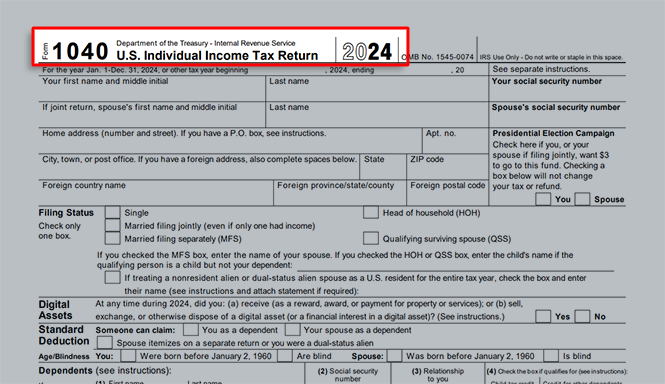
Tax Return PDF Extraction allows you to extract the proforma data from a tax return and populate it into the tax software.
Export progress
SPbinder now displays a progress bar in the
Export
window, allowing users to track the export's progress in real time.
The progress bar is available for
CCH Axcess Tax (All Leadsheets)
and GoSystem Tax RS (Classic/Simplified Leadsheets)
now, and will expand in the next release to GoSystem Tax RS (None/Without Leadsheets)
, UltraTax
, and Lacerte
.API
We’ll cover the following new enhancements in API:
Updated Service expansion
SurePrep has expanded its API capabilities to include support for:
- 1040SCAN PRO
- 1040SCAN ORGANIZE
Both services are offered exclusively for 1040 binders, and importantly, they are only available to users of the V7 API, ensuring compatibility with the latest platform standards.
Updated tax software expansion
SurePrep APIs have been enhanced to include support for UltraTax CS as an integrated tax software option, allowing firms to improve their efficiency while seamlessly connecting UltraTax CS within their SurePrep ecosystem.
New TaxCaddy and SPbinder API calls
Along with an expanded availability of supported tax software and services, we're also introducing new TaxCaddy and SPbinder API calls that can streamline your firm's tax preparation processes even further.
TaxCaddy API calls include:
- SendTaxCaddyInvitation: Allows firms to securely send onboarding invitations to tax clients, granting them access to TaxCaddy for document sharing and collaboration.
- SendTaxCaddyInvitationReminder: Enables firms to automatically send timely reminders to tax clients for pending actions, such as document uploads or task completion.
- GetDRLItems: Enables firms to securely retrieve Document Request Lists (DRLs) created for TaxCaddy clients.
- DeleteDRLItem: Allows firms to efficiently remove specific DRL items from a client’s Document Request List (DRL).
- Drl.status.updated(webhook): Provides real-time notifications whenever a document's status in the DRL is updated or removed
- GetMemberDetails: Retrieves information about members already assigned to one or more taxpayer profiles. Supports querying by single, multiple, or all tax client IDs.
- UpdateMember: Updates the assigned members for one or more tax clients, allowing bulk addition or removal of members.
SPbinder API calls include:
- GetBinderDetailsByBinderID: Direct binder status checking using Binder ID.
- ServiceUnits(lookup): Comprehensive service unit information retrieval, including the names, service type IDs, and remaining units for each service available to your firm.
note
The documentation is coming soon to Thomson Reuters' Developer Portal. However, you can contact SurePrep Support if you would like to start development now.
Review Wizard options linked to Office Location
Each office location within your firm can now configure their own Review Wizard settings for API binders, enabling you to tailor the system to meet the unique needs of different locations.
Go to
Account Admin
, REVIEW WIZARD
, then Indexing Options
to make your selection from the Select an office location to customize its Review Wizard options
dropdown.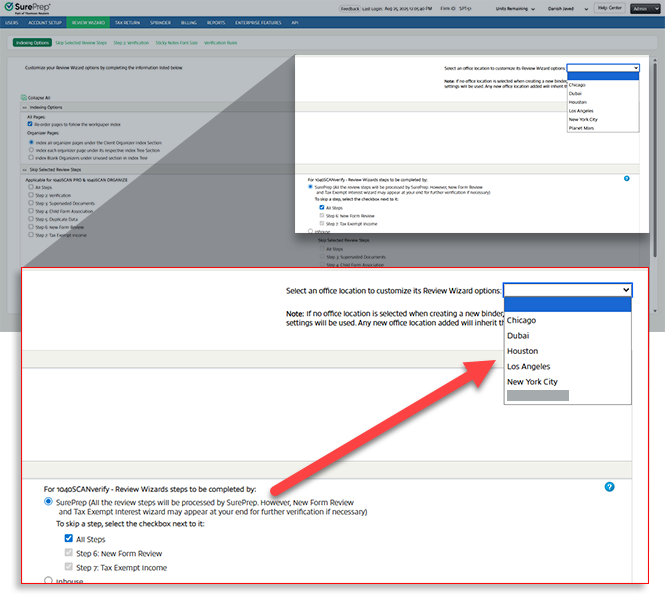
Enhanced export control
We've introduced new flexibility for exporting data after verification. You can automatically export API binders to your tax software like you do today, or, if you prefer, you can now manually control the export process. This allows you to choose the workflow that best suits your firm's operations.
To configure your export options, go to
Account Admin
, API
, Firm Defaults
, then Tax Software
and select the Automatically export the data to tax software on completion of the verification process
checkbox to enable this export option.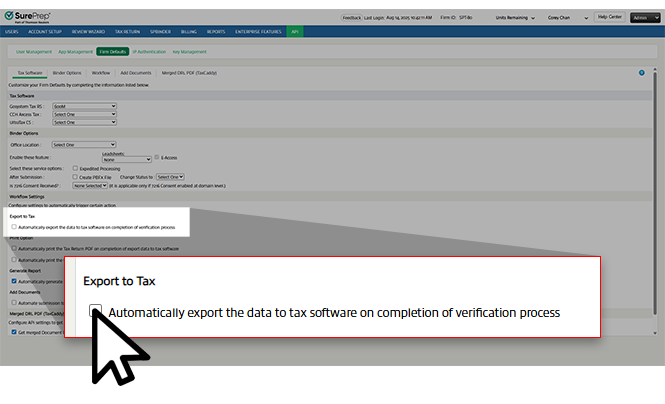
TaxCaddy
We've published a separate TaxCaddy Enhancements Recap article for you to review all of TaxCaddy's new features! Select the
TaxCaddy Enhancements Recap for 2025
article listed in the Related Content
section below.Coming soon
We've got more features releasing in the near future! SurePrep and TaxCaddy users can expect the following features arriving soon:
- FileRoom enhancements: Users can expect even more enhancements coming to FileRoom's UI, delivering improved functionality and user experience.
- New API calls: New API calls for SPbinder and TaxCaddy are on their way.
- Word document conversion: Users will soon be able to convert a Microsoft Word document into a PDF upon upload.
Related Content
-
Announcements
Format: Article
-
TaxCaddy enhancements Recap for 2025
Format:
Article

