
TaxCaddy enhancements Recap for 2025
Review TaxCaddy's enhancements from 2025
Hello everyone! Let's get you all caught up on the new TaxCaddy features we've added since the last tax season. We will cover the following new enhancements in this article:
- New API calls
- Firm Preparing option
- Smart Links return
- Changes to TaxCaddy's Pay By Check feature
- TaxCaddy content migration
Users looking for all of SurePrep's enhancements across all products can select the
SurePrep enhancements recap for 2025
article in the Related Content
section!note
Additional items will be added to the 2025 Recap article!
This article is not an exhaustive list of all the updates that were released this year. Please check out the release notes for additional information if necessary.
New API calls
We've introduced new TaxCaddy API calls that can streamline your firm's tax preparation processes even further.
New TaxCaddy API calls include:
- SendTaxCaddyInvitation: Allows firms to securely send onboarding invitations to tax clients, granting them access to TaxCaddy for document sharing and collaboration.
- SendTaxCaddyInvitationReminder: Enables firms to automatically send timely reminders to tax clients for pending actions, such as document uploads or task completion.
- GetDRLItems: Enables firms to securely retrieve Document Request Lists (DRLs) created for TaxCaddy clients.
- DeleteDRLItem: Allows firms to efficiently remove specific DRL items from a client’s Document Request List (DRL).
- Drl.status.updated(webhook): Provides real-time notifications whenever a document's status in the DRL is updated or removed
- GetMemberDetails: Retrieves information about members already assigned to one or more taxpayer profiles. Supports querying by single, multiple, or all tax client IDs.
- UpdateMember: Updates the assigned members for one or more tax clients, allowing bulk addition or removal of members.
- TaxCaddyDocumentCategories: Lets API users authorized with TaxCaddy & TaxCaddy Admin permissions to retrieve all document categories (default & custom) for a firm based on tax return type and year. This API exclusively supports 1040 return type.
- SendDocumentUploadRequest: Lets API users send multiple document upload requests for a single Tax Client ID in one API call. Supports 1040 tax return type, and provides confirmation responses with detailed status for each request.
Firm Preparing option
You will now see the new
Firm Preparing
option available for any document Upload request sent to your client! The Firm Preparing
feature should be used when a client's document request is being uploaded by your firm, rather than by the taxpayer themself. In cases like these, the taxpayer will not be required to upload the requested document, allowing them to focus on their other tasks in TaxCaddy.After selecting a document request in the
Requested Items
section of a client's profile, users will now see the Firm Preparing
option listed in the document's menu.
Once the  in the
Firm Preparing
option is selected, the document request will now be denoted with the FIRM PREPARING
badge in the Status
column to indicate your selection.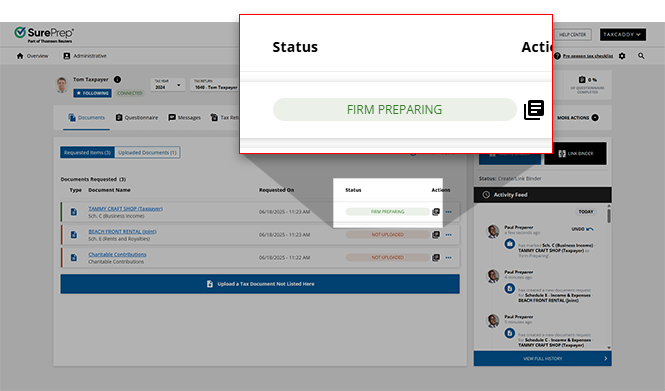
When you are ready to upload the requested document, select
Undo 'Firm Preparing'
from the document menu to undo the document's FIRM PREPARING
status. 
Smart Links have returned
We're excited to announce that Smart Links have returned to TaxCaddy! Once again, users can simplify the document collection process by establishing links between their clients' TaxCaddy accounts and their
Financial Institutions
. In addition to financial institutions, we're thrilled to share that you can also create links with Payroll
institutions to fetch their W-2 documents as well!Linking with Payroll accounts
When establishing a Smart Link with your account, you will now see the option to select
Payroll
as the institution type along with Financial Institution
. Users that select Payroll
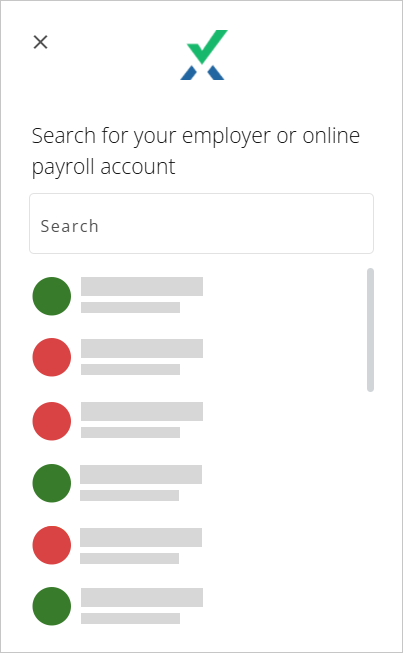
will be able to select from our expansive list of supported employers and payroll accounts!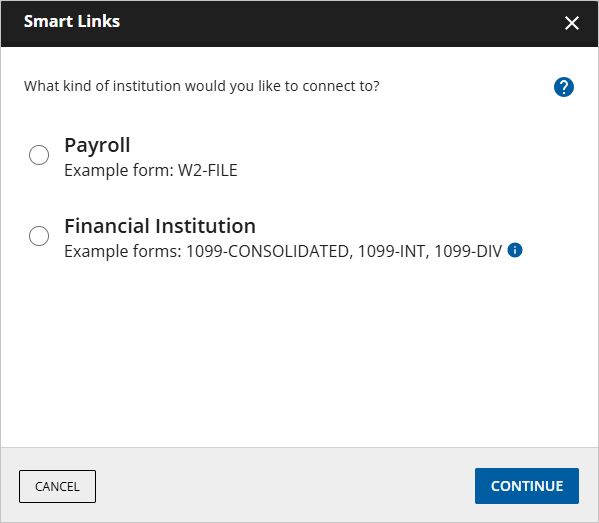
Updated list of financial institutions
Our list of supported financial institutions has been updated! Now, users who previously may not have had the ability to establish a Smart Link with their institution will be able to do so within just a few clicks.
TaxCaddy content migration
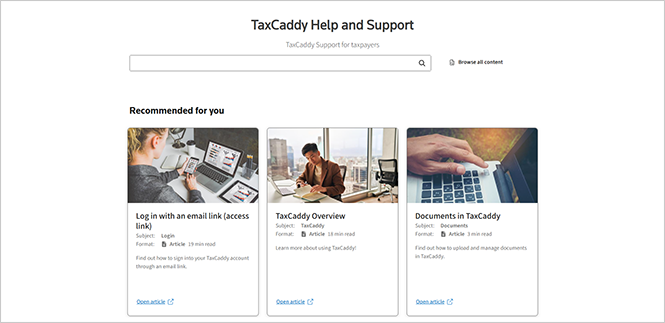
axpayer TaxCaddy help center content has been published alongside other Thomson Reuters product documentation on their Help & Support platform.
note
Starting November 17, 2025, the taxpayer's Support email address has changed to taxcaddy.support@thomsonreuters.com
Users can contact the Support team for assistance locating any documentation that they're having difficulty finding.
Navigating to taxpayer TaxCaddy content
To view the taxpayer's TaxCaddy content, select
Tax & Accounting
from the Industry
dropdown, then select TaxCaddy
from the Product
dropdown on the Help & Support
page.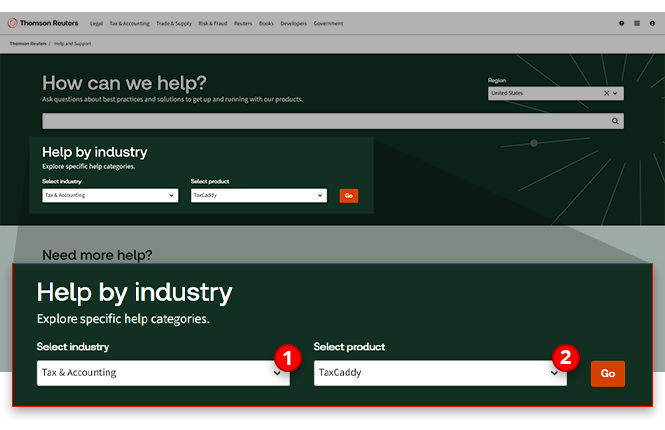
New location, same articles
Despite the new location of the documentation, the content that has helped guide your clients through their TaxCaddy experience will remain the same. In an effort to make the transition as seamless as possible, our team has worked to preserve the same content and article structure your clients have grown used to.
Changes to TaxCaddy's Pay By Check feature
We’ve updated how federal tax payments are handled in TaxCaddy to align with Executive Order 14247, which calls for payments to the federal government (“federal receipts,” including taxes) to be processed electronically
as soon as practicable
, subject to law and limited exceptions.Changes to TaxCaddy’s Pay By Check Feature
Effective September 21, 2025, the
Pay by Check
feature for federal tax payments have been removed from TaxCaddy, subject to future Treasury guidance.How to Pay Instead
- Electronic options available:
- IRS Direct Pay (bank account)
- EFTPS (Electronic Federal Tax Payment System)
- Debit/credit card processors (fees may apply)
- State and Local Tax Payments: ThePay by Checkfeature remains available for state and local tax payments at this time.
Tracking in TaxCaddy
- While thePay by Checkfeature is no longer available for federal tax payments, TaxCaddy can still be used to track an uploaded federal tax payment.
- Once a federal tax payment has been made electronically, taxpayers can utilize theMARK AS PAIDfeature to ensure that their payment records remain up-to-date.
Pending Items in TaxCaddy
- Any pending Standard federal tax payments previously sent to your clients have been updated toOnline Payment.
Coming soon
We've got more features releasing in the near future! TaxCaddy users can expect the following features arriving soon:
- Document Auto-categorization: We’ll be releasing Document Auto-categorization on TaxCaddy,designed to streamline and accelerate the process of fulfilling document requests.
Related Content
-
Announcements
Format: Article
-
SurePrep enhancements recap for 2025
Format:
Article

