
Add categories to Document Request List
TaxCaddy includes a Document Request List with predefined categories and subcategories by default. Additionally, you can add more categories to fulfill any further requirements your firm may have.
note
Only users with Administrative permissions have access to the
Document Request List
tab. Follow these steps to add a category to the Document Request List.
- Sign in to TaxCaddy.
- SelectAdministrative, selectDocument Request List.
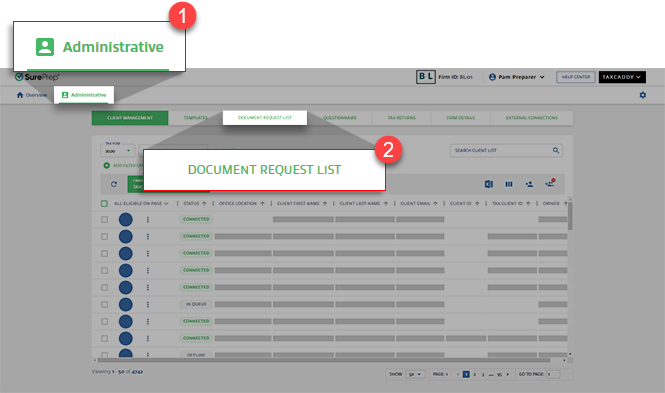
- Select theTAX YEAR.

- Select theAdd Categorybutton.
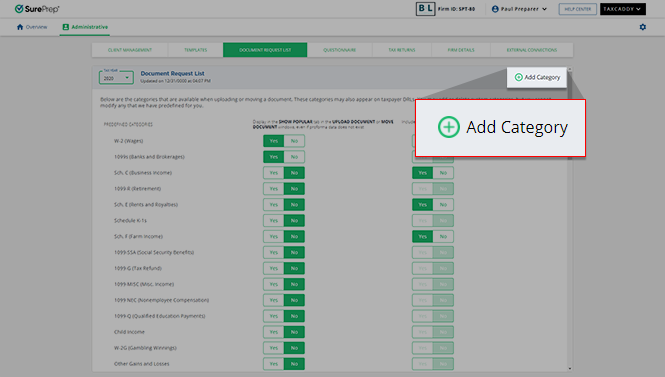
- A new row appears underAdded Categories. Enter a name for the category and then press theEnterkey to save.

- The new category is added to the bottom of the list, with the display preference set toYes, which means that it will be displayed to your clients even when no proforma data exists for the client.
 You and your clients will now be able to upload the document to the custom category.
 You will now be able to move the document to the custom category.
Related Content
-
Categories covered in DRL
Format: Article
-
Edit categories in Document Request List
Format:
Article
-
Delete categories from Document Request List
Format:
Article
-
Include or exclude categories from the shortlist displayed to clients
Format:
Article
-
Create custom DRL (import proforma data)
Format:
Article
-
Categories covered in DRL
Format:
Article
-
Edit categories in Document Request List
Format:
Article
-
Delete categories from Document Request List
Format:
Article

